20
Cursor Movements
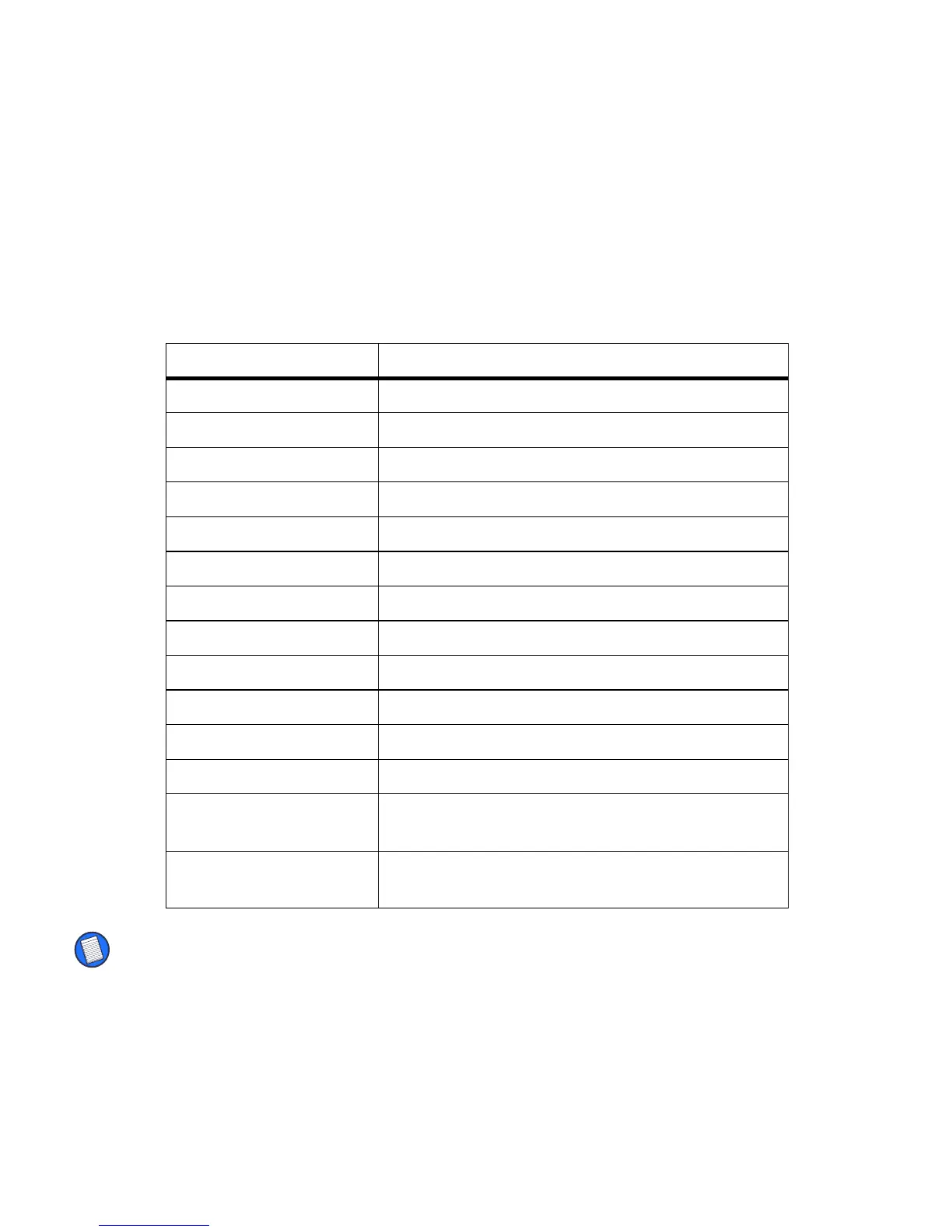
The following table lists the keyboard shortcuts for moving the cursor and
selecting text.
NOTE: For more information on changing the Tab function refer to “Changing Layout Settings”
on page 17.
Key Sequence Result
Ctrl – Left arrow Moves the cursor one word to the left.
Ctrl – Right arrow Moves the cursor one word to the right.
Ctrl – Shift – Left arrow Highlights the word to the left of the cursor.
Ctrl – Shift – Right arrow Highlights the word to the right of the cursor.
Shift – Left arrow Highlights the character to the left of the cursor.
Shift – Right arrow Highlights the character to the right of the cursor.
Shift – Up arrow Highlights one line of text above the cursor.
Shift – Down arrow Highlights one line of text below the cursor.
Cmd – Left arrow Emulates the Home key.
Cmd – Right arrow Emulates the End key.
Fn – Up arrow Emulates the Page up key.
Fn – Down arrow Emulates the Page down key.
Shift – Tab Tabs backward through fields when set to “Inserts
Tab” in Layout Settings.
Tab Tabs forward through fields when set to “Inserts Tab”
in Layout Settings.


 To Next Page