40
8.3 Nuendo - Windows and
MacOS
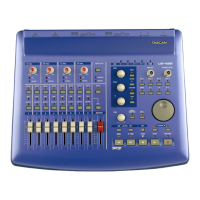
The US-428 is fully supported under
Nuendo v1.xx for Windows and Mac,
including ASIO 16 and 24 bit drivers and
control surface mapping. We suggest
you make sure you’ve got the most
current update.
Before setting up the US-428 to work
with Nuendo, please install the US-428
v3.0 drivers. (Refer to the document on
installing the US-428 drivers with either
Win98SE/ME or Win2000.) Begin the
setup procedure below with the US-428
plugged in and power on. If you have
not already done so, install Nuendo.
Installing the US-428 under Nuendo:
Open the Nuendo application
From the D
EVICES menu, choose
D
EVICE SETUP.
Select the A
DD/REMOVE tab. Select
“T
ASCAM US-428” from the device menu
and click A
DD. TASCAM US-428 should
appear on the list of loaded devices on
the left side of the window.
Highlight US-428 and click the S
ETUP
tab. Select US-428 C
ONTROL PORT for
MIDI I
NPUT and MIDI OUTPUT.
Highlight VST M
ULTITRACK. In the ASIO
D
RIVER pull-down menu, select ASIO
US-428
(16- or 24-bit) driver.
Highlight D
EFAULT MIDI PORTS. Select
US-428 MIDI 1 or 2 from the INPUT and
O
UTPUT drop-down menus.
From the D
EVICES menu, choose VST
I
NPUTS. Make sure at least one pair of
inputs for the US-428 are set to active.
If you’re running Nuendo for the first
time, you’ll need to create a new project.
Select F
ILE/NEW PROJECT, and choose
E
MPTY PROJECT.
You’ll then need to add tracks to the
project. Select the P
ROJECT/ADD
TRACKS menu. This can be done one-
at-a-time by choosing the type of track
(
AUDIO, MIDI or GROUP), or by selecting
M
ULTIPLE.
Once you’ve created Audio tracks, you
can open the VST Mixer (D
EVICES/VST
M
IXER, or press F1 on the US-428 or F3
on your computer keyboard). You
should have control of Nuendo’s faders,
mutes, transports and other basic
functions, as well as EQ and Aux sends.
The controller mapping for the US-428
within Nuendo largely follows the same
protocols as Cubase and Cubasis.
Refer to the US-428 manual for more
info on these functions. Refer to the
Nuendo manual for more info on basic
operations of the program.




 To Next Page