5-7
Operation on the Machine > Loading Paper in the Multi Purpose Tray
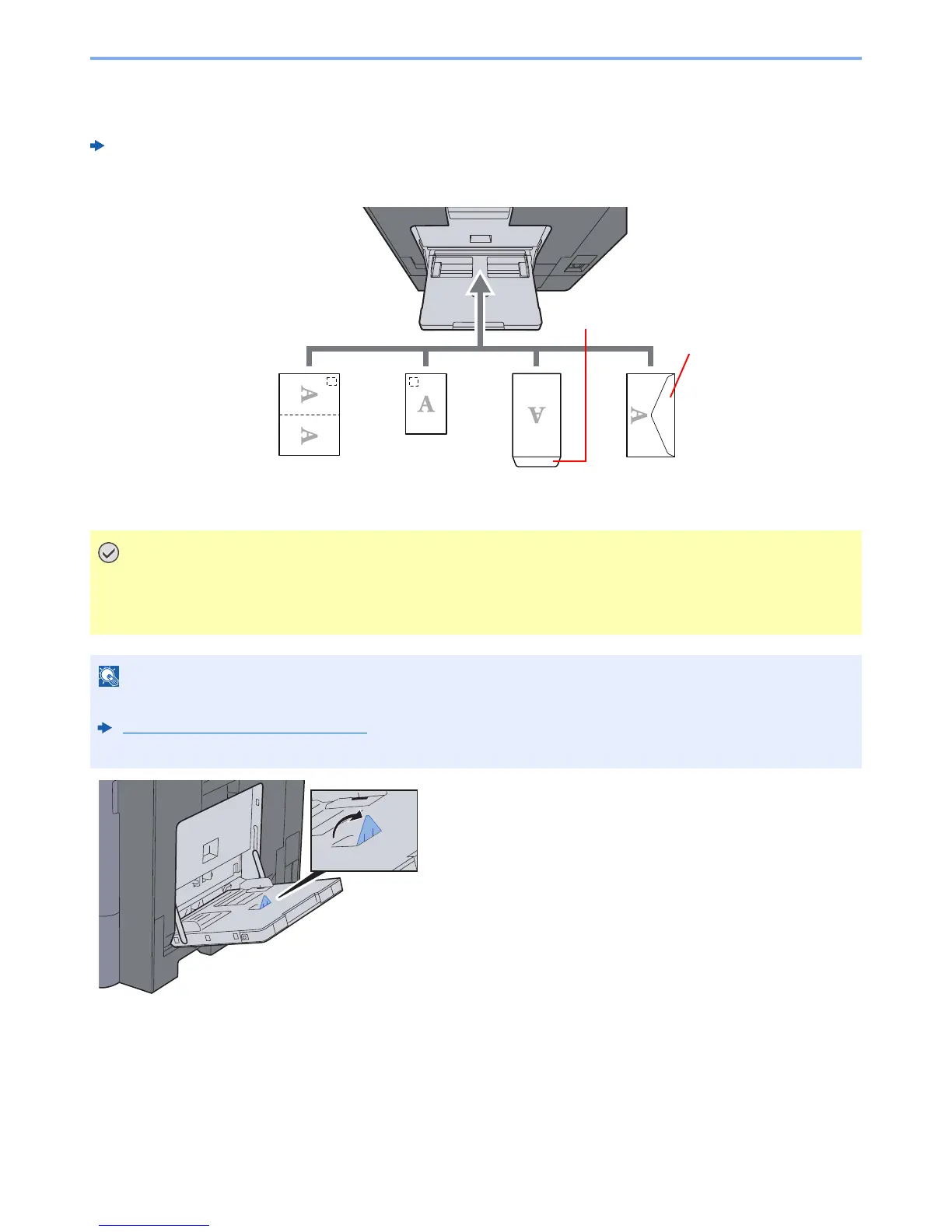
When you load envelopes or cardstock in the multi purpose tray
Load the paper with the print side facing down. For the procedure for printing, refer to the following:
Printer Driver User Guide
Example: When printing the address.
• Use unfolded Oufuku hagaki (Return postcard).
• How to load envelopes (orientation and facing) will differ depending on the type of envelope. Be sure to
load it in correctly, otherwise printing may be done in the wrong direction or on the wrong face.
• When you load envelopes in the multi purpose tray, select the envelope type by referring to the following:
Cassette/MP Tray Settings (page 8-8)
• Lift up the stopper when you load cardstock in the multi purpose tray.
Close the flap.
Open the flap
Portrait form
envelopes
Landscape form
envelopes
Hagaki
(Cardstocks)
Oufuku hagaki
(Return postcard)



 To Next Page