10-41
Troubleshooting > Clearing Paper Jams
Clearing Paper Jams
If a paper jam occurs, the touch panel will display "Paper Jam." and the machine will stop. Refer to these procedures to
remove the jammed paper.
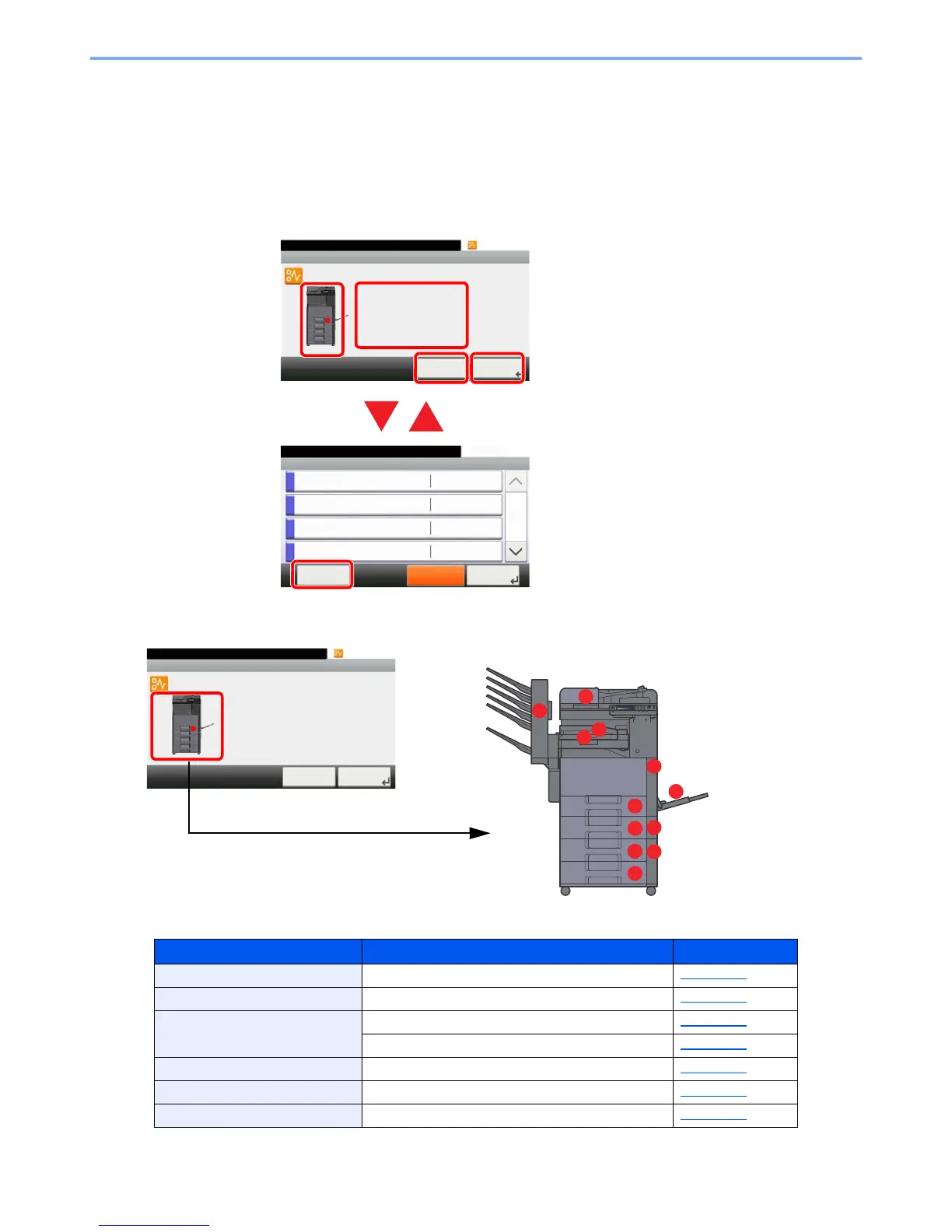
Jam Location Indicators
If a paper jam occurs, the location of the jam will be displayed on the touch panel as well as the clearing instructions.
1 Shows the location of a paper jam.
2 Shows the previous step.
3 Shows the next step.
4 Shows the removal procedure.
5 Selecting [Status/Job Cancel] key
displays [Hold]. Selecting [Hold]
displays status screen, and the status
of jobs can be checked.
6Select [Display Error] to return to the
paper jam guidance.
Paper Jam Location Indicator
Paper Jam Location Reference Page
A Cassette 1 page 10-43
B Cassette 2 page 10-43
C Cassette 3 (500-sheet x 2) page 10-44
Cassette 3 (2000-sheet x 1) page 10-46
D Cassette 4 (500-sheet x 2) page 10-48
E Multi Purpose Tray page 10-50
F Right Cover 1 page 10-51



 To Next Page