15
Step 2: Cable connections
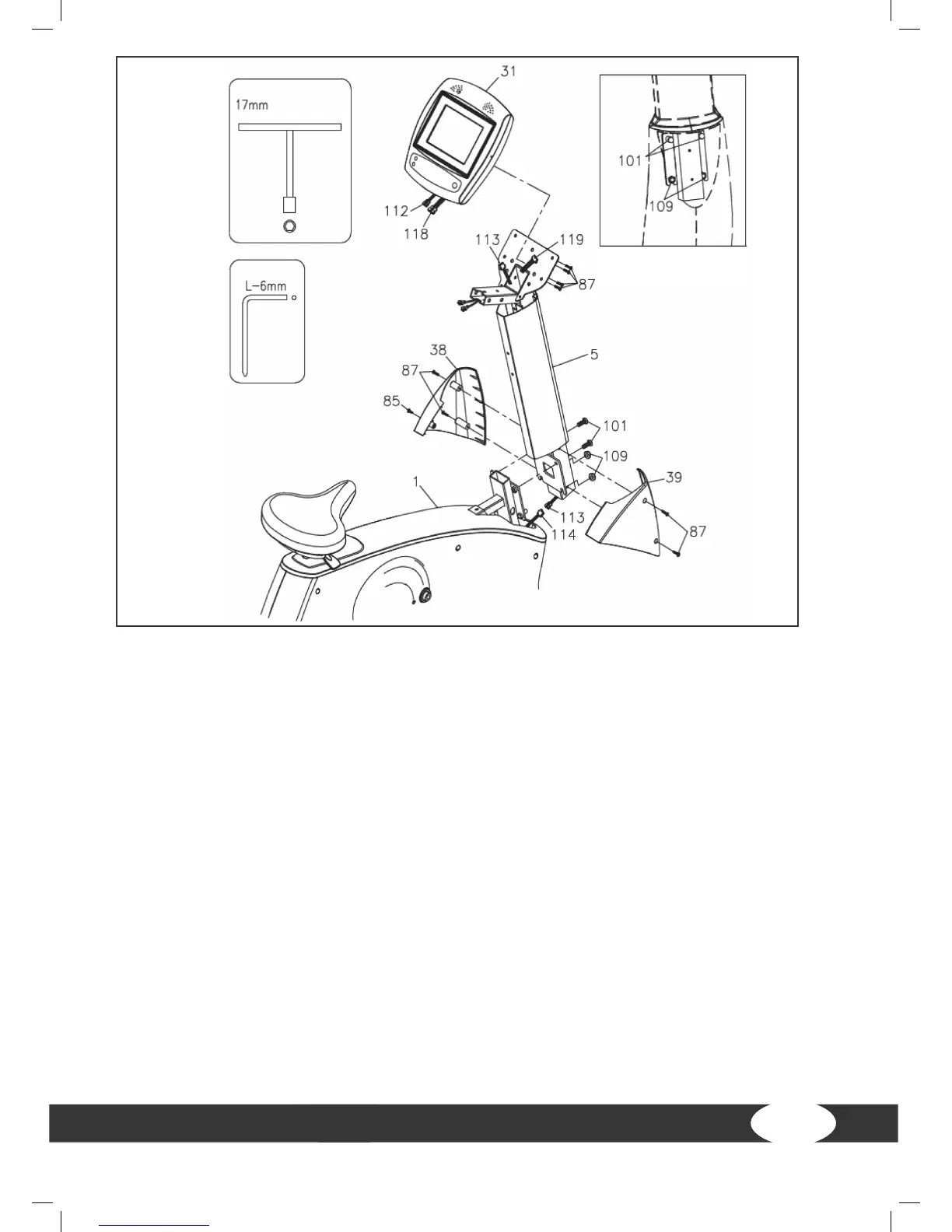
a) Connect the middle connection cable (113) to the lower connection cable (114). Make
sure that the cables are not stuck.
Step 3: Assemble console mast
a) Check if two nylon nuts (M10xp1.5)(109) were pre-mounted on the frame. See g. 1.
b) Insert the console mast (5) in the main frame (1) and mount it with two screws
(M10xp1.5x25mm) (101). Then tighten the nuts (M10xp1.5)(109).
Step 4: Assemble console mast covers
a) Mount the right console mast cover (39) on the console mast (5) with two screws
(M5xp0.8x15mm)(87).
b) Mount the left console mast cover (38) on the console mast (5) with two screws
(M5xp0.8x15mm)(87) as well as another screw (M4x20mm)(85).
Figure 1


 To Next Page