
 Need help?
Do you have a question about the tbs electronics TBS6508 and is the answer not in the manual?
Lists items included in the TBS6508 package.
Specifies the necessary hardware and OS for the TBS6508 tuner.
Details the various uses and functions of the TBS6508 tuner.
Step-by-step guide on physically installing the TBS6508 card into a computer's PCI-E slot.
Instructions for correctly connecting the TV signal cable to the tuner card.
Procedure for installing the necessary drivers for the TBS6508 on Windows operating systems.
Guide on using the tool to switch tuner modes for different TV standards.
Instructions for downloading and setting up DVBDream player software.
Steps to configure the tuner for DVB-S2X/S2/S satellite signals, including LNB and scanning.
Steps to configure the tuner for DVB-T2/T terrestrial signals.
Steps to configure the tuner for DVB-C2/C cable signals.
Instructions for installing the TBS6508 card into a PC running Linux.
Guide for downloading and installing the TBS6508 Linux driver.
Method to check if the Linux driver for TBS6508 has been successfully loaded.
Overview of compatible software for streaming TV signals like DVBLast, TVheadend, Astra Cesbo.
Explains DISEQC commands for locking satellite signals with TBS6508.
Instructions and commands for using DVBLast for signal scanning.
Guide on configuring and using TVheadend with the TBS6508.
Steps for installing and configuring Astra Cesbo for TV signal processing.
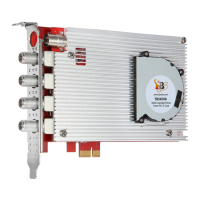
The TBS6508 is a versatile Octa PCI Express TV tuner card designed to support a wide array of digital TV standards, including DVB-S2X/S2/S/T2/T/C2/C/ISDB-T. This multi-standard capability makes it significantly easier for users to switch between different digital TV signals without needing multiple dedicated tuners. The card features four independent RF inputs, allowing for flexible signal reception.
One of the key usage features of the TBS6508 is its advanced satellite reception capabilities. Beyond supporting standard DVB-S2X/DVB-S2/S QPSK and 8PSK modulation schemes, which are common in most satellite receivers, the card also supports more specialized modes such as CCM, VCM, 16APSK, and 32APSK Stream Mode. These advanced modes are often not supported by typical satellite receiving devices, making the TBS6508 a powerful tool for capturing special streams when used with dedicated TBS tools.
The device is compatible with various operating systems, including Windows XP, Vista, 7, 8, 10, and Linux, ensuring broad usability across different computing environments. For installation, it requires an available PCI Express slot (x1, x4, x8, or x16). The primary applications of the TBS6508 include data receiving, IPTV streaming, media monitoring, and digital content distribution, highlighting its utility in both personal and professional settings.
Hardware installation involves turning off the computer, removing the cover, and inserting the card into an available PCI-E slot. It's crucial to ensure the card is firmly and completely seated and secured with a screw. A critical maintenance feature emphasized in the manual is the caution against touching internal PC components, especially the CPU and VGA chip, due to the risk of burns from high temperatures. Users are also advised to refer to their PC and peripheral equipment manuals for safe handling.
Connecting the TV signal cable to the tuner card is straightforward, but users are warned to ensure correct connection to prevent damage to the antenna device. The card's input configuration is detailed, showing how different LNB adapters correspond to specific tuner groups (e.g., LNB0 adapter for tuners 0 and 1, LNB1 for tuners 2 and 3, etc.). A specific maintenance note for satellite reception is that for a single LNB receiving signals from one transponder, the two adapters within a group (e.g., 0 and 1 for LNB0) must maintain the same settings for Low/High band and vertical/horizontal levels (e.g., HH HH, VL VL, HL HL, or VH VH).
For Windows users, driver installation is a key step. The manual directs users to download the TBS6508 Windows driver from the official TBS websites. The installation process is guided through a setup wizard, and successful installation can be verified via the Device Manager, where "TBS6508 Octuple BDA Tuners" should be listed under "Sound, video and game controllers." Troubleshooting tips are provided for cases where the card isn't detected, suggesting changing the PCIe slot or cleaning the golden finger with an eraser. A strong warning is given against inserting or pulling out the card while the computer is working, as this can damage the tuner card.
A unique maintenance and usage feature is the TBS6508 Change Mode Tool. Before using the card with DVB applications, users must download and use this tool to select the appropriate tuner mode (e.g., DVB-S/S2, DVB-T/T2, DVB-C, etc.). This flexibility allows the card to adapt to different signal types as needed.
For enjoying satellite TV or recording video on a PC, the manual outlines the installation of player software like DVBDream. The process involves downloading and installing DVBDream, then using the Change Mode Tool to set the tuner mode to "DVB-S/S2." After a brief device initialization period, DVBDream can be opened. Setting LNB parameters within DVBDream is crucial, involving selecting the correct satellite, LNB type, and frequency parameters. If Diseqc is used for multiple LNBs, users must select the corresponding Diseqc version.
Channel scanning can be performed either automatically or manually. Auto scan is recommended when specific frequency information is unknown, while manual scan is used when frequency and bandwidth details are available. The manual provides clear steps for both, including how to save scanned channels. Icons within the player software indicate whether channels are encrypted, free, or only provide sound.
Similar detailed instructions are provided for setting up DVB-T2/T and DVB-C2/C modes, emphasizing the use of the Change Mode Tool to switch modes before scanning channels.
For Linux users, the installation process begins with verifying that the card is detected by the motherboard using the lspci command. The Linux driver can be downloaded from a specified GitHub link, and installation involves cloning the media build repository and installing the firmware. Users are advised to restart the PC after installation. Troubleshooting common installation errors is supported by a wiki page.
Verifying successful driver loading in Linux involves checking for adapter entries (adapter0-adapter7) in /dev/dvb. If the driver is not loaded or the installation is unsuccessful, soft-linking under DVB-S2/S mode might be necessary for some streaming software to function correctly.
The TBS6508 is compatible with various streaming software in Linux, including DVBlast, Astra Cesbo, Tvheadend, and Mumudvb, each offering different output protocols (RTP/UDP, HTTP/HLS, HTTP). The manual provides command-line examples for scanning signals using DVBlast for DVB-S2/S, DVBT/T2, DVB-C2/C, ISDBT, and QAM_B modes, specifying parameters like frequency, symbol rate, LNB voltage, bandwidth, and adapter.
For Astra Cesbo, detailed installation steps and interface settings are referenced on the Astra website, including commands for downloading, granting authority, copying files, creating configuration directories, and running Astra. A critical maintenance feature for Astra Cesbo is the need to link the software to the adapter, specifically selecting "frontend 1" for satellite signals.
The manual also clarifies that when scanning DVBS/S2 signals, users should pick "frontend 1," while "frontend 0" is used for DVBT/T2, DVBC, ISDBT, and other modes, ensuring correct signal processing for each adapter. This comprehensive guide covers the full lifecycle of using the TBS6508, from initial hardware installation and driver setup to advanced configuration for various digital TV standards and streaming applications, with a strong emphasis on proper usage and troubleshooting.
 General
| Input Range | 950~2150 MHz |
|---|---|
| Operating System Support | Windows, Linux |
| Input | RF |
| Output | Digital |
| Interface | PCI Express |
| Supported Standards | DVB-S2X/S2/S |
| Power Consumption | 15W |
| Channels | 8 |
| Connector | F-connector |

 To Next Page