MFC Kit Instructions 5.0 PQconnect Option
33
PCB Calibration Process
If the user needs to calibrate the PCB than they will need to follow the steps below. Note: an RS485
to USB converter, a windows computer, and PQvision will be needed for the calibration. Before
energizing the filter, the user should connect the RS485 to USB converter to the PCB.
Power will need to be energized to the PCB for the calibration process.
• Step 1. Energize unit
• Step 2: Open PQvision desktop application
• Step 3: Connect to the device by selecting the appropriate “COM port”
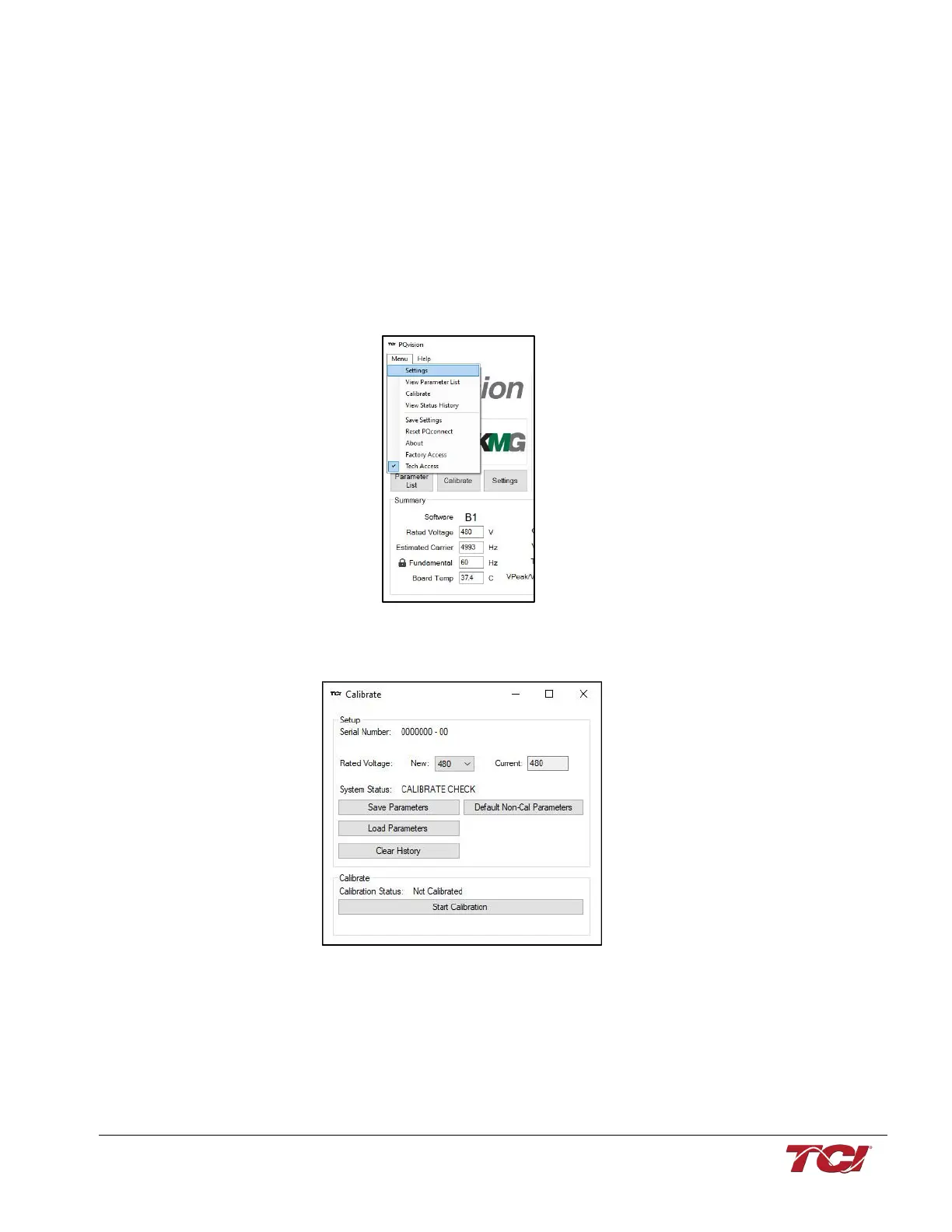
• Step 4. Go to “Menu” and select “Tech access”
Figure 17: PQvision Main Menu
• Step 5: Go to “Menu” and select “Calibrate”
Figure 18: Calibration Screen
• Step 6: Select “Default Non-Cal Parameters”
• Step 7: Select “Start Calibration”
o Note: Calibration will take about 1-2 minutes
• Step 8: After the calibration is complete, select “Save Parameters”



 To Next Page