EasyManua.ls Logo

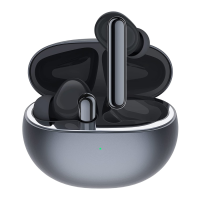
TCL MOVEAUDIO Neo - User Manual

TCL MOVEAUDIO Neo
24 pages
Print Icon
To Next Page IconTo Next Page
Loading...
User Manual
Model: TW241V1.0

Questions and Answers

  • M
    Margaret LeeAug 20, 2025
    What to do if I can't hear audio from one of my TCL Headphones?
    • S
      Sandra BennettAug 20, 2025
      If you can't hear audio from one of your TCL earbuds, place both earbuds in the charging case, ensuring that both the earbuds and the case are sufficiently charged. Then, take the earbuds out and try again. If the problem continues, consider resetting the earbuds.
  • J
    Jennifer GlennAug 22, 2025
    What to do if I can't pair my TCL Headphones?
    • C
      corywatsonAug 22, 2025
      If you can't pair your TCL earbuds with your device, make sure you have turned off the Bluetooth function of all previously paired devices. Remove your earbuds from the pairing list on your device. Then, follow the pairing steps in the user manual.
  • M
    Melanie DavisAug 25, 2025
    Why can't I find my TCL Headphones on the pairing list?
    • J
      Jennifer BeckAug 25, 2025
      If you can't find your TCL earbuds on your device's pairing list for the first-time connection, ensure your earbuds are not connected to another device. Check if the earbuds are in pairing mode (the LED flashes blue). Turn off and then on the Bluetooth function of your device. Enable the searching function on your device again.
  • A
    Alex Jenkins PhDAug 26, 2025
    Why is music playing through the device speaker instead of my TCL Headphones?
    • B
      Brittany RodriguezAug 26, 2025
      If the music plays through your device speaker instead of your TCL earbuds, first, check whether your earbuds are properly connected to your device. Also, verify that you have selected the earbuds as the default playback device in your device's settings.
  • J
    Jeffrey MillerAug 27, 2025
    Why is the audio quality poor with crackling noise on my TCL Headphones?
    • D
      david36Aug 28, 2025
      To fix poor audio quality and crackling noise in your TCL earbuds, first, ensure that your connected device is nearby and there are no obstructions causing wireless interference between the earbuds and your device. Try reconnecting the earbuds. Also, verify that your device supports both hands-free profile (HFP) and advanced audio distribution profile (A2DP). If you are using game apps with chatting function, quit or restart the app to avoid forcing the earbuds into HFP mode, which has poorer audio quality than A2DP mode.
  • D
    dale72Aug 29, 2025
    How to fix TCL Headphones that won't turn on?
    • P
      phillipskyleAug 30, 2025
      If you can't turn on your TCL earbuds, it's likely that they don't have enough battery power. Charge your earbuds to resolve this issue.
  • S
    Stephen BanksAug 31, 2025
    How to turn on noise canceling on TCL Headphones?
    • S
      Scott MorenoAug 31, 2025
      To enable or disable the noise cancellation feature on your TCL earbuds, press and hold both earbuds simultaneously for 3 seconds. You will hear a prompt tone indicating the switch between Noise cancellation, Transparency, and OFF modes.
  • A
    Aaron FisherSep 2, 2025
    Why is the noise canceling not working on my TCL Headphones?
    • M
      matthew97Sep 2, 2025
      If the noise canceling function on your TCL earbuds isn't working well, enable it by pressing and holding both earbuds simultaneously for 3 seconds. Ensure the ear tips fit properly and create a good seal with your ear canal. Clean the sound openings (microphone and speaker) with a dry, soft cloth to remove any debris.
  • M
    michelestaffordSep 4, 2025
    Why can't I hear the caller when using my TCL Headphones?
    • E
      estradajosephSep 4, 2025
      If, during a call using your TCL earbuds, you can't hear the caller's voice, some smartphones may default to receiving calls on the phone instead of the earbuds. You may need to manually switch the call to your earbuds through your smartphone's settings. Additionally, increase the volume on your earbuds and adjust the volume on your connected Bluetooth device.
  • S
    ssalinasSep 6, 2025
    Why can't I control music functions with my TCL Headphones?
    • C
      Corey SnowSep 6, 2025
      If you are having trouble controlling music functions on your device with your TCL earbuds, ensure that the Bluetooth audio source supports audio video remote control profile (AVRCP). Some music or video player apps may not support AVRCP. Test with other apps and, if the issue persists, try reconnecting the earbuds.

Summary

Read this first

Chapter 1. Welcome

Whats in the box

Lists the included items in the package.

Overview

Provides a general overview of the product's components.

Chapter 2. Get started

First Time Using - Activation

Guide on how to activate the earbuds for the first time.

Replace ear tips

Instructions for replacing the ear tips for a better fit.

Wear the earphones

Steps on how to properly wear the earphones for optimal comfort and sound.

Chapter 3. Charging

Charging case

Instructions on how to charge the charging case using a USB cable.

Earbuds

Instructions on how to charge the earbuds within the charging case.

Check the battery status

How to check the battery level of the charging case using LED indicators.

Chapter 4. Bluetooth

Connect with a Bluetooth device for the first time

Step-by-step guide to pair the earbuds with a new Bluetooth device.

Disconnect from a Bluetooth device

Methods to disconnect the earbuds from a connected Bluetooth device.

Reconnect with your devices

How the earbuds automatically reconnect to previously paired devices.

Restart the earbuds

Steps to restart the earbuds to resolve connection or pairing issues.

Reset the earbuds

Instructions to reset the earbuds to factory settings to fix persistent problems.

Chapter 5. Use your earbuds

Music mode

Controls for music playback, including play/pause, next/previous song, and EQ modes.

Call mode

How to manage phone calls, including answering, ending, and rejecting calls.

Low latency mode

How to enable low latency mode for synchronized audio and visuals.

Voice assistant

Instructions on activating Siri or Google Assistant using the earbuds.

Active Noise Cancellation

How to switch between ANC, Transparency, and OFF modes for noise control.

Important safety information

Important handling information

Guidelines for handling the earbuds and charging case carefully to prevent damage.

Hearing loss

Warning about listening at high volumes and potential hearing damage.

Medical device interference

Information on potential interference with medical devices due to magnets.

Choking hazard

Warning about the choking hazard for small children.

Charging

Battery

Operating temperature

Regulatory compliance information

Radio Equipment Directive Declaration of Conformity

EU declaration of conformity for radio equipment.

FCC compliance statement

FCC rules and statements regarding device compliance and interference.

FCC Radiation Exposure Statement

Statement on FCC radiation exposure limits for the transmitter.

Canadian compliance statement

Compliance statements for Canada, including RSS standards.

California battery charger efficiency

Information on California's battery charger efficiency standards.

Disposal and recycling information

Guidelines for proper disposal and recycling of the product.

Troubleshooting

General problems

Common issues and solutions related to general device operation.

Connection problems

Solutions for issues encountered when pairing or connecting the earbuds.

Audio problems

Solutions for common audio playback and quality issues.

Function problems

Trademarks

TCL MOVEAUDIO Neo Specifications

General IconGeneral
TypeIn-ear
ConnectivityWireless
Bluetooth Version5.0
Driver Size6 mm
Frequency Response20 Hz - 20 kHz
Sensitivity95 dB
Battery LifeUp to 5 hours (earbuds), Up to 20 hours (with charging case)
Charging Time1.5 hours
Water ResistanceIPX4

Related product manuals