2. PRINTER SETUP
ENGLISH VERSION
2- 8
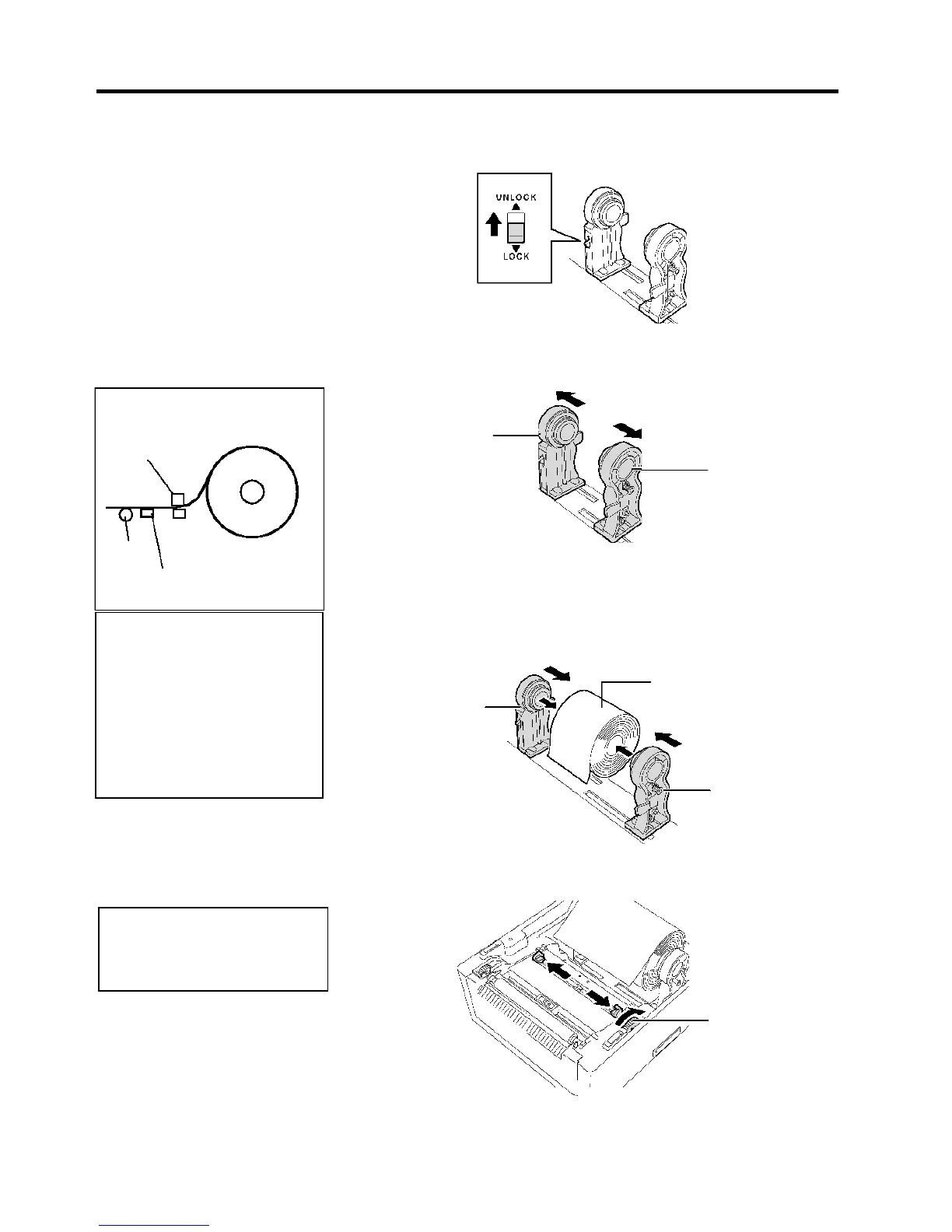
2.7 Loading the Media
NOTES:
1.
Refer to the Supply Path Label
attached inside of the Top
Cover.
2.
Make sure that the print side
faces up.
3.
Cut the leading edge of the
media straight with scissors.
Media
4.
Place a media roll between the Media Holders so that the media is fed
with the print side facing up. Fit the projection of the Media Holders
into the core. Make sure that the projection of the both Media Holders
is engaged with the core firmly.
Media Holder
Media Holder
Media Holder
Lock Switch
2.
Slide the Media Holder Lock Switch to the Unlock (▲) side to
release the Media Holders.
5.
Turn the Media Guide Adjustment Dial in the arrow indicating
direction to move the Media Guides outward.
NOTE
:
o not forcibly move the Media
Guides by hand, as doing so may
break the Media Guides.
Media Guide


 To Next Page