2. PRINTER SETUP
ENGLISH VERSION
2-11
2.7 Loading the Media
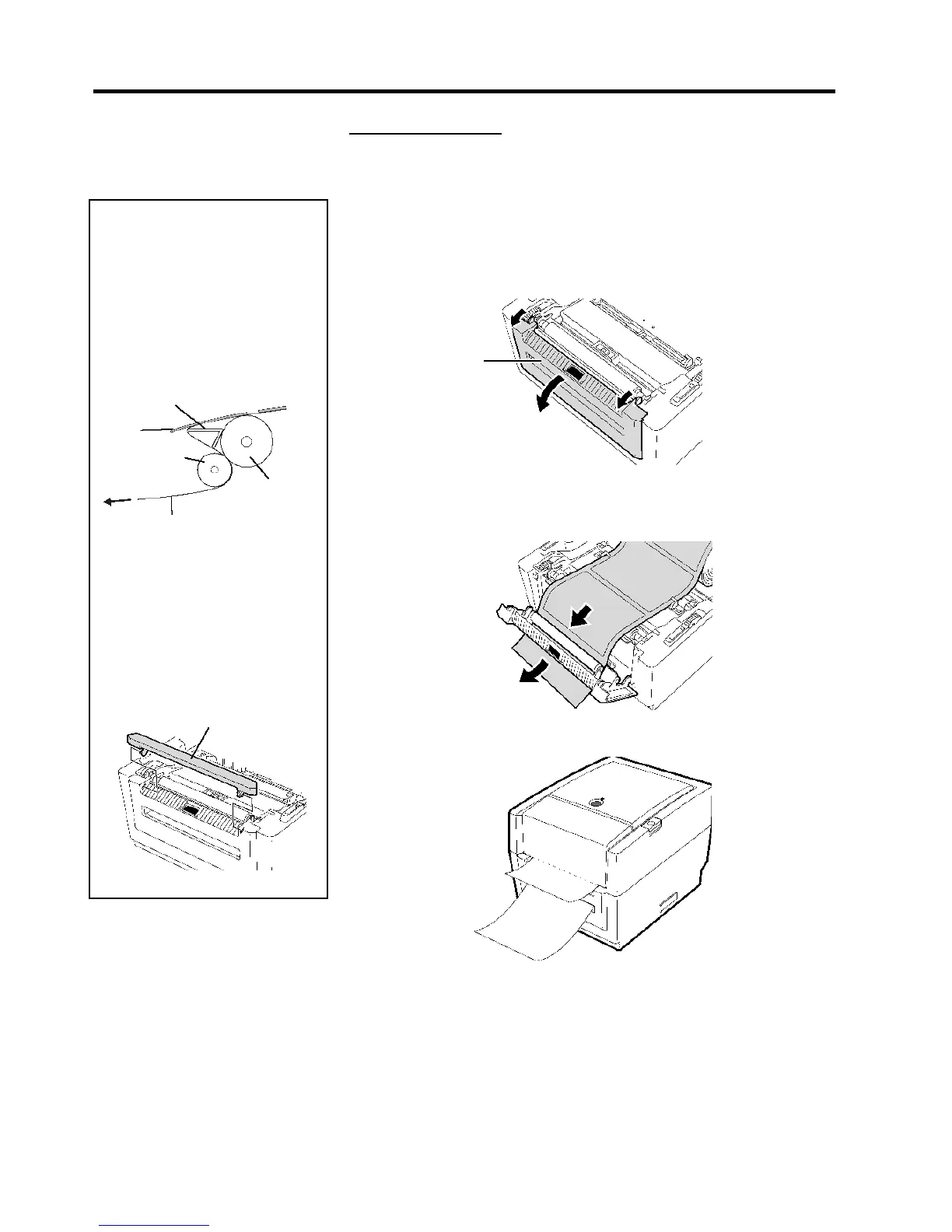
Strip mode (Option):
When issued in the strip mode, labels are automatically removed from the
backing paper each time a label is printed.
2.7 Loading the Media
(Cont.)
•
How to set the media
Stri
Plate
NOTES
:
1.
When issuing labels without
removing them from the backing
paper, it is not necessary to pass
the media through the Strip Block.
2.
When the media is correctly set,
the backing paper is supposed to
be pinched by the Platen and the
Strip Feed Roller as shown below.
When issuing labels in the strip mode, set the label in the following
procedure:
1.
Load the media as described on the previous pages.
2.
Open the Strip Block by pulling it out.
Strip Block
Label
Stri
Platen
3.
Remove enough labels from the leading edge of the media to leave 20
cm of backing paper free, and insert the top edge of the backing paper
into the media slot in the Strip Block.
3.
If the peel-off issue is performed
under intense light, the strip sensor
may not correctly detect the
presence of a printed label on the
strip shaft. In this case, reduce the
intensity of the light or fit the
Shade Plate to the Strip Block as
shown in the figure.
Shade Plate
Backing Paper
4.
Close the Strip Block and Top Cover.


 To Next Page