EasyManua.ls Logo

Teac A-6300 - Page 12

Teac A-6300
112 pages
Print Icon
To Next Page IconTo Next Page
To Previous Page IconTo Previous Page
Loading...
REMOVAL
OF
TENSION
ARMS
LEFT
AND
RIGHT
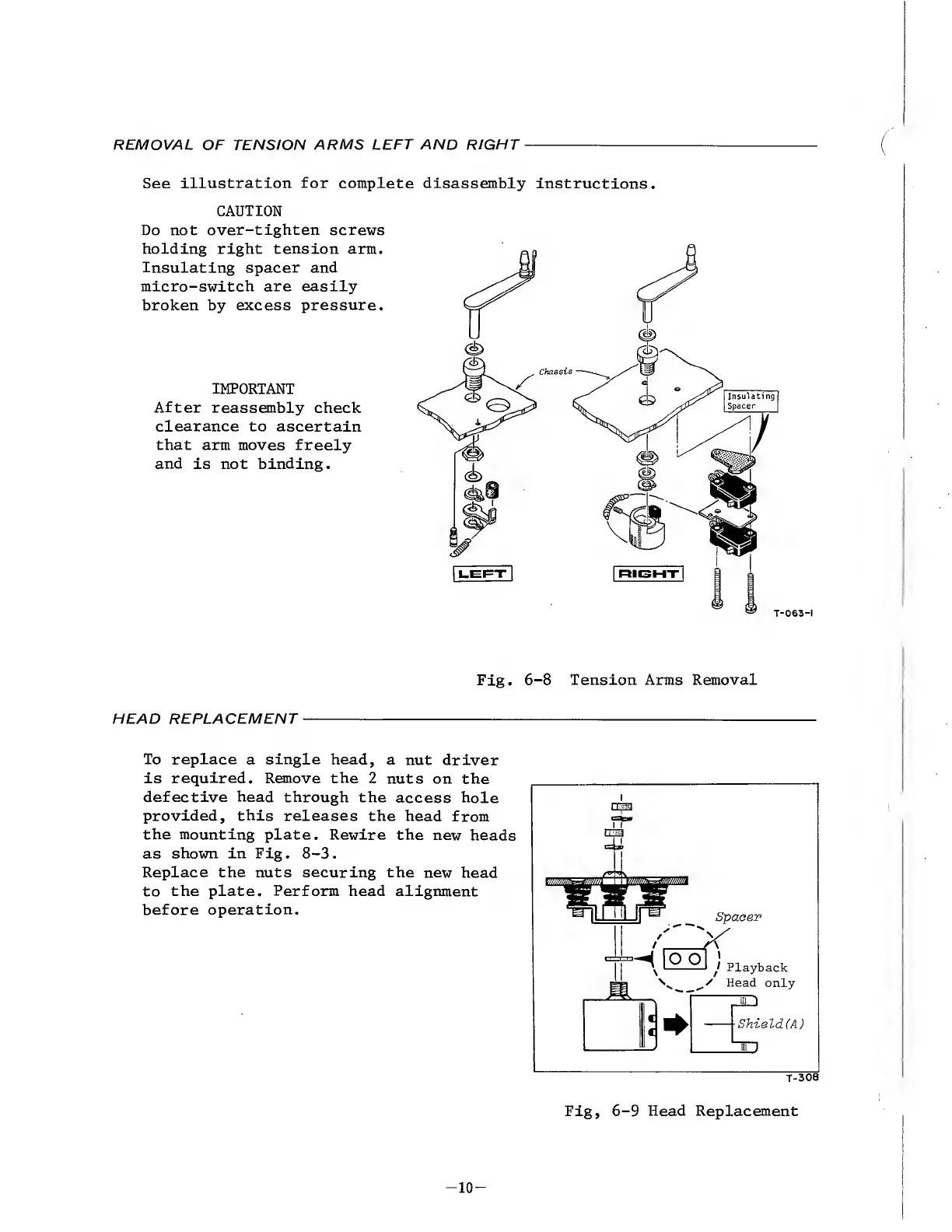
See
illustration
for
complete
disassembly
instructions.
CAUTION
Do
not
over-tighten
screws
holding
right
tension
arm.
Insulating
spacer
and
micro-switch
are
easily
broken
by
excess
pressure.
IMPORTANT
After
reassembly
check
clearance
to
ascertain
that
arm
moves
freely
and
is
not
binding.
Fig.
6-8
Tension
Arms
Removal
HEAD
REPLACEMENT
To
replace
a
single
head,
a
nut
driver
is
required.
Remove
the
2
nuts
on
the
defective
head
through
the
access
hole
provided,
this
releases
the
head
from
the
mounting
plate.
Rewire
the
new
heads
as
shown
in
Fig.
8-3.
Replace
the
nuts
securing
the
new
head
to
the
plate.
Perform
head
alignment
before
operation.
Shield(A)
3D
T-308
Fig,
6-9
Head
Replacement
-
1
0
-

Other manuals for Teac A-6300

Related product manuals