EasyManua.ls Logo

Teac A-6300 - Page 37

Teac A-6300
112 pages
Print Icon
To Next Page IconTo Next Page
To Previous Page IconTo Previous Page
Loading...
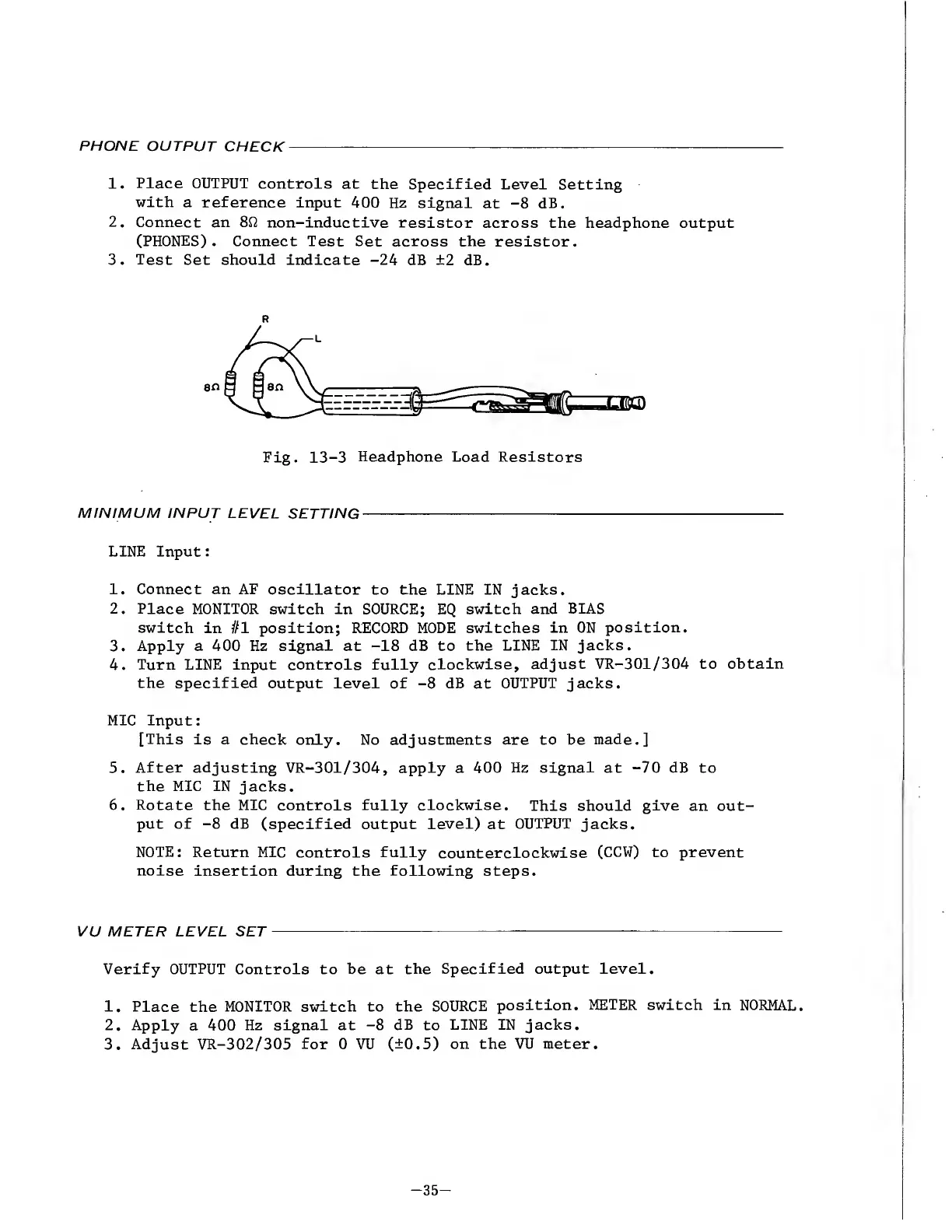
PHONE
OUTPUT
CHECK
1.
Place
OUTPUT
controls
at
the
Specified
Level
Setting
with
a
reference
input
400
Hz
signal
at
-8
dB.
2.
Connect
an
8ft
non-inductive
resistor
across
the
headphone
output
(PHONES).
Connect
Test
Set
across
the
resistor.
3.
Test
Set
should
indicate
-24
dB
±2
dB.
R
Fig.
13-3
Headphone
Load
Resistors
MINIMUM
INPUT
LEVEL
SETTING
-
LINE
Input:
1.
Connect
an
AF
oscillator
to
the
LINE
IN
jacks.
2.
Place
MONITOR
switch
in
SOURCE;
EQ
switch
and
BIAS
switch
in
#1
position;
RECORD
MODE
switches
in
ON
position.
3.
Apply
a
400
Hz
signal
at
-18
dB
to
the
LINE
IN
jacks.
4.
Turn
LINE
input
controls
fully
clockwise,
adjust
VR-301/304
to
obtain
the
specified
output
level
of
-8
dB
at
OUTPUT
jacks.
MIC
Input:
[This
is
a
check
only.
No
adjustments
are
to
be
made.]
5.
After
adjusting
VR-301/304,
apply
a
400
Hz
signal
at
-70
dB
to
the
MIC
IN
jacks.
6.
Rotate
the
MIC
controls
fully
clockwise.
This
should
give
an
out¬
put
of
-8
dB
(specified
output
level)
at
OUTPUT
jacks.
NOTE:
Return
MIC
controls
fully
counterclockwise
(CCW)
to
prevent
noise
insertion
during
the
following
steps.
VU
METER
LEVEL
SET
-
Verify
OUTPUT
Controls
to
be
at
the
Specified
output
level.
1.
Place
the
MONITOR
switch
to
the
SOURCE
position.
METER
switch
in
NORMAL.
2.
Apply
a
400
Hz
signal
at
-8
dB
to
LINE
IN
jacks.
3.
Adjust
VR-302/305
for
0
VU
(±0.5)
on
the
VU
meter.
-
35
-

Other manuals for Teac A-6300

Related product manuals