EasyManua.ls Logo

Teac A-6300 - Page 38

Teac A-6300
112 pages
Print Icon
To Next Page IconTo Next Page
To Previous Page IconTo Previous Page
Loading...
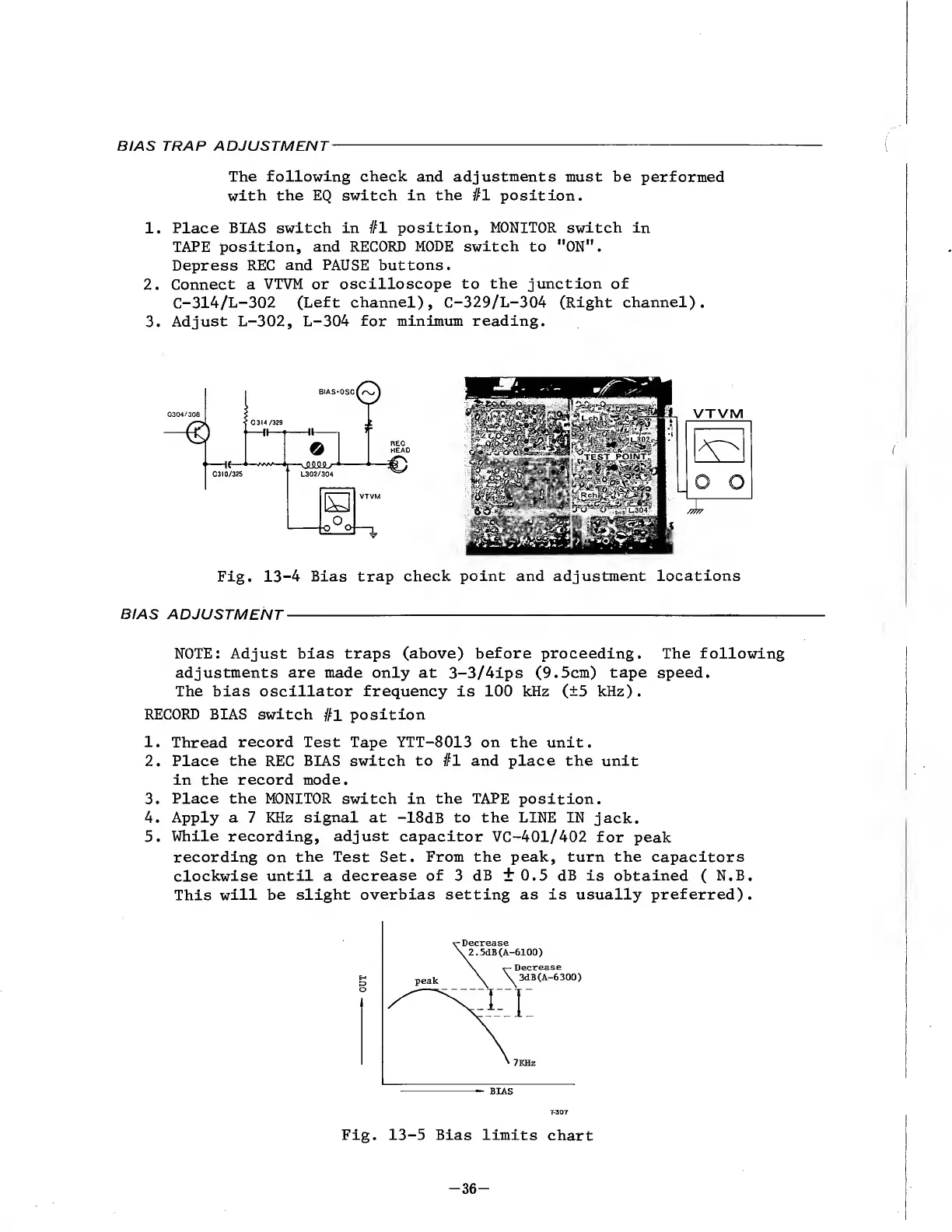
BIAS
TRAP
ADJUSTMENT
-
The
following
check
and
adjustments
must
be
performed
with
the
EQ
switch
in
the
#1
position.
1.
Place
BIAS
switch
in
#1
position,
MONITOR
switch
in
TAPE
position,
and
RECORD
MODE
switch
to
"ON".
Depress
REC
and
PAUSE
buttons.
2.
Connect
a
VTVM
or
oscilloscope
to
the
junction
of
C-314/L-302
(Left
channel),
C-329/L-304
(Right
channel).
3.
Adjust
L-302,
L-304
for
minimum
reading.
Fig.
13-4
Bias
trap
check
point
and
adjustment
locations
BIAS
ADJUSTMENT
-
-
NOTE:
Adjust
bias
traps
(above)
before
proceeding.
The
following
adjustments
are
made
only
at
3-3/4ips
(9.5cm)
tape
speed.
The
bias
oscillator
frequency
is
100
kHz
(±5
kHz).
RECORD
BIAS
switch
#1
position
1.
Thread
record
Test
Tape
YTT-8013
on
the
unit.
2.
Place
the
REC
BIAS
switch
to
#1
and
place
the
unit
in
the
record
mode.
3.
Place
the
MONITOR
switch
in
the
TAPE
position.
4.
Apply
a
7
KHz
signal
at
-18dB
to
the
LINE
IN
jack.
5.
While
recording,
adjust
capacitor
VC-401/402
for
peak
recording
on
the
Test
Set.
From
the
peak,
turn
the
capacitors
clockwise
until
a
decrease
of
3
dB
+0.5
dB
is
obtained
(
N.B.
This
will
be
slight
overbias
setting
as
is
usually
preferred).
BIAS
Fig.
13-5
Bias
limits
chart
-
3
6
-

Other manuals for Teac A-6300

Related product manuals