EasyManua.ls Logo

Teac A-6300 - Page 39

Teac A-6300
112 pages
Print Icon
To Next Page IconTo Next Page
To Previous Page IconTo Previous Page
Loading...
RECORD
HEAD
AZIMUTH
ADJUSTMENT
Coarse
Adjustment:
NOTE:
The
effect
of
turning
the
azimuth
screw
will
not
immedi¬
ately
register
on
the
Test
Set.
A
slight
delay
will
be
noticed.
Therefore,
the
screw
must
be
rotated
slightly
with
a
pause
to
see
the
effect.
1.
Connect
a
Test
Set
to
the
OUTPUT
jack
and
an
AF
oscillator
to
the
LINE
IN
jack,
then
set
the
AF
oscillator
to
10
kHz.
2.
Make
certain
that
the
LINE
controls
are
at
the
Specified
Input
Level
positions.
3.
Place
the
MONITOR
switch
to
SOURCE
and
adjust
the
AF
oscillator
to
obtain
a
signal
of
20
dB
below
the
Specified
Output
Level.
(The
Test
Set
will
indicate
-28
dB.)
4.
Thread
a
record
Test
Tape
on
the
unit.
5.
Place
the
MONITOR
switch
in
the
TAPE
position.
6.
While
recording
adjust
the
azimuth
screw
for
maximum
indication
on
the
Test
Set.
Fine
Adjustment:
NOTE:
It
is
absolutely
essential
to
accomplish
the
coarse
ad¬
justment
before
performing
the
fine
adjustment
to
avoid
phase
error
larger
than
45?
7.
Connect
the
test
equipment
as
shown
in
Fig.
13-1.
8.
Apply
a
10
kHz
signal
at
-28
dB
to
the
LINE
IN
jacks
and
record
this
signal.
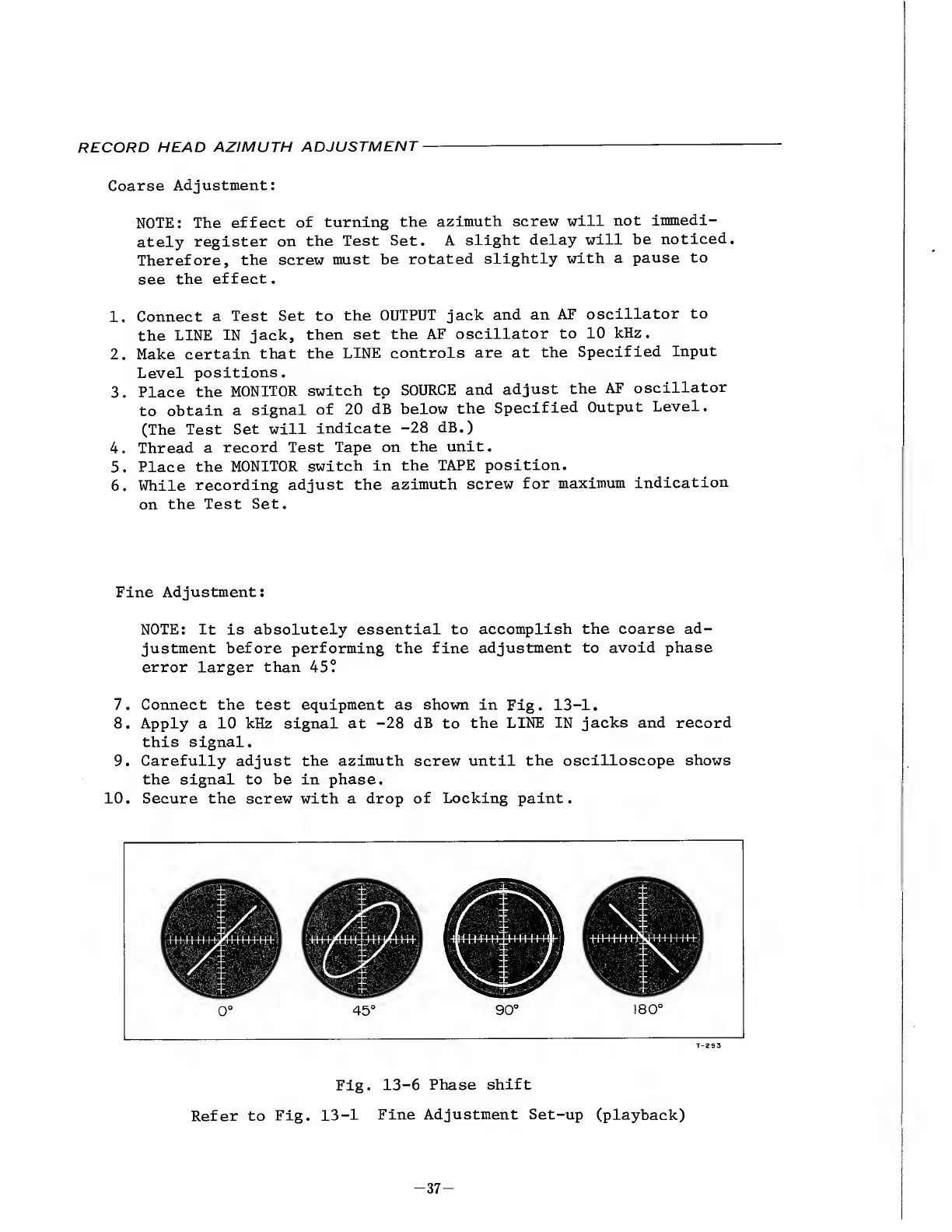
9.
Carefully
adjust
the
azimuth
screw
until
the
oscilloscope
shows
the
signal
to
be
in
phase.
10.
S
ecure
the
screw
with
a
drop
of
Locking
paint.
45
°
180
°
Fig.
13-6
Phase
shift
Refer
to
Fig.
13-1
Fine
Adjustment
Set-up
(playback)
-
3
7
-

Other manuals for Teac A-6300

Related product manuals