EasyManua.ls Logo

Teac A-6300 - Page 40

Teac A-6300
112 pages
Print Icon
To Next Page IconTo Next Page
To Previous Page IconTo Previous Page
Loading...
RECORD
LEVEL
SET-
----—_-_
NOTE:
The
OUTPUT
control
must
be
at
the
specified
output
level
position
(-8
dB
at
OUTPUT
jacks),
and
the
LINE
INPUT
controls
at
the
Specified
Input
Level
Setting.
1.
Apply
a
400
Hz
signal
at
-8
dB
to
the
LINE
IN
jacks.
2.
Thread
a
record
Test
Tape
TEAC
YTT-8013
on
the
unit,
then
set
BIAS
switch
to
#1
position.
Tape
SPEED
at
HIGH.
3.
Place
the
MONITOR
switch
in
the
TAPE
position,
LINE
and
OUTPUT
Controls
to
Specified
Level
position.
4.
Adjust
VR-303/306
for
a
-8
dB
signal
at
OUTPUT
jacks.
OVERALL
FREQUENCY
RESPONSE-
----—^-
RECORD
BIAS
switch
to
the
#1
position
1.
Thread
a
blank
TEAC
YTT-8013
tape
on
the
unit.
Place
BIAS
switch
at
#1
position
(EQ
SW
at
l),tape
SPEED
at
HIGH.
2.
Apply
a
signal
stepped
from
40
Hz
to
24
KHz
at
-28
dB
to
LINE
IN
jacks
and
record
it
on
the
Test
Tape.
3.
Adjust
L-301/303
for
best
response.
4.
Repeat
overall
response
check
at
LOW
speed.
1-'—1
Mill-1-1-
_
OVERALL
(YTT-8013)
r
L
7j.ips
5
-
_
:
L.
p
v
""
'
"
1
E
r
_
_
1
m
i
r
1
III
IH
B
1
II
in-
I
1
1
II
E
_
1
!
■■
m
9
1
!
■■
1
III
IB
,
+
3
i
i
n
:
J
r
A
1
1
I
m
i
i
!
Bl
imi
“i
1
IHI
-1
I
i
m
m
II
125
I4KI
5K
20
5
0
_i
_
t
_
_
_
_
_
J
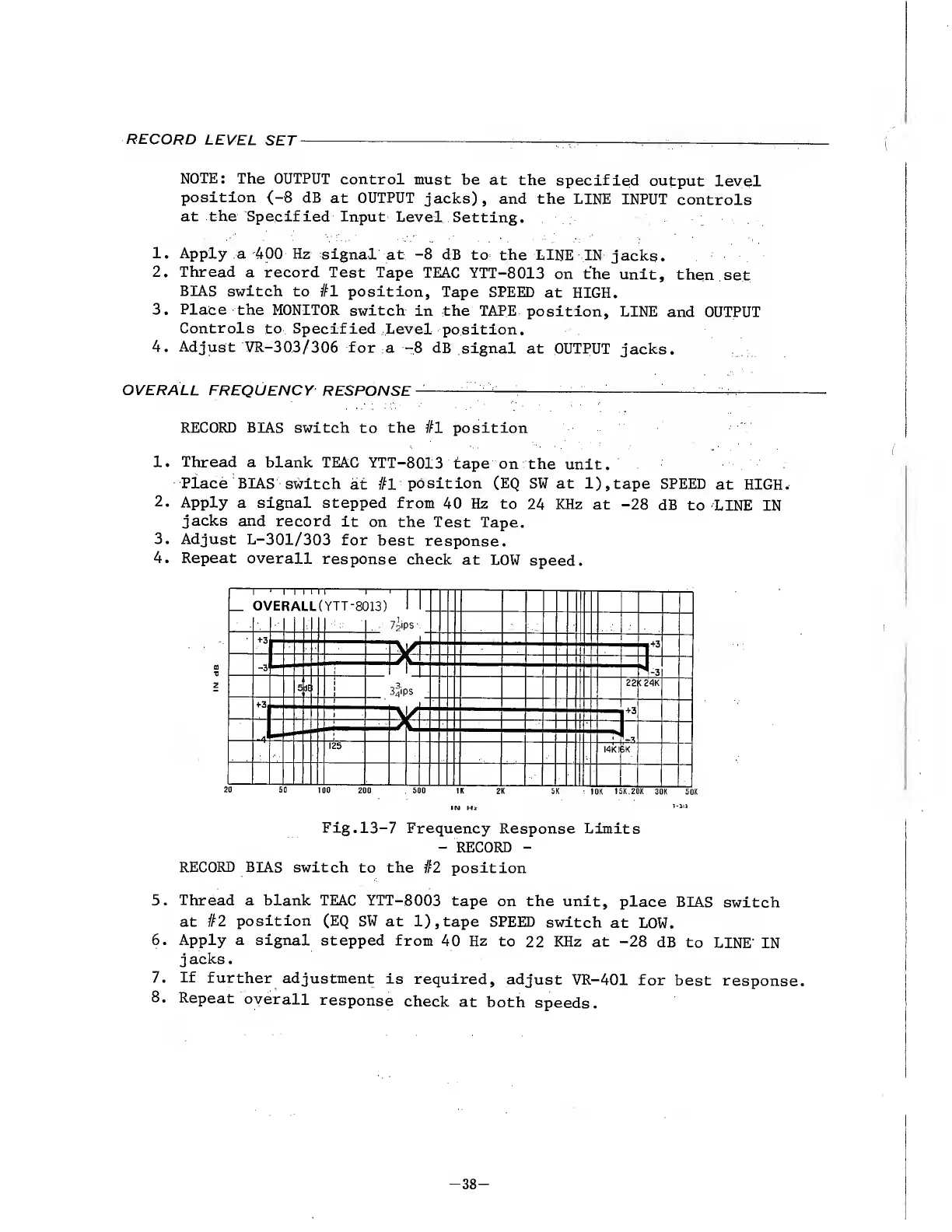
Fig.13-7
Frequency
Response
Limits
-
RECORD
-
RECORD
BIAS
switch
to
the
#2
position
5.
Thread
a
blank
TEAC
YTT-8003
tape
on
the
unit,
place
BIAS
switch
at
#2
position
(EQ
SW
at
l),tape
SPEED
switch
at
LOW.
6.
Apply
a
signal
stepped
from
40
Hz
to
22
KHz
at
-28
dB
to
LINE'
IN
j
acks.
7.
If
further
adjustment
is
required,
adjust
VR-401
for
best
response.
8.
Repeat
overall
response
check
at
both
speeds.
-
3
8
-

Other manuals for Teac A-6300

Related product manuals