ENGLISH FRANÇAIS
74
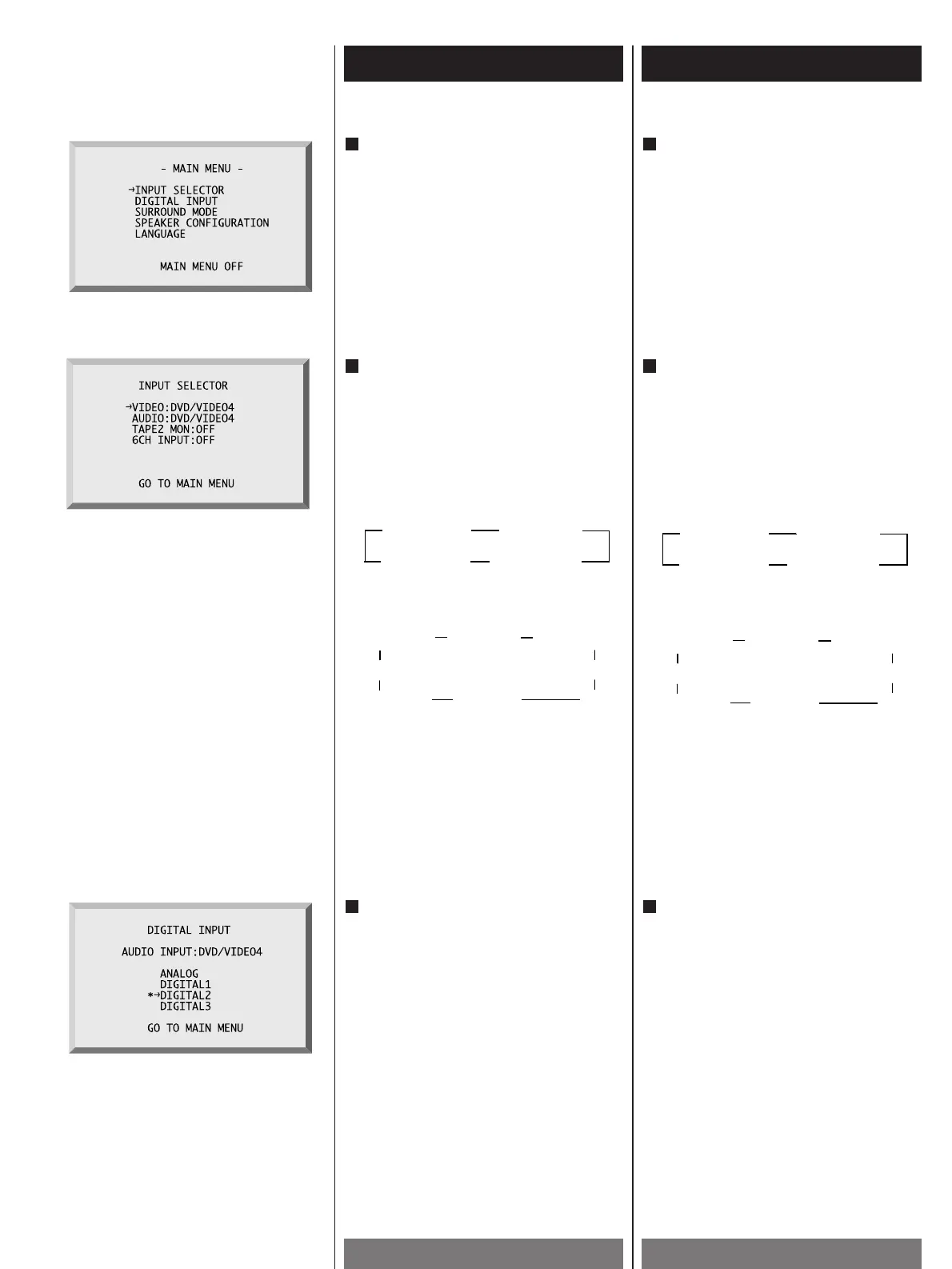
At “INPUT SELECTOR” section, you can
choose the input source that you’d like to
hear. Locate “
e
“ to what you'd like to
change with “
5/b“ buttons and change
the input source with “
g/t“ buttons.
< In case of “VIDEO”, the mode will be
change in this order :
< In case of “AUDIO”, the mode will be
change in this order :
TAPE 2 MONITOR and 6-CH INPUT will display
ON or OFF when these buttons are pressed.
If you want to be back to “MAIN MENU”,
locate “
e
“ to “GO TO MAIN MENU” and press
“ENTER”.
4
When you choose “DIGITAL INPUT” in
“MAIN MENU”, the display shows as
follows. “*“mark will be displayed where
you have chosen. You want DIGITAL INPUT
to move “
e
“ and if press “ENTER”,
“
*“mark will appear where “
e
“ is
positioned.
If you want to be back to “MAIN MENU”,
move “
e
“ to “GO TO MAIN MENU” and
press “ENTER”.
Digital input sources, which you can select
as you change functions, are defined at
this product.
At “PHONO, TUNER, MD/TAPE 1, VCR/VIDEO
1” mode, you can select only “ANALOG”.
5
When “MAIN MENU” appears, locate “
e
“
to what you’d like to change with “
5/b“
buttons on the remote controller and press
“ENTER”.
If you want OSD menu to disappear, locate
“
e
“ to “MAIN MENU OFF” and press
“ENTER”. Without any input for 20 seconds,
it will disappear automatically.
3
Affichage
à
fonctions OSD (2)
OSD Function Display (2)
Dans la section “INPUT SELECTOR”, vous
pouvez choisir la source d’entrée que vous
souhaitez écouter. Positionnez “
e
“ sur ce
que vous souhaitez changer avec les
touches “
5 /b “ et changez la source
d’entrée avec les touches “
g/t“.
< Quand “VIDEO” est choisi, le mode change
dans cet ordre :
< Quand “AUDIO” est choisi, le mode change
dans cet ordre:
TAPE 2 MONITOR et 6-CH INPUT apparaissent
et disparaissent de l’affichage chaque fois que
ces touches sont pressées.
Si vous souhaitez retourner au menu “MAIN
MENU”, positionnez “
e
“ sur “GO TO MAIN
MENU” et appuyez sur “ENTER”.
4
Quand vous choisissez “DIGITAL INPUT”
dans “MAIN MENU”, l’affichage change
comme suit. La marque “*“ est affichée à
côté de l’élément choisi.
Si vous positionnez “
e
“ sur DIGITAL
INPUT et appuyez sur “ENTER”, la marque
“
*“ apparaît à l’endroit où “
e
“ est
positionné. Si vous souhaitez retourner au
menu “MAIN MENU”, positionnez “
e
“ sur
“GO TO MAIN MENU” et appuyez sur
“ENTER”.
Les sources d’entrée numériques que vous
pouvez choisir quand la fonction est
changée sont les suivantes. Pendant le
mode “PHONO, TUNER, MD/TAPE 1,
VCR/VIDEO 1”, vous ne pouvez choisir que
“ANALOG”.
5
Quand “MAIN MENU” apparaît, positionner
“
e
“ sur ce que vous souhaitez changer
avec les touches “
5 /b “ sur la
télécommande et appuyez sur “ENTER”.
Si vous souhaitez faire disparaître le menu
sur l’écran, positionnez “
e
“ sur “MAIN
MENU OFF” et appuyez sur “ENTER”.
S’il n’y a pas d’entrée pendant 20 secondes,
il disparaît automatiquement.
3



 To Next Page