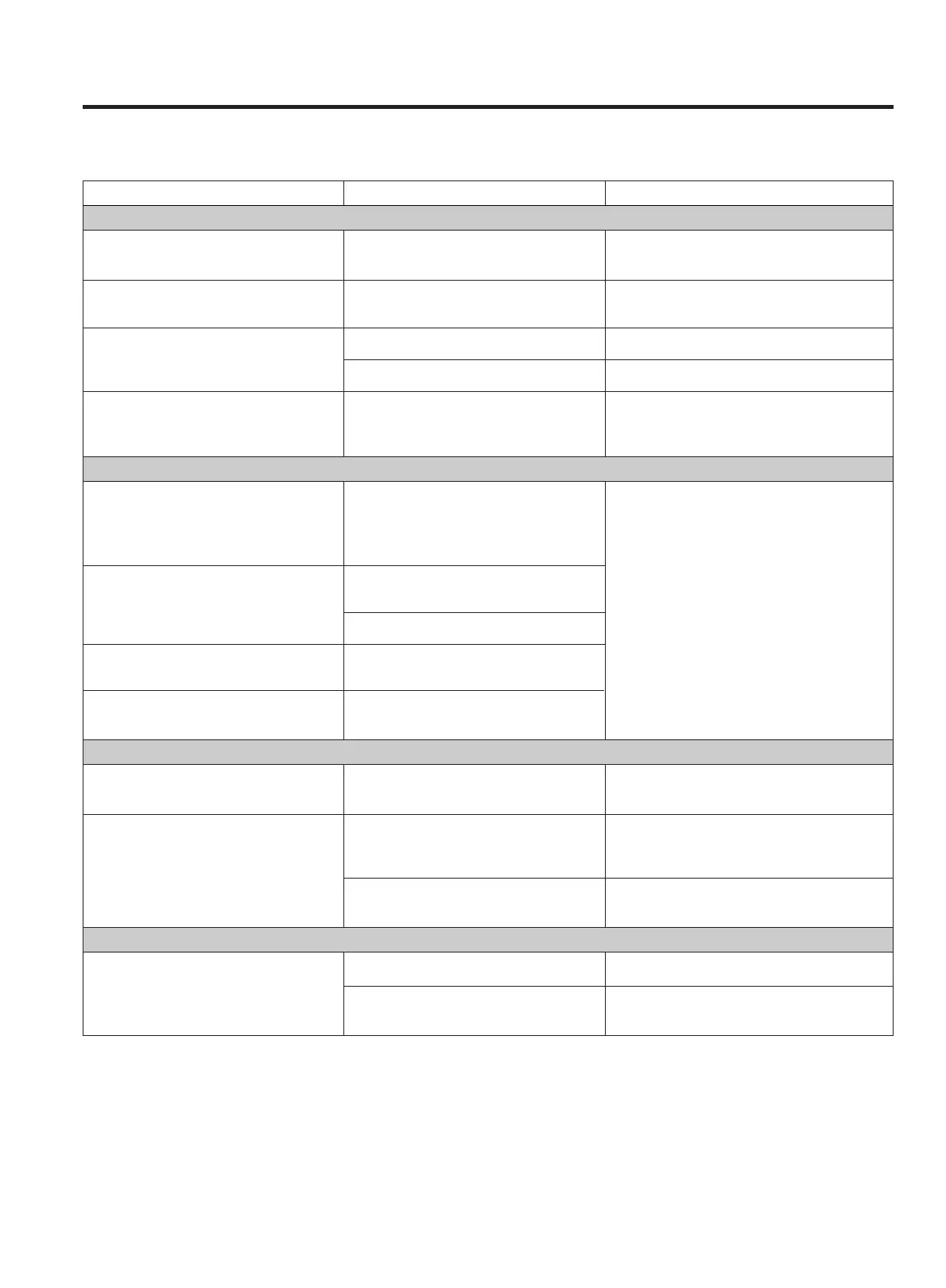
Problem Probable Cause Remedy
Amplifier
When listening to the music in stereo, Speakers are connected wrongly. After checking, if needed, connect correctly
left/right speakers sounds reversed. again.
Low hum or buzzer sound. Power line of fluorescent light is install- Place this product from electric devices
ed near to wall outlet of this product. as far away as possible.
Sound is only heard from one channel. One of the input cords is disconnected. Connect the input cords securely.
The BALANCE control is set to one end. Adjust the BALANCE control.
Sound cut during listening to the music Speaker impedance is less than After turning off the power and then turning
or no sound even though power is ON. prescribed for this unit. it on again, reduce the volume or change to
the regulated speakers.
Tuner
An unusual hissing noise is heard when A slight noise may be heard because O Try reducing the treble sound by turning
listening to the broadcast in stereo, the method use for modulation of FM the treble controls.
but not heard when listening stereo broadcasts is different than that O Try changing the location, height and/or
monaurally. used for monaural broadcasts. direction of the antenna.
O Set the FM mode to monaural by pressing
Noise is excessive in both stereo and Poor location and/or direction of the the STEREO/MONO button. (Note that the
monaural broadcasts. antenna. broadcast will then be heard as monaural
sound.)
Transmitting station is too far away. O If an indoor antenna is being used, change
to an outdoor antenna.
Sound is distorted and/or the volume Broadcast signals are being disturbed. O Try using an antenna with more elements.
level becomes low.
Excessive distortion in the sound of Speaker system connections are not
stereo broadcasts. correct.
Surround Effects
No sound from the rear speakers. SURROUND MODE switch is set to Set the switch to the desired surround
BYPASS. mode position.
No sound from the center speaker. SURROUND MODE switch is not set to Set the switch to DOLBY PRO LOGIC or
DOLBY PRO LOGIC or DOLBY 3 DOLBY 3 STEREO.
STEREO
CENTER MODE switch is set to Set the switch to NORMAL or WIDE.
PHANTOM.
Remote Control Unit
Remote control impossible. The batteries are exhausted. Replace with new batteries.
The remote control unit is too far from Operate the remote control unit within the
the receiver or out of the effective range. effective range.
TROUBLESHOOTING
– 23 –
To determine any problem with your receiver, always check the most obvious possible causes first. If any problem still
remains after you have checked the items below, consult your nearest TEAC dealer.



 To Next Page