EasyManua.ls Logo

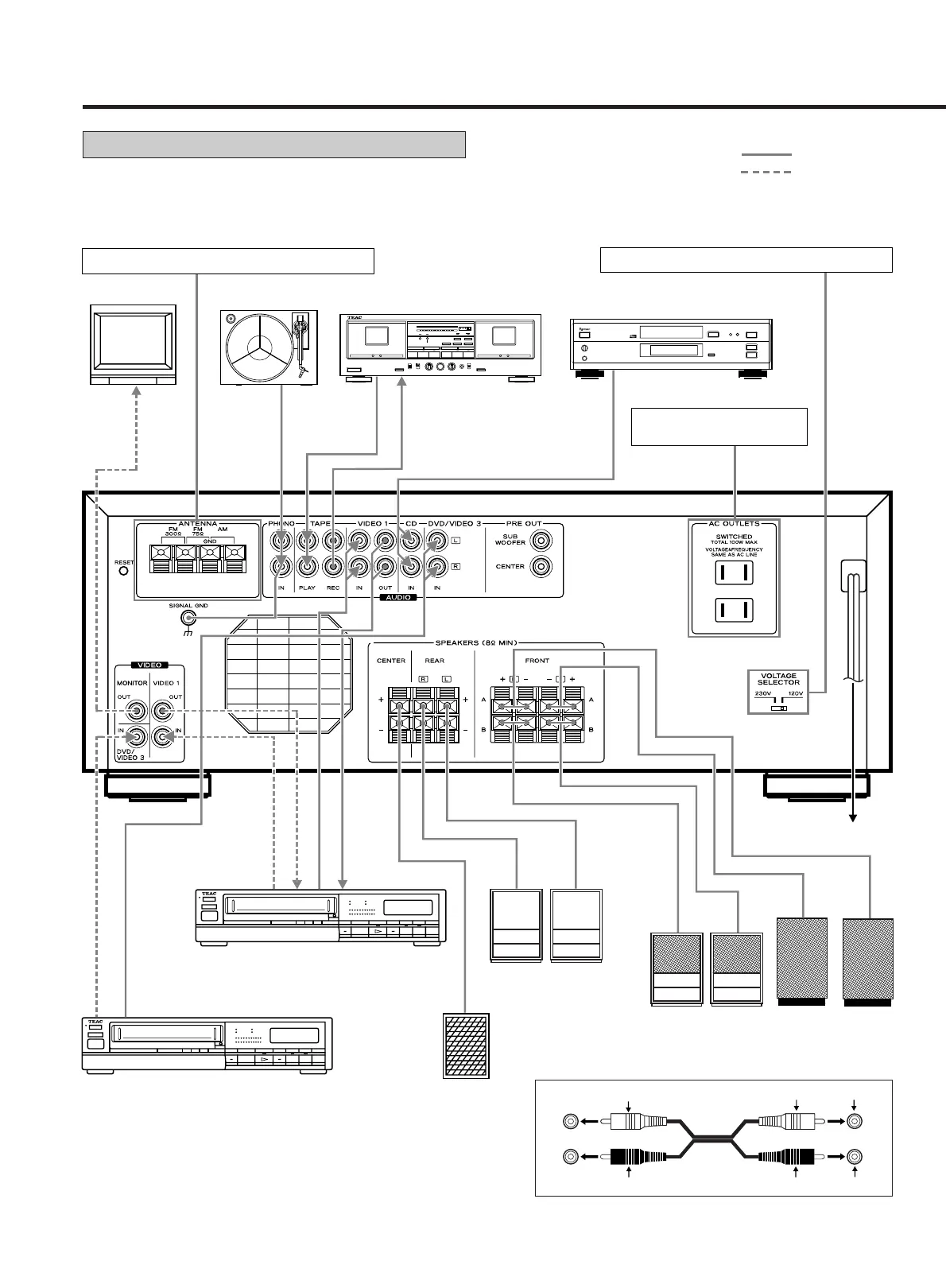
Teac AG-V8520 - System Connections Overview; Component Interconnection Diagram; Speaker and AC Outlet Wiring

Teac AG-V8520
47 pages
Print Icon
To Next Page IconTo Next Page
To Previous Page IconTo Previous Page
Loading...
CONNECTIONS
System Connections
:Audio signal
:Video signal
– 5
CAUTION: Do not plug the power cord of any component
into AC outlets and do not turn their POWER switches
on until all connections have been performed.
LL
RR
White White White
Red Red Red
Audio connection cords
+
TV Monitor
Turntable
Tape Deck
CD Player
LINE OUT
LINE IN
VIDEO OUT
AUDIO OUT
VIDEO OUT
VIDEO IN
AUDIO OUT
AUDIO IN
VIDEO 1
DVD/VIDEO 3
Center Speaker
Right
Left
Rear Speaker
Front B
Speaker
Front B
Speaker
Front A
Speaker
Front A
Speaker
To AC outlet
Refer to "VOLTAGE CONVERSION" on page 4.
AC Outlets:
Two switched, Total 100W.
Refer to "Antenna Connections" on pages 6-7.

Table of Contents

Related product manuals