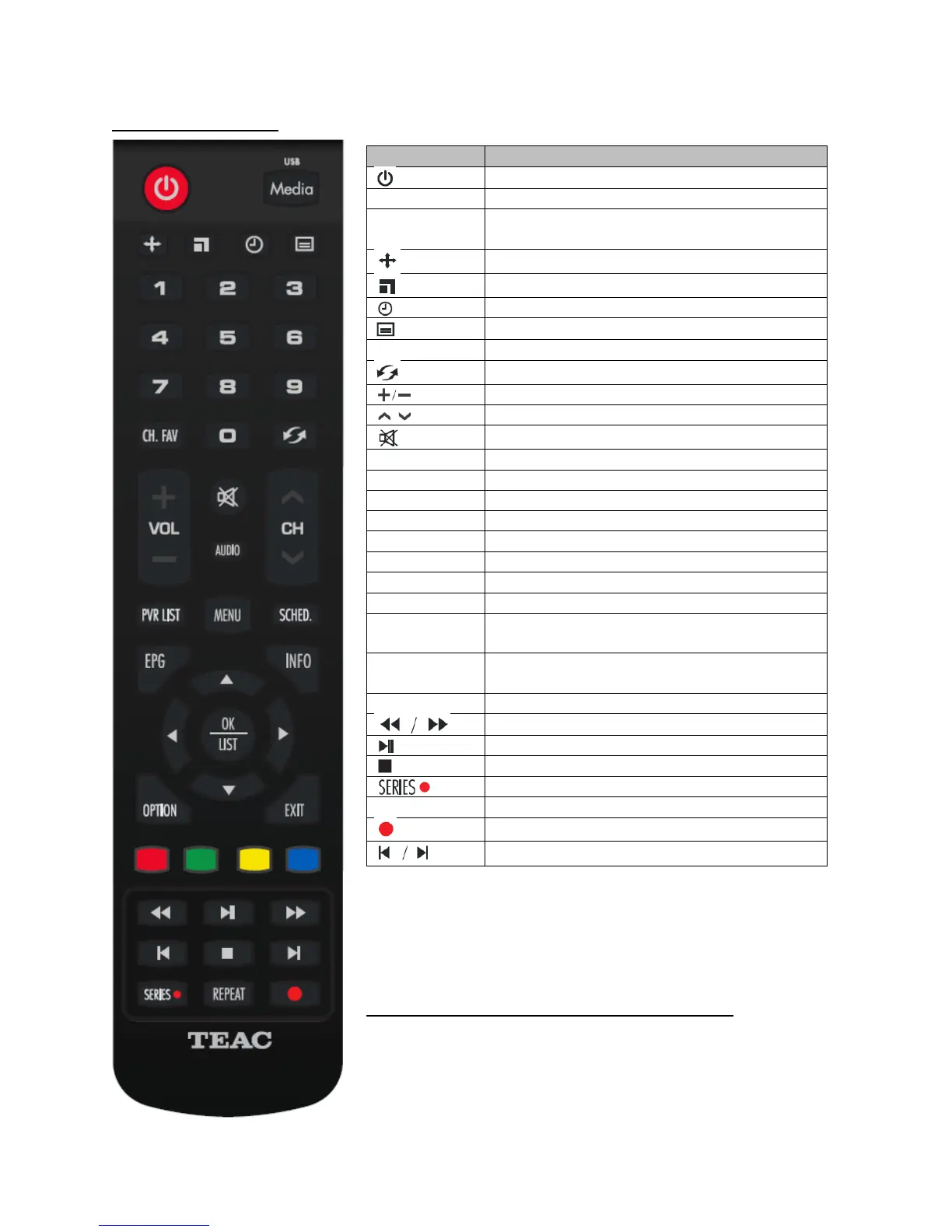
Turn on unit/switch to Standby Mode
Number keys for setting up functions or
channel switching
View Favourite Channel lists
Switch back to the previous channel
Switch channels sequentially
Mute sound. Press again to unmute
Enter or exit the main menu
View scheduled items ("Timer List")
View the Electronic Program Guide
Show current channel info
Navigate the menu: up/down/left/right
Show options during playback
Return to the previous menu screen or quit
the menu
Red/green/yellow/blue: Dynamic function
keys – refer to on-screen hints
Confirm or enter menu selections
Start recording current channel
Play previous/next media file
NOTE: When using the remote control, point it at the infrared
sensor at the front of the set top box. Ensure that there are no
obstacles blocking the signal. If the signal becomes weak, you
may need to replace the batteries with new ones.
Installing/replacing Remote Control Batteries
Open the battery cap at the back of the remote control. Insert
2 new AAA batteries into the battery compartment. Ensure
that the batteries’ +/- polarities match the printed guides.
Replace the battery compartment cover.


 To Next Page