12
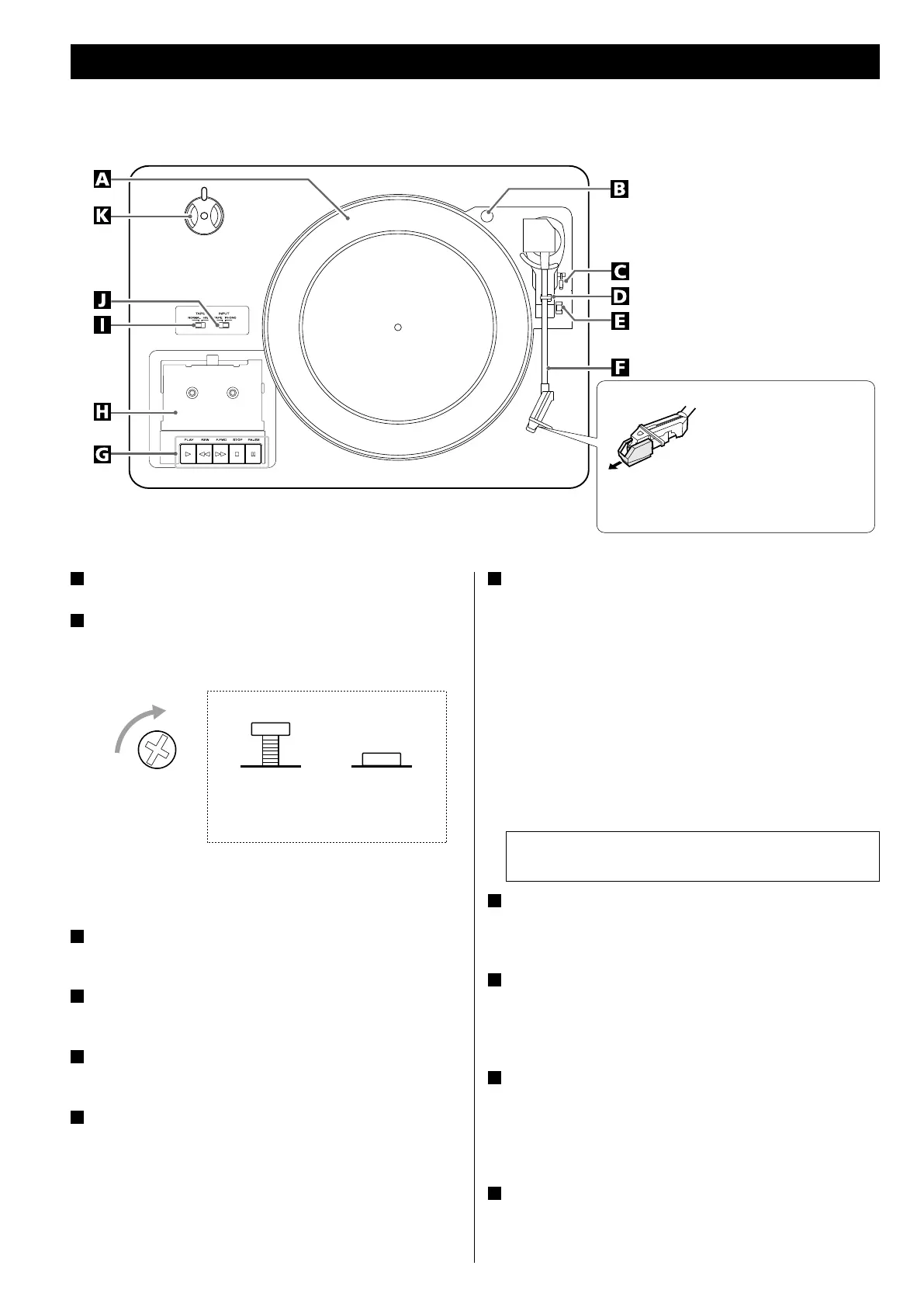
A
turntable
B
screw fixing the turntable for transportation
Before use, completely loosen the screw by turning it clockwise
with a coin or screwdriver.
When you transport the unit, turn the screw counterclockwise to
secure the turntable.
C
cue-lever
Use this lever to lift the tone arm.
D
tone arm holder
Gently push the clamper to the right to release the tone arm.
E
speed selector
Select the speed suitable for the record.
F
tone arm
When you move the tone arm to inside, the turntable will begin
to turn.
Parts of the Turntable
Before use, detach the
stylus guard (white
plastic cover) by pulling it
straight off the front of the
cartridge in the direction of
the arrow.
G
Cassette tape operation button
PLAY (y)
Use this button to play a tape.
F.FWD (,)
Use this button to fast-forward a tape.
REW (m)
Use this button to rewind a tape.
STOP (H)
Use this button to stop playing a tape.
PAUSE (J)
Use this button to suspend playing/recording temporarily.
H
Cassette holder
Set a cassette tape with the exposed tape in front and the side to
play facing up.
I
TAPE switch
When playing a normal tape (type
!
), set the TAPE switch to
NORMAL. When playing a chrome tape (type
@
) or metal tape
(type
!%
), set the switch to HIGH.
J
INPUT switch
When PHONO/TAPE is selected by pressing the corresponding
button, use this switch to switch between “RECORD” and “TAPE“.
When a record or cassette tape is playing, make sure to stop
playing prior to using the switch.
K
45 RPM adaptor
When playing a 45 RPM large hole single record, use the adaptor.
Slide the part of holding the adapter to the side.
Never press the PLAY button (y) and REW button (m) at
the same time.
During use
Side view of the screw for transport
During transport
(when shipped
from the factory)



 To Next Page