23
ENGLISH
Listening to a Cassette Tape 1
1
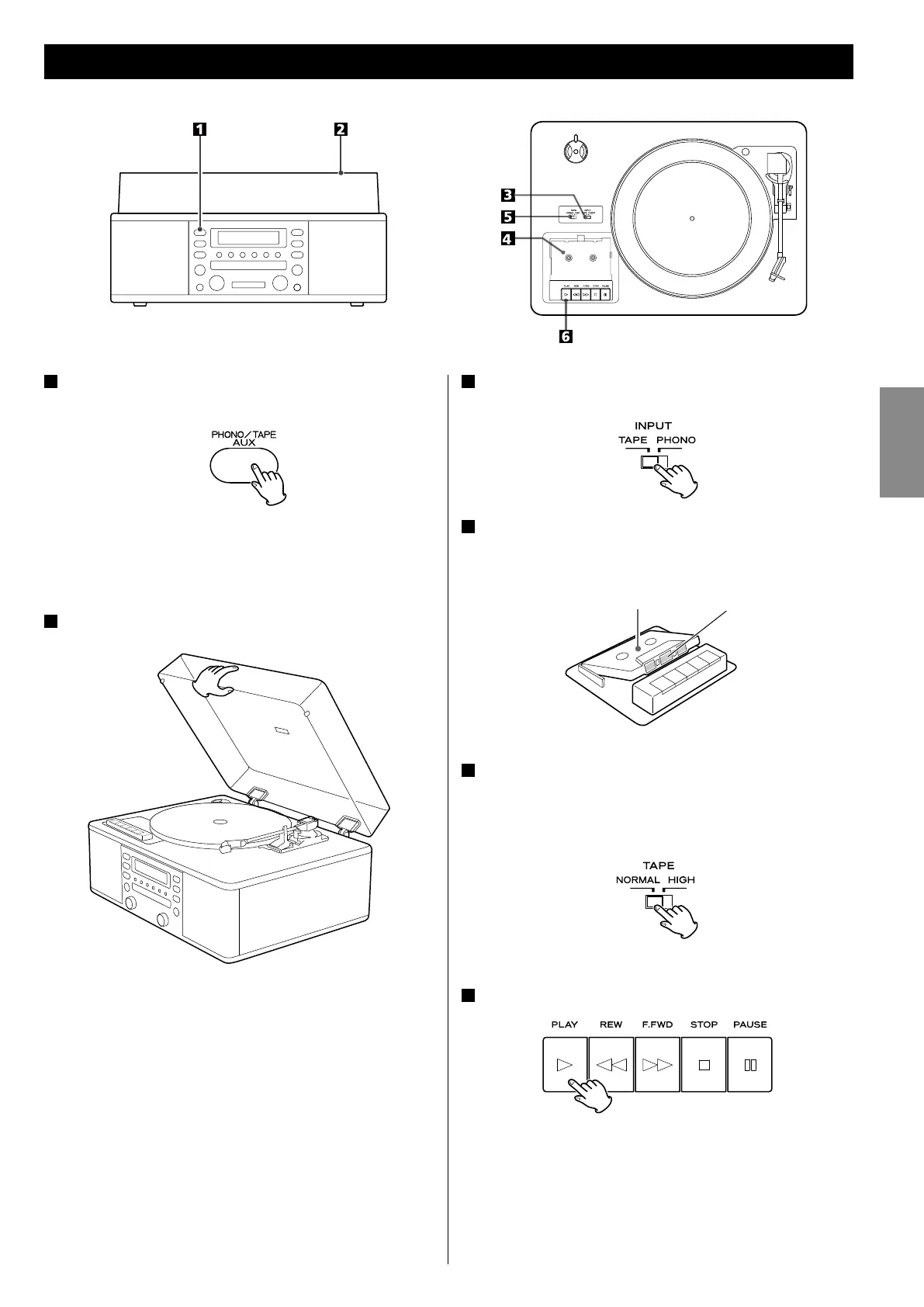
Press the PHONO/TAPE/AUX button to select PHONO/
TAPE.
< Each time the PHONO/TAPE/AUX button is pressed, PHONO/
TAPE (record or cassette tape) and AUX (external component) are
selected alternatively.
2
Slowly open the cover.
< When opening the cover, pay attention to prevent your hand
from getting caught.
3
Set the INPUT switch to TAPE.
4
Set a recorded cassette tape in the cassette holder.
Set a cassette tape with the exposed tape in front and the side to
play facing up.
Side to play Tape
5
Set the TAPE switch.
When playing a normal tape (type
!
), set the TAPE switch by the
turntable to NORMAL. When playing a chrome tape (type
@
) or
metal tape (type
!%
), set the switch to HIGH.
6
Press the PLAY button (y).
Playback starts.
When the playback of one side finishes, the playback stops. To play
the other side, turn over the cassette tape.



 To Next Page