English – 13 | MP-211
Basic Operation
Function Operation
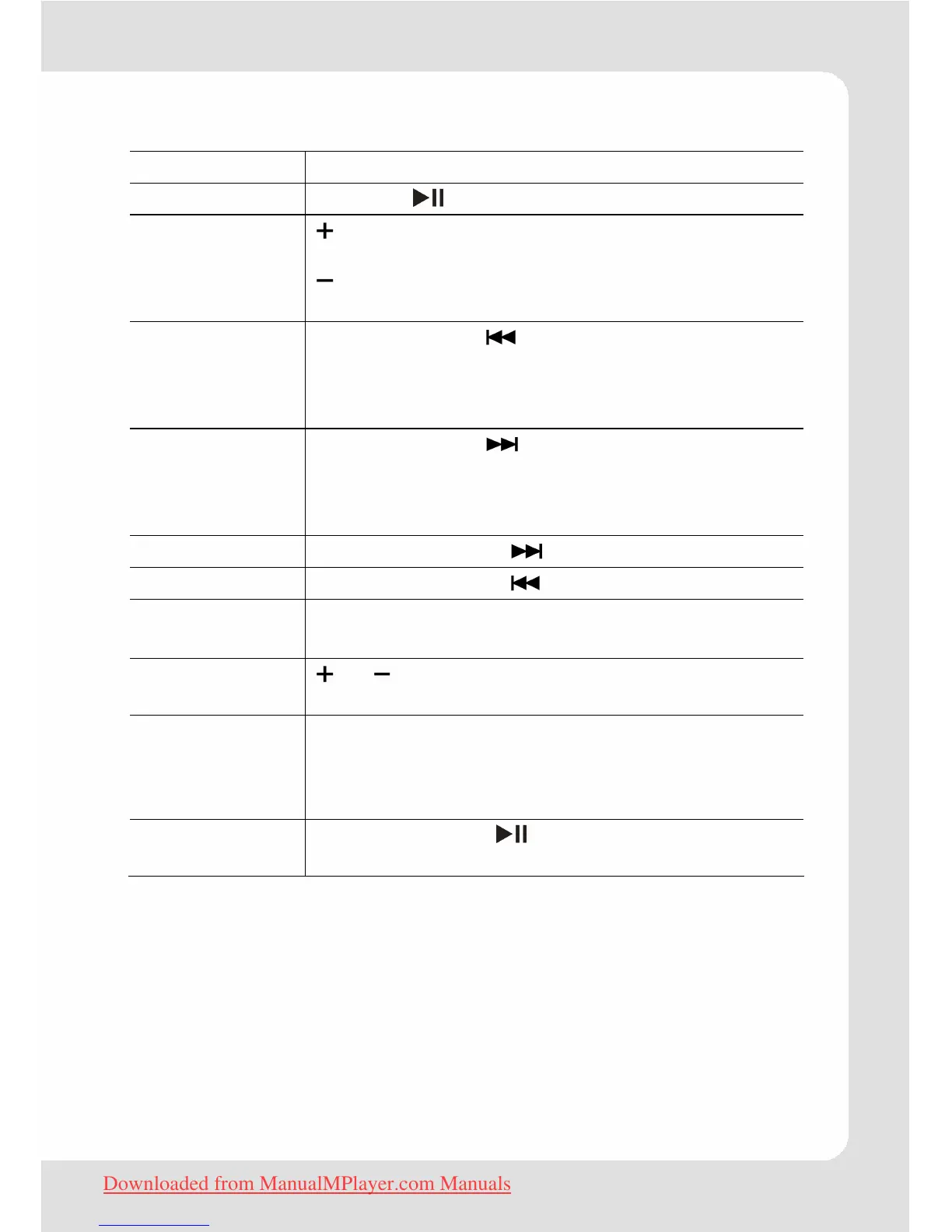
Play/Pause Press the button to play or pause.
Adjust volume
(Music, Movies,
and Radio
mode)
: Press: increase volume
Press and hold: increase volume continuously
: Press: decrease volume
Press and hold: decrease volume continuously
Previous (title,
picture, video,
main menu
option)
Shortly press the button.
Next (title, pic-
ture, video,
main menu
option)
Shortly press the button.
Fast Forward Press and hold the button.
Rewind Press and hold the button.
Move to main
menu
Press and hold the
M button to display the
main menu
Browser
navigation
or allow to select an object, a folder or a
file.
Return to
Browser (
Music,
Movies, Pic-
tures, E-Books)
To return to Browser from any mode, press
M
shortly.
Confirm
selection
Press play button to confirm and enter the
selected item.
Downloaded from ManualMPlayer.com Manuals


 To Next Page