English – 19 | MP-211
Minimum System Requirements
OS Support: Microsoft 2000/XP/Vista (32-bit only)
CPU: Pentium class equivalent or better
Memory (RAM): > 64MB
Free HD Space: 10MB
Video: 24-bit color adapter
WMP: Windows Media Player 9 or better
Installation
Copy the folder “VideoConverter_V2.12.00(128x128)” to your com-
puter.
Converting Video
To start the software, double-click the file “VideoConvert.exe”.
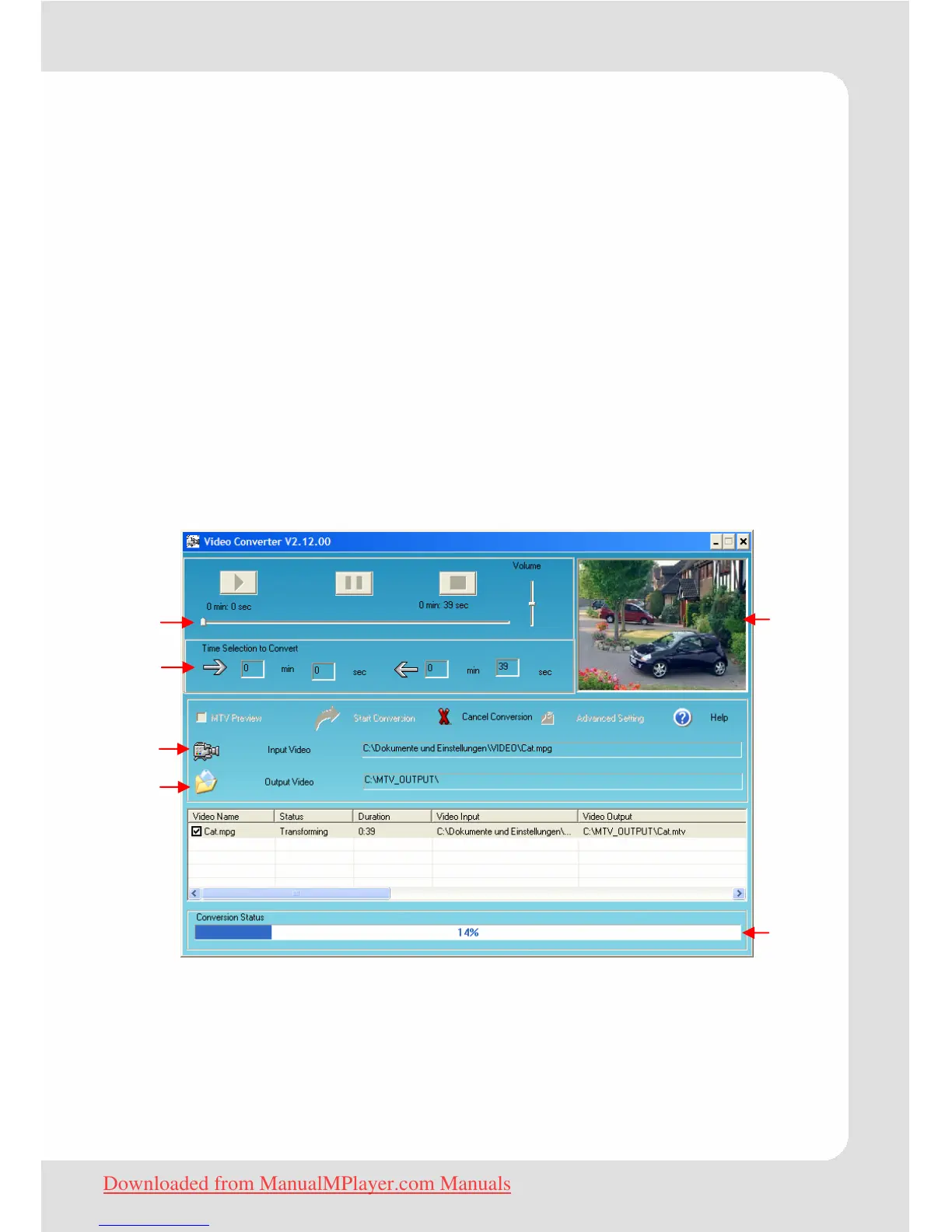
The application window shown below will appear.
c Seek Bar for preview and time selection
d Start and End time-point selection
e Select the video file to convert
f Select the destination folder of the converted video file
g Video preview window
h Conversion progress bar
c
d
e
f
g
h
Downloaded from ManualMPlayer.com Manuals


 To Next Page