English – 15 | MP-211
Now Playing Controls (Music Playback)
To start playing music, browse for a song and then press to
start playback.
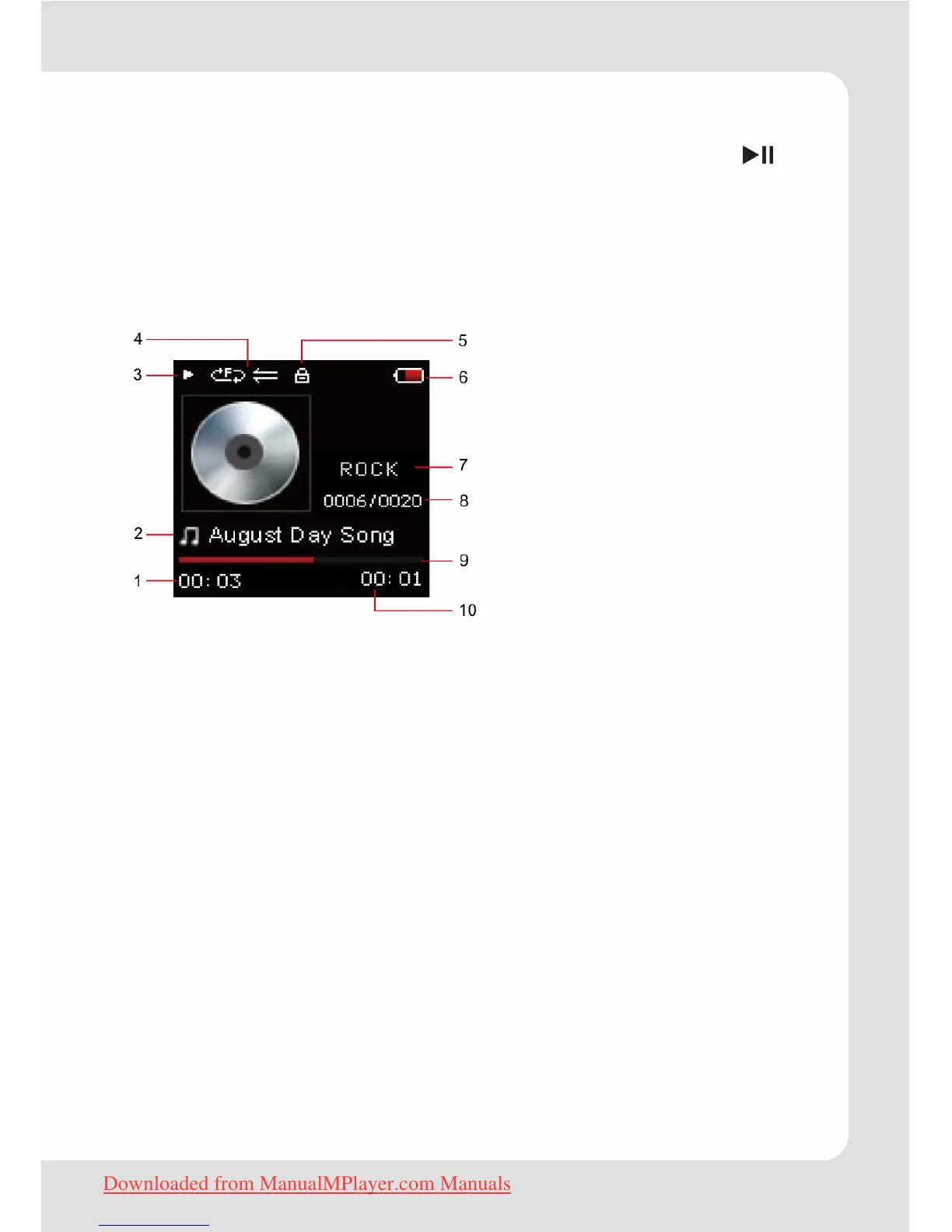
When a song is playing, the Now Playing screen appears (see
below).
The following functions may be performed from the Now Playing
screen.
1 Elapsed Time
2 Title, Artist, Album
3 Play Status
4 Play Mode
5 Lock Icon
6 Battery Level
7 Equalizer
8 Current track / Total tracks
9 Progress Bar
10 Remain Time
Proceed as described in the section “Basic Operation”.
Album Cover Widget Function
Some music files contain ID3 tag information like the name of the
artist, the name of the album, the cover art, or genre information,
which can be displayed by the player. The widget is able to fetch
this information during downloads.
Important: Normally only original copyright protected files
contain this information. If the music file does not contain
entries in the ID3 tag, the player will display a symbol
showing a rotating CD.
Downloaded from ManualMPlayer.com Manuals


 To Next Page