EasyManua.ls Logo

Teac Multitrack Series - Special Features; Punch in Recording; Pitch Control; Cueing

Teac Multitrack Series
14 pages
Print Icon
To Next Page IconTo Next Page
To Previous Page IconTo Previous Page
Loading...
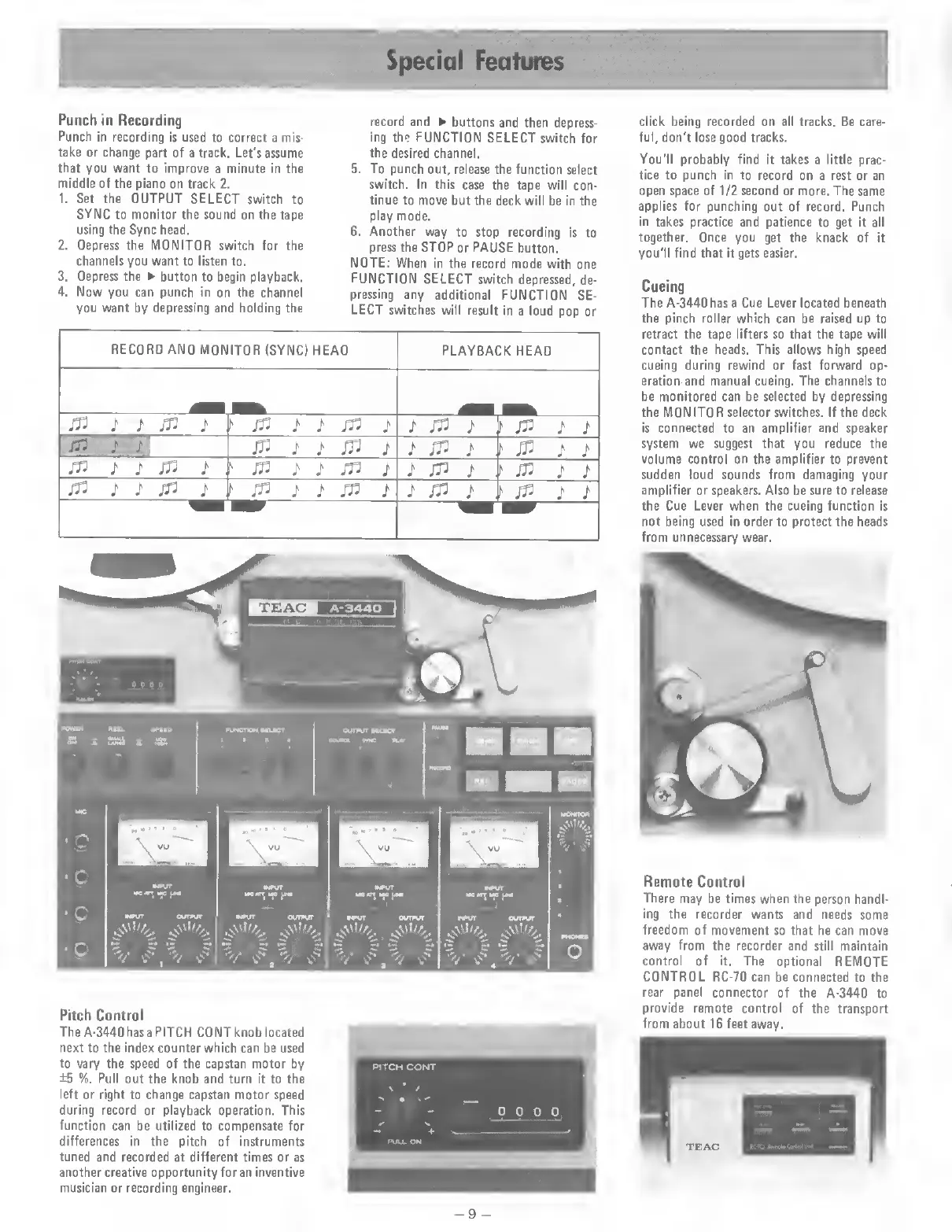
Special
Features
Punch
in
Recording
Punch
in
recording
is
used
to
correct
a
mis¬
take
or
change
part
of
a
track.
Let's
assume
that
you
want
to
improve
a
minute
in
the
middle
of
the
piano
on
track
2.
1.
Set
the
OUTPUT
SELECT
switch
to
SYNC
to
monitor
the
sound
on
the
tape
using
the
Sync
head.
2.
Depress
the
MONITOR
switch
for
the
channels
you
want
to
listen
to.
3.
Depress
the
button
to
begin
playback.
4.
Now
you
can
punch
in
on
the
channel
you
want
by
depressing
and
holding
the
record
and
buttons
and
then
depress¬
ing
the
FUNCTION
SELECT
switch
for
the
desired
channel.
5.
To
punch
out,
release
the
function
select
switch.
In
this
case
the
tape
will
con¬
tinue
to
move
but
the
deck
will
be
in
the
play
mode.
6.
Another
way
to
stop
recording
is
to
press
the
STOP
or
PAUSE
button.
NOTE:
When
in
the
record
mode
with
one
FUNCTION
SELECT
switch
depressed,
de¬
pressing
any
additional
FUNCTION
SE¬
LECT
switches
will
result
in
a
loud
pop
or
RECORD
AND
MONITOR
(SYNC)
HEAD
PLAYBACK
HEAD
_
jn
/
;
fr
i
\
rft
}
J'
ift
}
J'
Jft
/
f
fr
i
i
1ft
j
4
in
i
i
in
i
i
fr
i
.
t
1
Jft
J
J
fr
;
/
fr
;
jft
j
j
jft
j
J
Jft
J
,
I'
J
V
i
i
frilln
i
i
fr
i
>
fr
i
t
fr
i
>
fr
i
i
Pitch
Control
The
A-3440
has
a
PITCH
CONT
knob
located
next
to
the
index
counter
which
can
be
used
to
vary
the
speed
of
the
capstan
motor
by
±5
%.
Pull
out
the
knob
and
turn
it
to
the
left
or
right
to
change
capstan
motor
speed
during
record
or
playback
operation.
This
function
can
be
utilized
to
compensate
for
differences
in
the
pitch
of
instruments
tuned
and
recorded
at
different
times
or
as
another
creative
opportunity
for
an
inventive
musician
or
recording
engineer.
PITCH
CONT
\
*
/
-
>
0
0
0
0
+
PULL
ON
click
being
recorded
on
all
tracks.
Be
care¬
ful,
don't
lose
good
tracks.
You'll
probably
find
it
takes
a
little
prac¬
tice
to
punch
in
to
record
on
a
rest
or
an
open
space
of
1/2
second
or
more.
The
same
applies
for
punching
out
of
record.
Punch
in
takes
practice
and
patience
to
get
it
all
together.
Once
you
get
the
knack
of
it
you'll
find
that
it
gets
easier.
Cueing
The
A-3440
has
a
Cue
Lever
located
beneath
the
pinch
roller
which
can
be
raised
up
to
retract
the
tape
lifters
so
that
the
tape
will
contact
the
heads.
This
allows
high
speed
cueing
during
rewind
or
fast
forward
op¬
eration
and
manual
cueing.
The
channels
to
be
monitored
can
be
selected
by
depressing
the
MONITOR
selector
switches.
If
the
deck
is
connected
to
an
amplifier
and
speaker
system
we
suggest
that
you
reduce
the
volume
control
on
the
amplifier
to
prevent
sudden
loud
sounds
from
damaging
your
amplifier
or
speakers.
Also
be
sure
to
release
the
Cue
Lever
when
the
cueing
function
is
not
being
used
in
order
to
protect
the
heads
from
unnecessary
wear.
Remote
Control
There
may
be
times
when
the
person
handl¬
ing
the
recorder
wants
and
needs
some
freedom
of
movement
so
that
he
can
move
away
from
the
recorder
and
still
maintain
control
of
it.
The
optional
REMOTE
CONTROL
RC-70
can
be
connected
to
the
rear
panel
connector
of
the
A-3440
to
provide
remote
control
of
the
transport
from
about
16
feet
away.
-9
-

Related product manuals