EasyManua.ls Logo

Teac Multitrack Series - Rear Panel Plugs and Jacks; Reel Installation; Tape Threading

Teac Multitrack Series
14 pages
Print Icon
To Next Page IconTo Next Page
To Previous Page IconTo Previous Page
Loading...
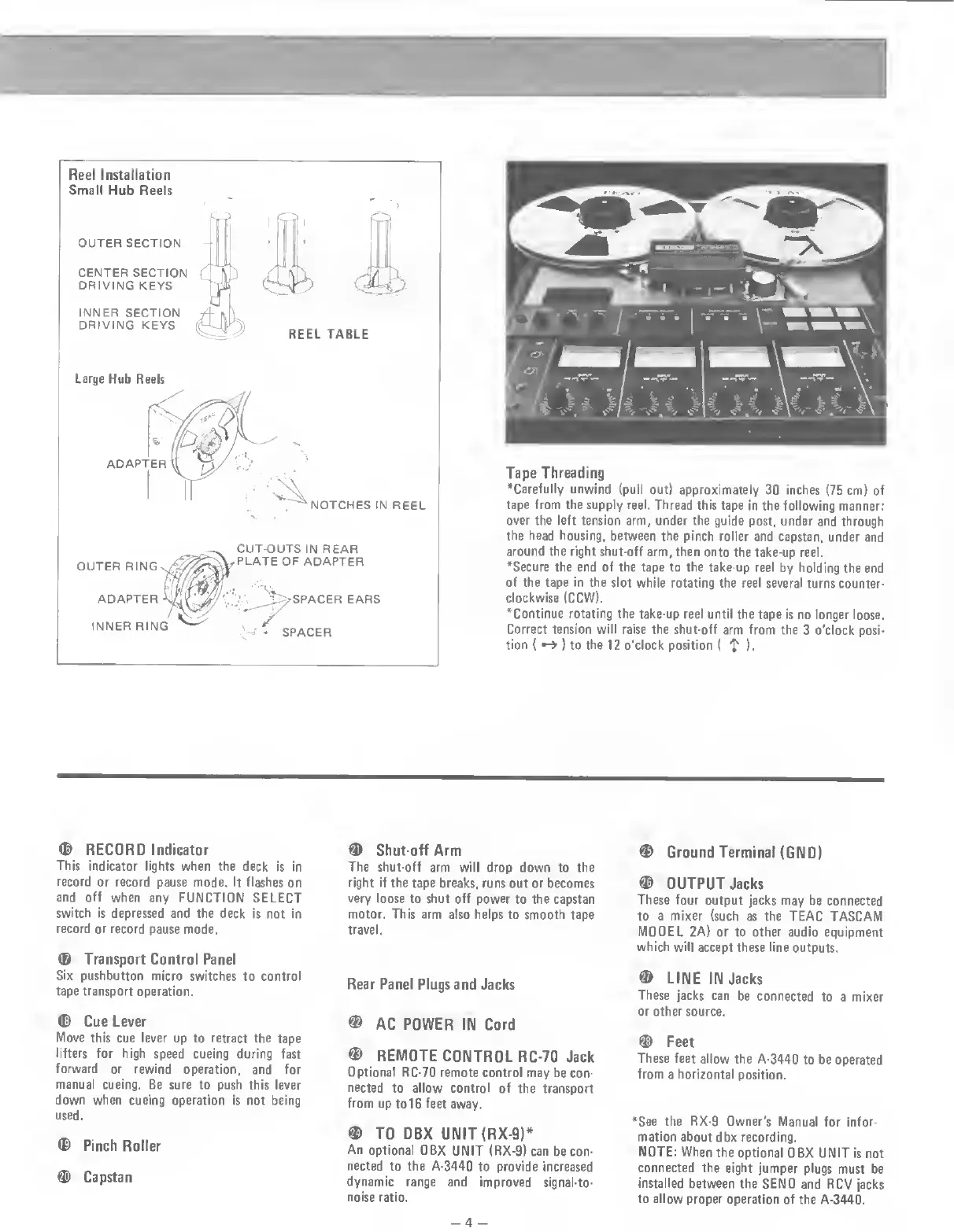
Reel
Installation
Small
Hub
Reels
OUTER
SECTION
CENTER
SECTION
DRIVING
KEYS
INNER
SECTION
DRIVING
KEYS
C
^
C
5
REEL
TABLE
Large
Hub
Reels
NOTCHES
IN
REEL
OUTER
RING
ADAPTER
INNER
RING
CUT-OUTS
IN
REAR
PLATE
OF
ADAPTER
EARS
SPACER
Tape
Threading
•Carefully
unwind
(pull
out)
approximately
30
inches
(75
cm)
of
tape
from
the
supply
reel.
Thread
this
tape
in
the
following
manner:
over
the
left
tension
arm,
under
the
guide
post,
under
and
through
the
head
housing,
between
the
pinch
roller
and
capstan,
under
and
around
the
right
shut-off
arm,
then
onto
the
take-up
reel.
•Secure
the
end
of
the
tape
to
the
take-up
reel
by
holding
the
end
of
the
tape
in
the
slot
while
rotating
the
reel
several
turns
counter¬
clockwise
(CCW).
•Continue
rotating
the
take-up
reel
until
the
tape
is
no
longer
loose.
Correct
tension
will
raise
the
shut-off
arm
from
the
3
o'clock
posi¬
tion
(
)
to
the
12
o'clock
position
(
f
)•
©
RECORD
Indicator
This
indicator
lights
when
the
deck
is
in
record
or
record
pause
mode.
It
flashes
on
and
off
when
any
FUNCTION
SELECT
switch
is
depressed
and
the
deck
is
not
in
record
or
record
pause
mode.
©
Transport
Control
Panel
Six
pushbutton
micro
switches
to
control
tape
transport
operation.
©
Cue
Lever
Move
this
cue
lever
up
to
retract
the
tape
lifters
for
high
speed
cueing
during
fast
forward
or
rewind
operation,
and
for
manual
cueing.
Be
sure
to
push
this
lever
down
when
cueing
operation
is
not
being
used.
©
Pinch
Roller
©
Capstan
©
Shut-off
Arm
The
shut-off
arm
will
drop
down
to
the
right
if
the
tape
breaks,
runs
out
or
becomes
very
loose
to
shut
off
power
to
the
capstan
motor.
This
arm
also
helps
to
smooth
tape
travel.
Rear
Panel
Plugs
and
Jacks
©
AC
POWER
IIM
Cord
©
REMOTE
CONTROL
RC-70
Jack
Optional
RC-70
remote
control
may
be
con¬
nected
to
allow
control
of
the
transport
from
up
to
16
feet
away.
©
TO
DBX
UNIT
(RX-9)*
An
optional
DBX
UNIT
(RX-9)
can
be
con¬
nected
to
the
A-3440
to
provide
increased
dynamic
range
and
improved
signal-to-
noise
ratio.
©
Ground
Terminal
(GND)
©
OUTPUT
Jacks
These
four
output
jacks
may
be
connected
to
a
mixer
(such
as
the
TEAC
TASCAM
MODEL
2A)
or
to
other
audio
equipment
which
will
accept
these
line
outputs.
©
LINE
IN
Jacks
These
jacks
can
be
connected
to
a
mixer
or
other
source.
©
Feet
These
feet
allow
the
A-3440
to
be
operated
from
a
horizontal
position.
•See
the
RX-9
Owner's
Manual
for
infor¬
mation
about
dbx
recording.
NOTE:
When
the
optional
DBX
UNIT
is
not
connected
the
eight
jumper
plugs
must
be
installed
between
the
SEND
and
RCV
jacks
to
allow
proper
operation
of
the
A-3440.
-4
-

Related product manuals