EasyManua.ls Logo

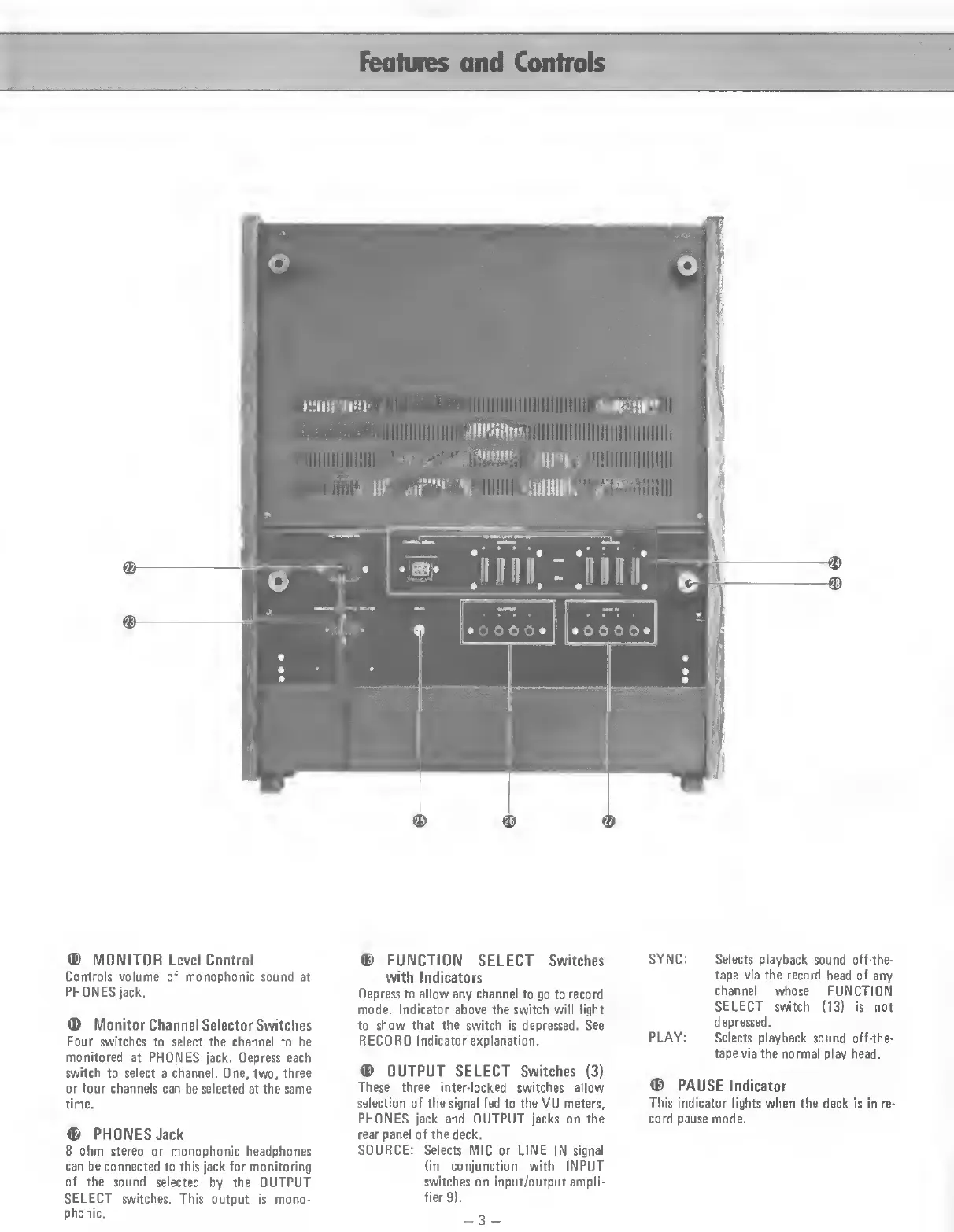
Teac Multitrack Series - Features and Controls

Teac Multitrack Series
14 pages
Print Icon
To Next Page IconTo Next Page
To Previous Page IconTo Previous Page
Loading...
Features
and
Controls
©
MONITOR
Level
Control
Controls
volume
of
monophonic
sound
at
PHONES
jack.
®
Monitor
Channel
Selector
Switches
Four
switches
to
select
the
channel
to
be
monitored
at
PHONES
jack.
Depress
each
switch
to
select
a
channel.
One,
two,
three
or
four
channels
can
be
selected
at
the
same
time.
©
PHONES
Jack
8
ohm
stereo
or
monophonic
headphones
can
be
connected
to
this
jack
for
monitoring
of
the
sound
selected
by
the
OUTPUT
SELECT
switches.
This
output
is
mono¬
phonic.
©
FUNCTION
SELECT
Switches
with
Indicators
Depress
to
allow
any
channel
to
go
to
record
mode.
Indicator
above
the
switch
will
light
to
show
that
the
switch
is
depressed.
See
RECORD
Indicator
explanation.
©
OUTPUT
SELECT
Switches
(3)
These
three
inter-locked
switches
allow
selection
of
the
signal
fed
to
the
VU
meters,
PHONES
jack
and
OUTPUT
jacks
on
the
rear
panel
of
the
deck.
SOURCE:
Selects
MIC
or
LINE
IN
signal
(in
conjunction
with
INPUT
switches
on
input/output
ampli¬
fier
9).
SYNC:
Selects
playback
sound
off-the-
tape
via
the
record
head
of
any
channel
whose
FUNCTION
SELECT
switch
(13)
is
not
depressed.
PLAY:
Selects
playback
sound
off-the-
tape
via
the
normal
play
head.
©
PAUSE
Indicator
This
indicator
lights
when
the
deck
is
in
re¬
cord
pause
mode.
-3
-

Related product manuals