EasyManua.ls Logo

Teac Multitrack Series - SIMUL-SYNC Recording Procedure

Teac Multitrack Series
14 pages
Print Icon
To Next Page IconTo Next Page
To Previous Page IconTo Previous Page
Loading...
I
Recording
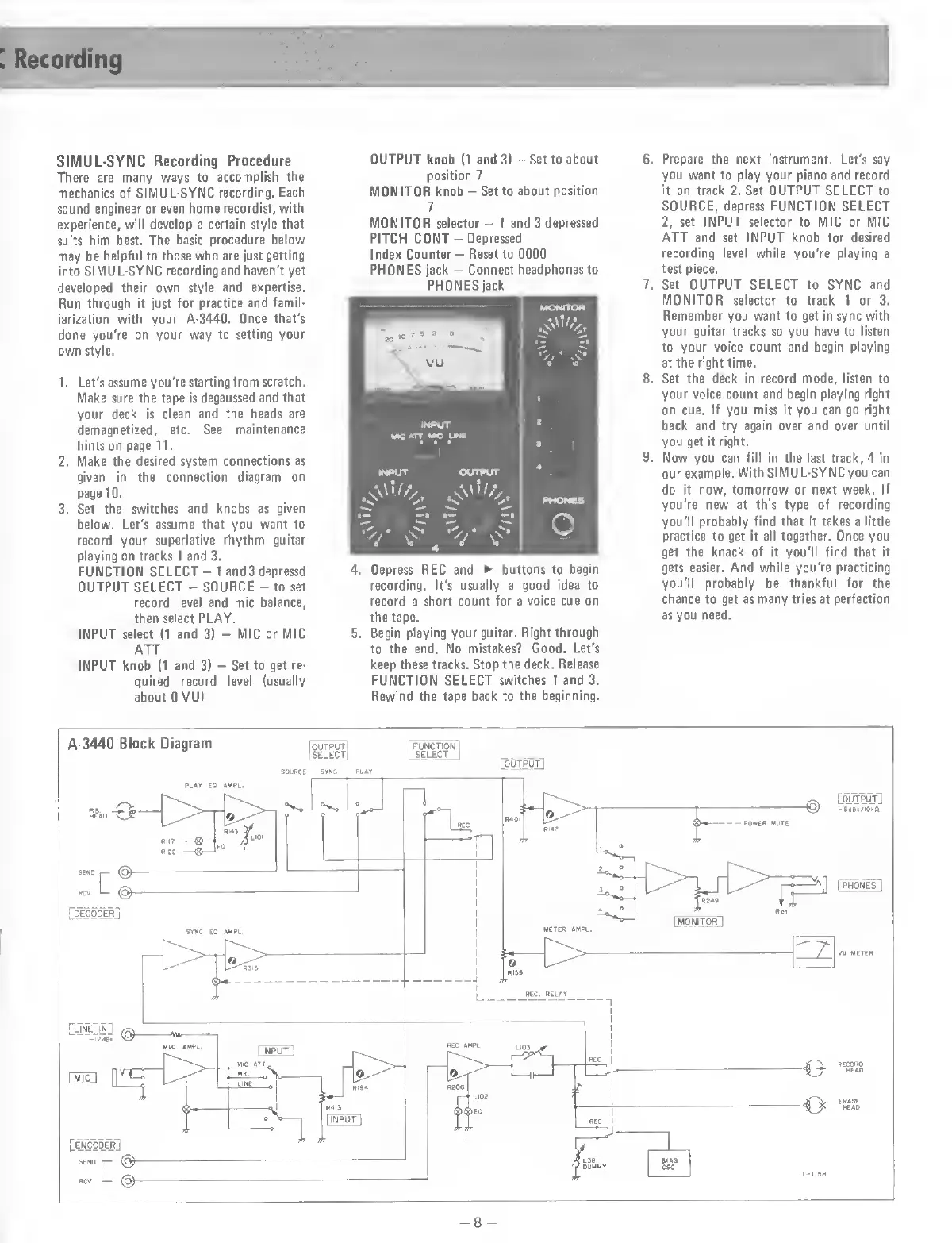
SIMUL-SYNC
Recording
Procedure
There
are
many
ways
to
accomplish
the
mechanics
of
SIMUL-SYNC
recording.
Each
sound
engineer
or
even
home
recordist,
with
experience,
will
develop
a
certain
style
that
suits
him
best.
The
basic
procedure
below
may
be
helpful
to
those
who
are
just
getting
into
SIMUL-SYNC
recording
and
haven't
yet
developed
their
own
style
and
expertise.
Run
through
it
just
for
practice
and
famil¬
iarization
with
your
A-3440.
Once
that's
done
you're
on
your
way
to
setting
your
own
style.
1.
Let's
assume
you're
starting
from
scratch.
Make
sure
the
tape
is
degaussed
and
that
your
deck
is
clean
and
the
heads
are
demagnetized,
etc.
See
maintenance
hints
on
page
11.
2.
Make
the
desired
system
connections
as
given
in
the
connection
diagram
on
page
10.
3.
Set
the
switches
and
knobs
as
given
below.
Let's
assume
that
you
want
to
record
your
superlative
rhythm
guitar
playing
on
tracks
1
and
3.
FUNCTION
SELECT
-
1
and3depressd
OUTPUT
SELECT
-
SOURCE
-
to
set
record
level
and
mic
balance,
then
select
PLAY.
INPUT
select
(1
and
3)
-
MIC
or
MIC
ATT
INPUT
knob
(1
and
3)
-
Set
to
get
re¬
quired
record
level
(usually
about
0
VU)
OUTPUT
knob
(1
and
3)
-
Set
to
about
position
7
MONITOR
knob
-
Set
to
about
position
7
MONITOR
selector
-
1
and
3
depressed
PITCH
CONT
-
Depressed
Index
Counter
-
Reset
to
0000
PHONES
jack
-
Connect
headphones
to
PHONES
jack
4.
Depress
REC
and
â–º
buttons
to
begin
recording.
It's
usually
a
good
idea
to
record
a
short
count
for
a
voice
cue
on
the
tape.
5.
Begin
playing
your
guitar.
Right
through
to
the
end.
No
mistakes?
Good.
Let's
keep
these
tracks.
Stop
the
deck.
Release
FUNCTION
SELECT
switches
1
and
3.
Rewind
the
tape
back
to
the
beginning.
6.
Prepare
the
next
instrument.
Let's
say
you
want
to
play
your
piano
and
record
it
on
track
2.
Set
OUTPUT
SELECT
to
SOURCE,
depress
FUNCTION
SELECT
2,
set
INPUT
selector
to
MIC
or
MIC
ATT
and
set
INPUT
knob
for
desired
recording
level
while
you're
playing
a
test
piece.
7.
Set
OUTPUT
SELECT
to
SYNC
and
MONITOR
selector
to
track
1
or
3.
Remember
you
want
to
get
in
sync
with
your
guitar
tracks
so
you
have
to
listen
to
your
voice
count
and
begin
playing
at
the
right
time.
8.
Set
the
deck
in
record
mode,
listen
to
your
voice
count
and
begin
playing
right
on
cue.
If
you
miss
it
you
can
go
right
back
and
try
again
over
and
over
until
you
get
it
right.
9.
Now
you
can
fill
in
the
last
track,
4
in
our
example.
With
SIMU
L-SYNC
you
can
do
it
now,
tomorrow
or
next
week.
If
you're
new
at
this
type
of
recording
you'll
probably
find
that
it
takes
a
little
practice
to
get
it
all
together.
Once
you
get
the
knack
of
it
you'll
find
that
it
gets
easier.
And
while
you're
practicing
you'll
probably
be
thankful
for
the
chance
to
get
as
many
tries
at
perfection
as
you
need.
-8
-

Related product manuals