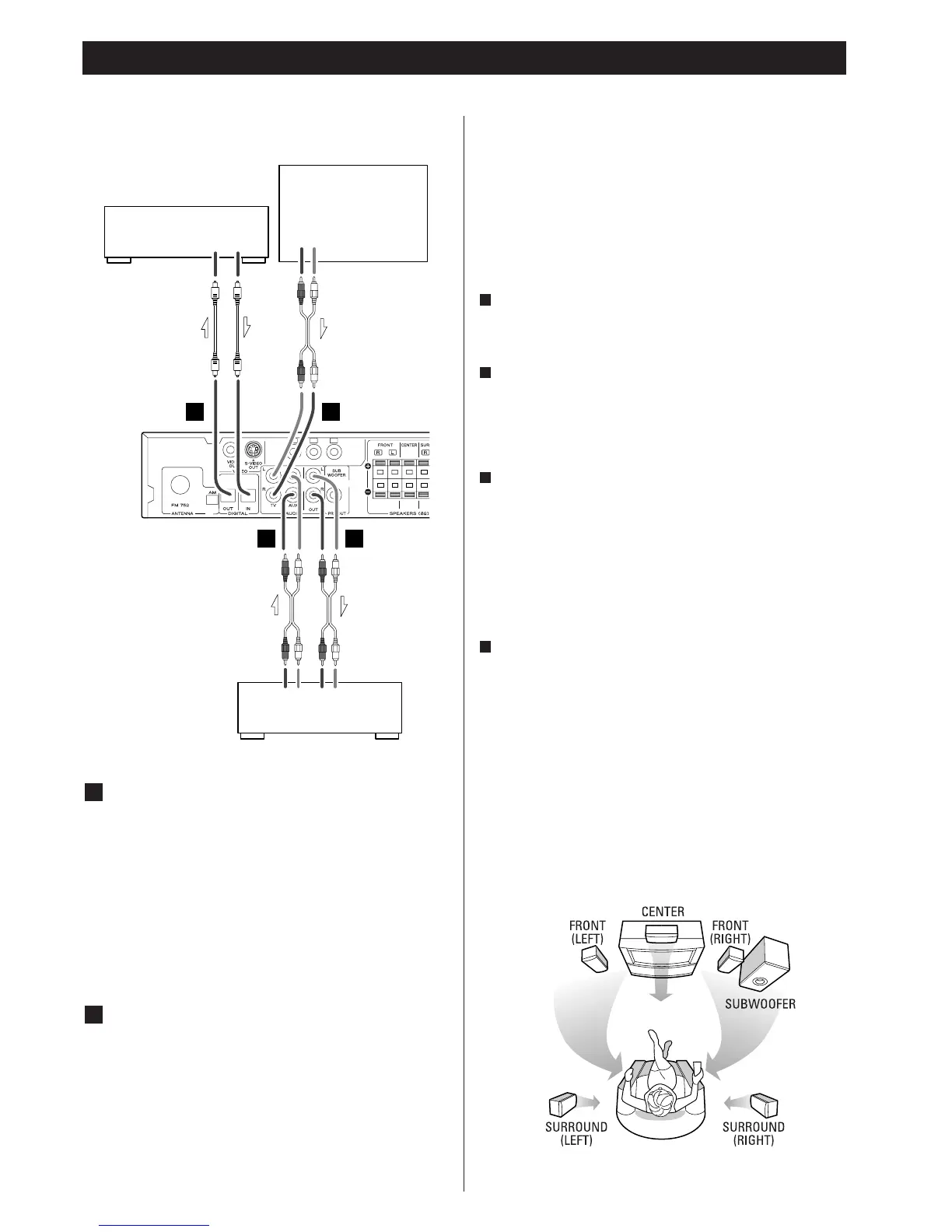
Connection 2
DIGITAL IN/OUT terminal
If the component has an DIGITAL IN terminal, connect them
with an optical cable.
DIGITAL OUT (PL-D2200)
q
DIGITAL IN (CD-R, MD, etc.)
DIGITAL IN (PL-D2200)
q
DIGITAL OUT (CD-R, MD, etc.)
<
Select the proper digital output mode in accordance with
your connection (see page 13).
AUDIO IN/OUT jacks
Analog 2-channel audio signal is input or output from these
jacks. Connect the component with an RCA pin cable.
Make sure to connect :
white plug q
white jack (L: left channel)
red plug q
red jack (R: right channel)
<
If you want to hear sound from a TV, connect the AUDIO
OUT jacks to the LINE IN jacks of TV.
B
A
Connection to audio components Positioning of the Speakers
The positioning of speakers differs according to the size and
acoustics of the listening room. While actually listening to a
program source, try various speaker positions to determine
which layout provides the best surround effect.
Place the speakers connected to "L" to your left, and "R" to your
right.
Front speakers
Place the front speakers in front of the listening position, to the
left and right of a TV.
Center speaker
Place a center speaker between the front speakers, on or
below the TV.
This speaker stabilizes the sound image and helps to recreate
sound motion.
Surround speakers
Install these speakers above the level of the listener's ears, to
the left and right.
Do not install the surround speakers too far behind the
listening position. It might be effective to direct the surround
speakers towards a wall or ceiling to further disperse the
sound.
Subwoofer
Because of variances in room sizes and shapes, you should
experiment with subwoofer placement to maximize the bass
sound at your primary listening position. Bass sound is non-
directional to the human ear so place your subwoofer
anywhere that sounds best from your favorite chair.
<
Before use, turn on the subwoofer by pressing down the
switch on the subwoofer. The indicator on the front turns
green. If no signal is detected within 5 minutes, the indicator
turns red (power standby mode).
<
Using the PHASE switch on the back of the subwoofer select
either 0 or 180 to achieve the most seamless integration of
energy with the front speakers.
D
C
B
A



 To Next Page