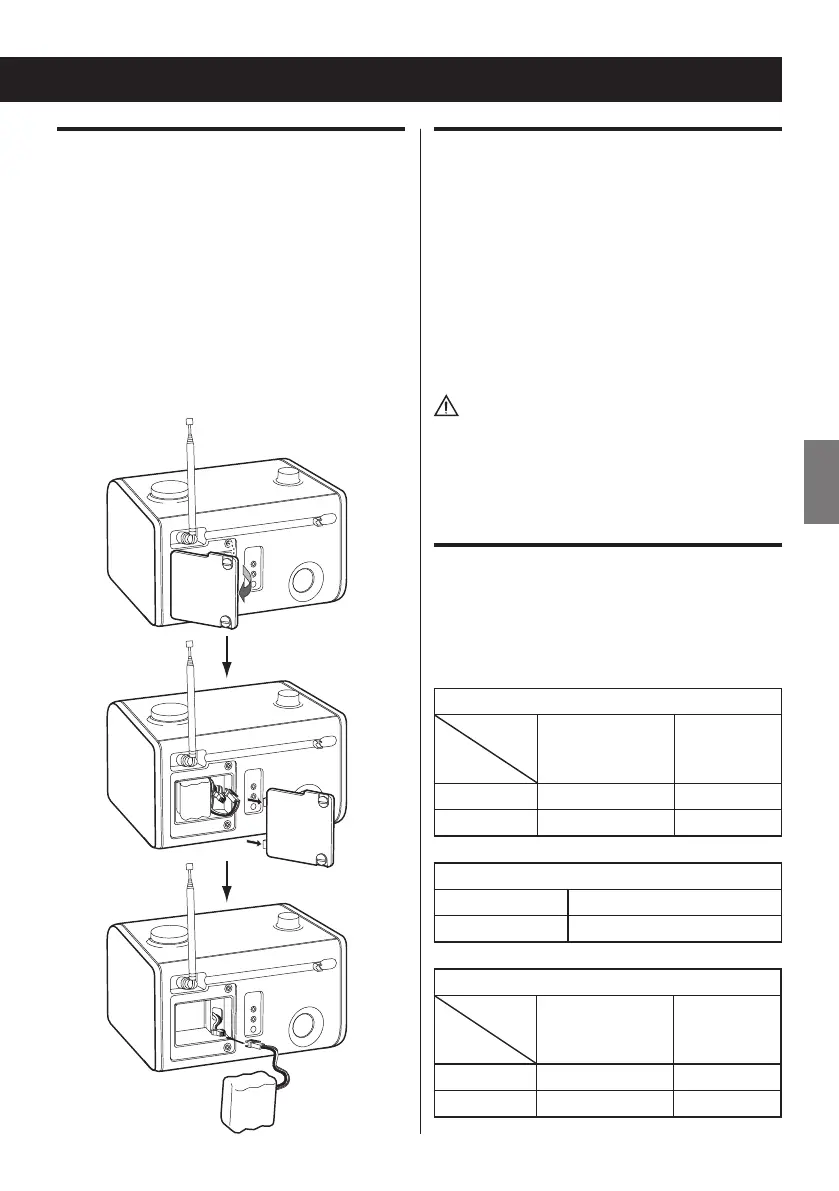
Connecting the battery pack
The battery pack’s connector is not connected
to prevent discharge when you purchase the
unit. Connect the battery pack before using the
unit for the first time.
1. Loosen the two screws on the battery
compartment cover.
2. Remove the cover.
3. Connect the battery pack connector.
4. Replace the cover and tighten the screws.
Replacing the battery pack
When the batteries are exhausted, replace the
battery pack with a new one.
1. Remove the battery compartment cover.
2. Disconnect the battery pack connector,
and remove it.
3. Insert a new battery pack and attach its
connector.
4. Replace the cover and tighten the screws.
Caution:
< Do not heat or disassemble rechargeable
batteries. Never dispose of old batteries by
throwing them into fire or open water.
Checking the battery icon
The battery icon state varies depending on the
AC adaptor, battery pack, and power standby/
on states.
When connected to AC adaptor and batteries
Battery
pack
Unit
Not fully charged
(charging)
Fully charged
Standby icon blinking No icon
ON icon blinking No icon
When connected to AC adaptor only
Standby icon blinking
ON No icon
When connected to batteries only
Battery
pack
Unit
Not fully charged Fully charged
Standby icon shown No icon
ON icon shown No icon



 To Next Page