21
1. Press the TASK button for the Schedule List.
2. If you want to delete an item on the list, use the
buttons to highlight the desired
item, then press the GREEN button.
3. Change the details of the timer. Customise each detail by highlighting them with the
/ buttons, press OK, then pick a choice (where available) with the / buttons.
To set the date, use the NUMBER buttons to key in the time in YYYY-MM-DD format.
To set the start/end times, use the NUMBER buttons to key in the time in 24-hou
r
format.
4. Choos
e “OK” at the bottom of the dialog to confirm and finish editing.
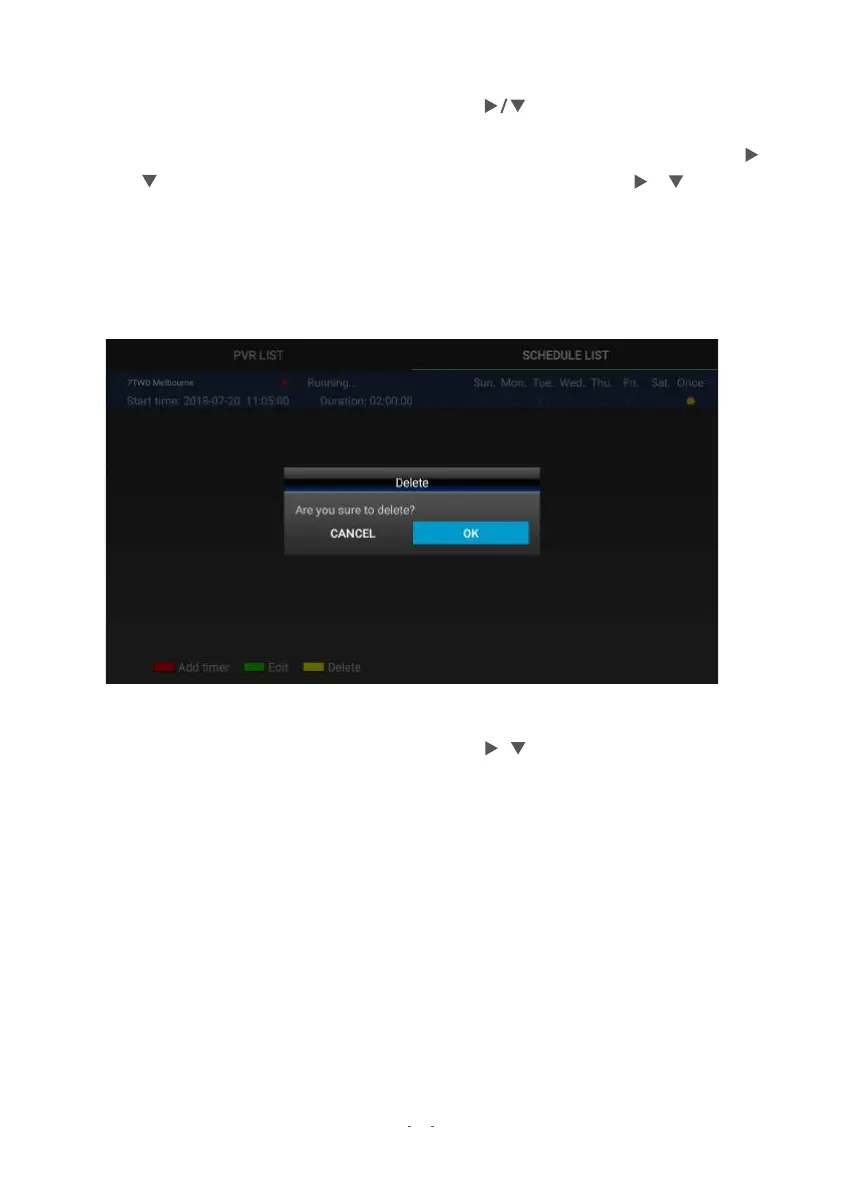
DELETE SCHEDULED ITEMS
1. Press the TASK button for the Schedule List.
2. If you want to delete an item on the list, use the / buttons to highlight the desired
item, then press the YELLOW button.
3. Choose “OK” the bottom of the dialog to confirm and finish deleting.


 To Next Page