EasyManua.ls Logo

Teac V-2RX - Mechanical Checks and Adjustments; Tape Path Adjustment (V-2 RX); Solenoid and Roller Adjustments; Torque and Speed Adjustments

Teac V-2RX
69 pages
Print Icon
To Next Page IconTo Next Page
To Previous Page IconTo Previous Page
Loading...
-V-2RX/V-4RX
4
MECHANICAL
CHECKS
AND
ADJUSTMENTS
4-1
PLAY
SOLENOID
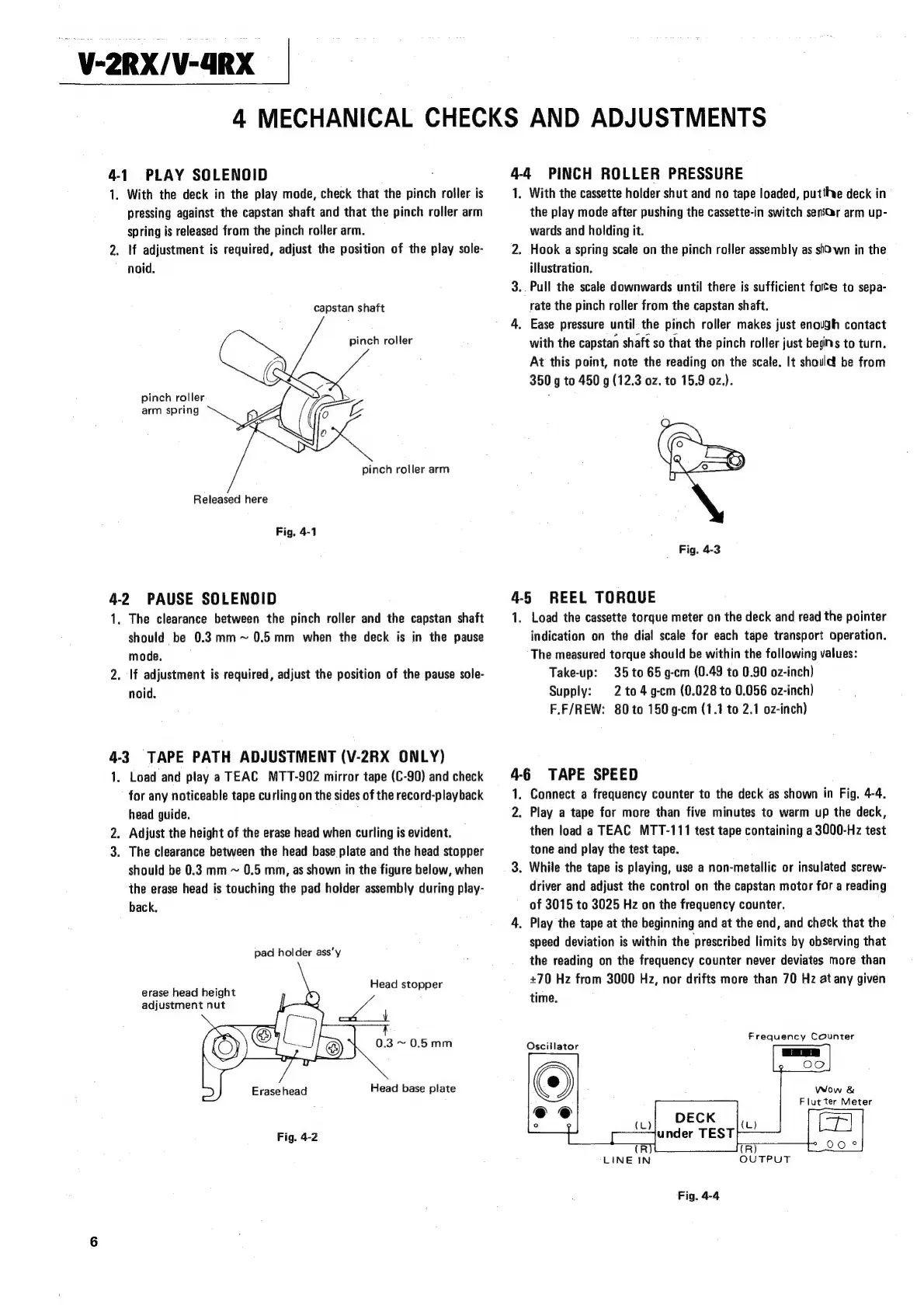
1.
With
the
deck
in
the
play
mode,
check
that
the
pinch
roller
is
pressing
against
the
capstan
shaft
and
that
the
pinch
roller
arm
spring
is
released
from
the
pinch
roller
arm.
2.
lf
adjustment
is
required,
adjust
the
position
of
the
play
sole-
noid.
capstan
shaft
pinch
roller
(3
oO
pinch
roller
>
ge
a
arm
spring
5
eX
pinch
roller
arm
Released
here
Fig.
4-1
4-2
PAUSE
SOLENOID
1.
The
clearance
between
the
pinch
roller
and
the
capstan
shaft
should
be
0.3mm
~
0.5
mm
when
the
deck
is
in
the
pause
mode.
2.
If
adjustment
is
required,
adjust
the
position
of
the
pause
sole-
noid.
4-3
TAPE
PATH
ADJUSTMENT
(V-2RX
ONLY)
1.
Load
and
play
a
TEAC
MTT-902
mirror
tape
(C-90)
and
check
for
any
noticeable
tape
curling
on
the
sides
of
the
record-playback
head
guide.
2.
Adjust
the
height
of
the
erase
head
when
curling
is
evident.
3.
The
clearance
between
the
head
base
plate
and
the
head
stopper
should
be
0.3
mm
~
0.5
mm,
as
shown
in
the
figure
below,
when
the
erase
head
is
touching
the
pad
holder
assembly
during
play-
back.
pad
holder
ass’y
2
Head
stopper
erase
head
height
pe
adjustment
nut
Fig.
4-2
4-4
PINCH
ROLLER
PRESSURE
1.
With
the
cassette
holder
shut
and
no
tape
loaded,
putihe
deck
in
the
play
mode
after
pushing
the
cassette-in
switch
senQr
arm
up-
wards
and
holding
it.
2.
Hook
a
spring
scale
on
the
pinch
roller
assembly
as
siOwn
in
the
illustration.
3..
Pull
the
scale
downwards
until
there
is
sufficient
foie
to
sepa-
rate
the
pinch
roller
from
the
capstan
shaft.
4.
Ease
pressure
until
the
pinch
roller
makes
just
enough
contact
with
the
capstan
shaft
so
that
the
pinch
roller
just
begins
to
turn.
At
this
point,
note
the
reading
on
the
scale.
It
shoulel
be
from
350
g
to
450
g
(12.3
oz.
to
15.9
o2.).
Fig.
4-3
4-5
REEL
TORQUE
1.
Load
the
cassette
torque
meter
on
the
deck
and
read
the
pointer
indication
on
the
dial
scale
for
each
tape
transport
operation.
The
measured
torque
should
be
within
the
following
values:
Take-up:
35
to
65
g-cm
(0.49
to
0.90
oz-inch)
Supply:
2
to
4.g-cm
(0.028
to
0.056
oz-inch)
F.F/REW:
80
to
150
g-cm
(1.1
to
2.1
oz-inch)
4-6
TAPE
SPEED
1.
Connect
a
frequency
counter
to
the
deck
as
shown
in
Fig.
4-4.
2.
Play
a
tape
for
more
than
five
minutes
to
warm
up
the
deck,
then
load
a
TEAC
MTT-111
test
tape
containing
a
3000-Hz
test
tone
and
play
the
test
tape.
3.
While
the
tape
is
playing,
use
a
non-metallic
or
insulated
screw-
driver
and
adjust
the
control
on
the
capstan
motor
for
a
reading
of
3015
to
3025
Hz
on
the
frequency
counter.
4.
Play
the
tape
at
the
beginning
and
at
the
end,
and
check
that
the
speed
deviation
is
within
the
‘prescribed
limits
by
observing
that
the
reading
on
the
frequency
counter
never
deviates
more
than
+70
Hz
from
3000
Hz,
nor
drifts
more
than
70
Hz
at
any
given
time.
Frequency
Counter
Oscillator
Wow
&
Flutter
Meter
DECK
under
TEST
R
LINE
IN
(R)
OUTPUT
Fig.
4-4

Related product manuals