EasyManua.ls Logo

Teac V-8030S - Page 6

Teac V-8030S
45 pages
Print Icon
To Next Page IconTo Next Page
To Previous Page IconTo Previous Page
Loading...
©
CD
direct
Select
Button
(See
page
7.)
@
Cassette
Holder
©
margin
reset
Press
this
button
to
release
the
peak
hold
memory.
©
Multi-Display
Window
@)
Peak
Level
Meter
This
meter
shows
the
peak
level
of
the
input
or
playback
signal.
The
meter
has
a
peak
hold
feature;
when
the
level
exceeds
~7
dB,
the
peak
level
is
held
for
approx.
2
seconds.
(®)
Tape
Type
Indicator
©
Linear
Counter
DOLBY
NR
[B\C)'S'
Indicator
TAPE/SOURCE
Indicator
Indicates
whether
the
deck
is
set
for
tape
or
source
monitoring.
®
BIAS/LEVEL
Indicator
Indicates
the
level
(sensitivity)
and
bias
when
calibration
is
performed.
CD
SYNC
Indicator
Lights
when
CD
synchro
start
is
activated
(H)
Level
Indicator
The
level
shown
by
the
Peak
Level
Meter
is
indicated
numerically
from
0
to
11
dB.
When
the
level
reaches
12
dB
or
more,
the
OVER
indicator
comes
on
and
the
level
11
dB
stays
lit
until
the
power
is
switched
off
or
the
margin
reset
button
is
pressed
@
CD
sync
Button
(See
page
9.)
CD
check
Button
(See
page
7.)
®
clear
Button
Pressing
the
clear
button
resets
the
linear
counter
to
zero
(0000).
®
tape
length
Button
@
RTZ
Button
(See
page
9.)
Remote
Sensor
(Remote
Control
Infrared
Signal
Receptor)
®
rec
mute
Button
(See
page
7.)
@
phones
Jack
Plug
stereo
headphones
into
this
jack
for
private
listening
or
monitoring.
®
Phones
level
Control
Adjust
the
level
of
the
signals
output
from
the
phones
jack.
®
balance
Control
(See
page
7.)
@
power
Switch
Note:
When
switching
the
power
on
again
after
switching
it
off,
be
sure
to
wait
for
more
than
3
seconds.
@
timer
Switch
(See
page
9.)
open/close
Button
Press
thes
button
to
open
or
close
the
Cassette
holder.
As
this
deck
employs
a
power
loading
mechanism,
opening
and
closing
the
cassette
holder
is
possible
only
when
the
power
is
on.
Even
if
the
holder
is
open,
it
closes
automatically
and
the
corresponding
operation
is
performed
when
the
»
button,
etc.
is
pressed.
The
cassette
holder
can
also
be
closed
manually.
®
<
pp:
(CPS)
Button
(See
page
8.)
®
Tape
Travel
Operation
Buttons
©
stop
Button
(m)
©
play
Button
(»>)
©
pause
Button
(m)
@
record
Button
(@)
@
(<<)
rewind
Button
@
(me)
fast-forward
button
®
display
Button
Press
this
button
to
switch
off
the
multi-
display
indication
(illumination).
Operations
Playback
and
Recording
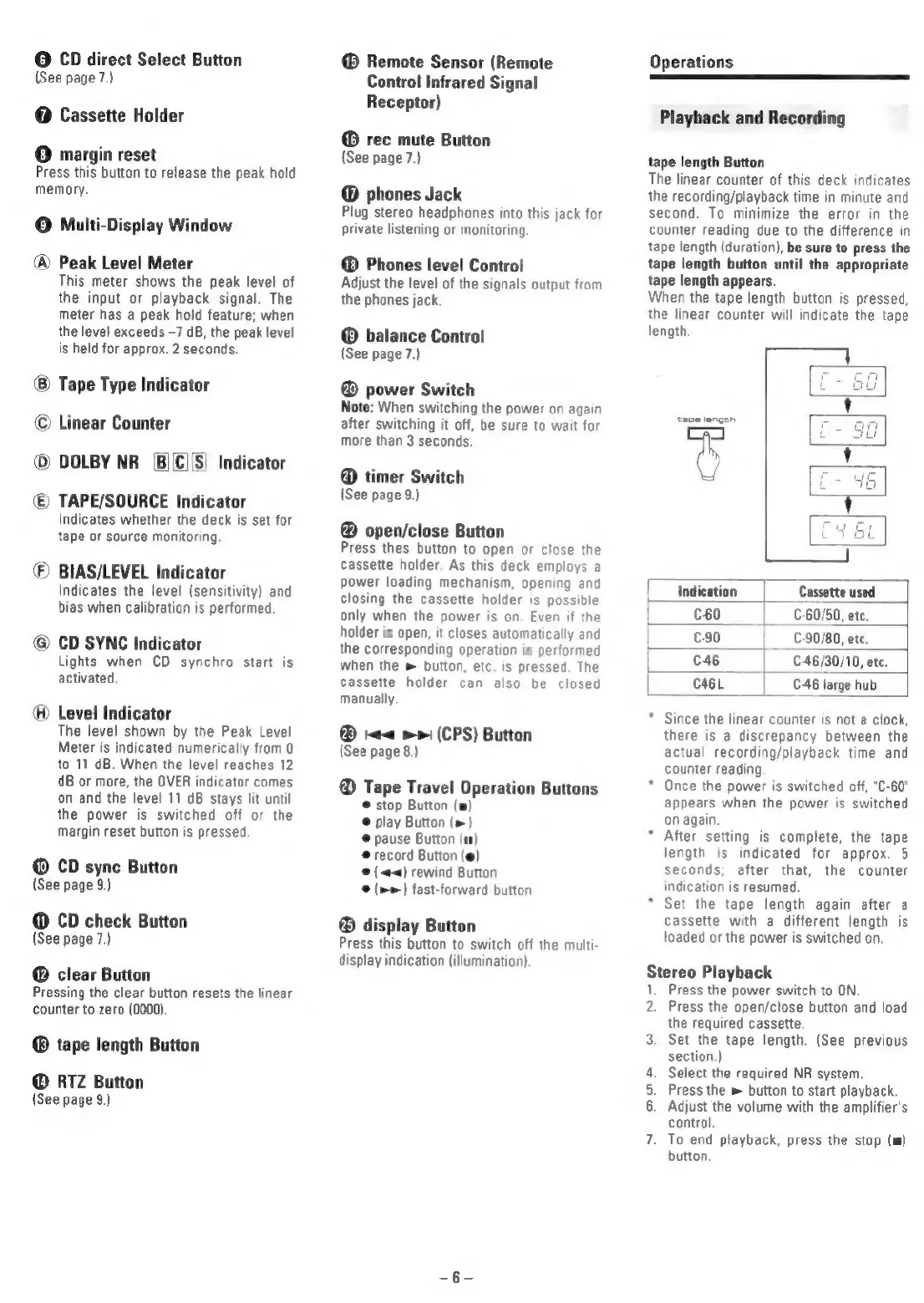
tape
length
Button
The
linear
counter
of
this
deck
indicates
the
recording/playback
time
in
minute
and
second.
To
minimize
the
error
in
the
counter
reading
due
to
the
difference
in
tape
length
(duration),
be
sure
to
press
the
tape
length
button
until
the
appropriate
tape
length
appears.
When
the
tape
length
button
is
pressed,
the
linear
counter
will
indicate
the
tape
length.
{Indication
Cassette
used
C60
|
C-60/50,
ete.
c-90
€-90/80,
etc.
C46
|
C-46/30/10,
ete.
case
C46
large
hub
—_|
Since
the
linear
counter
is
not a
clock,
there
is
a
discrepancy
between
the
actual
recording/playback
time
and
counter
reading
Once
the
power
is
switched
off,
"C-60"
appears
when
the
power
is
switched
on
again.
After
setting
is
complete,
the
tape
length
is
indicated
for
approx.
5
seconds;
after
that,
the
counter
indication
is
resumed.
*
Set the
tape
length
again
after
a
cassette
with
a
different
length
is
loaded
or
the
power
is
switched
on.
Stereo
Playback
1.
Press
the
power
switch
to
ON.
2.
Press
the
open/close
button
and
load
the
required
cassette.
3.
Set
the
tape
length.
(See
previous
section.)
4.
Select
the
required
NR
system
5.
Press
the
»
button
to
start
playback.
6.
Adjust
the
volume
with
the
amplifier's
control
7.
To
end
playback,
press
the
stop
(m)
button.

Related product manuals