EasyManua.ls Logo

Teac V-8030S - Calibration Procedure; Search Function

Teac V-8030S
45 pages
Print Icon
To Next Page IconTo Next Page
To Previous Page IconTo Previous Page
Loading...
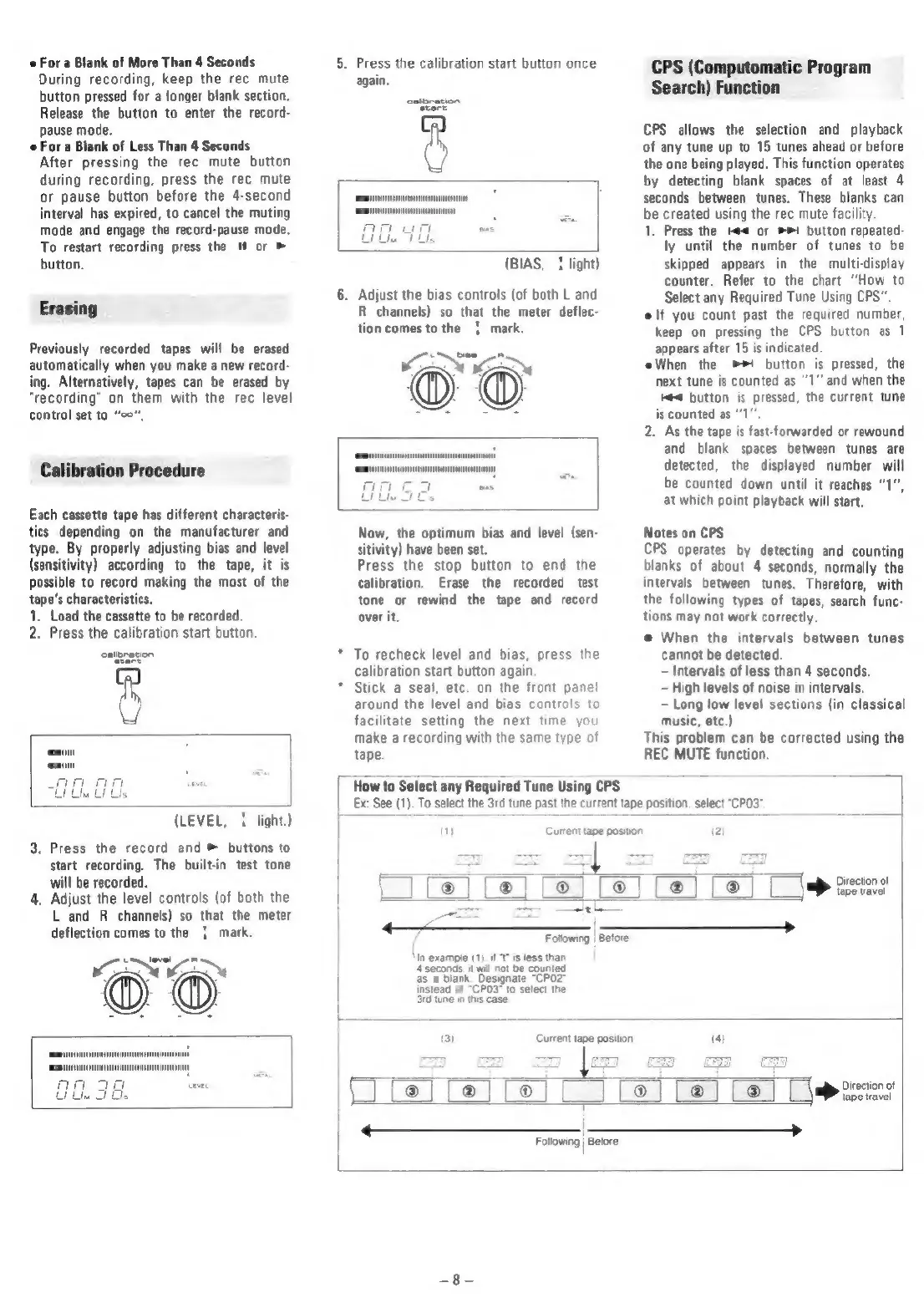
For
a
Blank
of
More
Than
4
Seconds
During
recording,
keep
the
rec
mute
button
pressed
for
a
longer
blank
section.
Release
the
button
to
enter
the
record-
pause
mode.
e
For
a
Blank
of
Less
Than
4
Seconds
After
pressing
the
rec
mute
button
during
recording,
press
the
rec
mute
or
pause
button
before
the
4-second
interval
has
expired,
to
cancel
the
muting
mode
and
engage
the
record-pause
mode.
To
restart
recording
press
the
#
or
>
button.
Erasing
Previously
recorded
tapes
will
be
erased
automatically
when
you
make
a
new
record-
ing.
Alternatively,
tapes
can
be
erased
by
“recording”
on
them
with
the
rec
level
control
set
to
“oo”,
Calibration
Procedure
Each
cassette
tape
has
different
characteris-
tics
depending
on
the
manufacturer
and
type.
By
properly
adjusting
bias
and
level
(sensitivity)
according
to
the
tape,
it
is
possible
to
record
making
the
most
of
the
tape's
characteristics.
1,
Load
the
cassette
to
be
recorded.
2.
Press
the
calibration
start
button.
me
(LEVEL,
{
light.)
.
Press
the
record
and
>
buttons
to
start
recording.
The
built-in
test
tone
will
be
recorded.
Adjust
the
level
controls
(of
both
the
L
and
R
channels)
so
that
the
meter
deflection
comes
to
the
{|
mark.
Gi
®©
o
>
mii
5.
Press
the
calibration
start
button
once
again.
woraci
(BIAS,
{
light)
2
}.
Adjust
the
bias
controls
(of
both
L and
R
channels)
so
that
the
meter
deflec-
tion
comes
to
the
|
mark.
fa
passe
Now,
the
optimum
bias
and
level
(sen-
sitivity)
have
been
set.
Press
the
stop
button
to
end
the
calibration.
Erase
the
recorded
test
tone
or
rewind
the
tape
and
record
over
it.
To
recheck
level
and
bias,
press
the
calibration
start
button
again.
Stick
a
seal,
etc.
on
the
front
panel
around
the
level
and
bias
controls
to
facilitate
setting
the
next
time
you
make
a
recording
with
the
same
type
of
tape.
fe
How
to
Select
any
Required
Tune
Using
CPS
Ex:
See
(1).
To
select
the
3rd
tune
past
the
current
tape
position,
select
"CP03".
a
Current
tape
position
CPS
(Computomatic
Program
Search)
Function
CPS
allows
the
selection
and
playback
of
any
tune
up
to
15
tunes
ahead
or
before
the
one
being
played.
This
function
operates
by
detecting
blank
spaces
of
at
least
4
seconds
between
tunes.
These
blanks
can
be
created
using
the
rec
mute
facility.
1.
Press
the
He<
or
>>!
button
repeated-
ly
until
the
number
of
tunes
to
be
skipped
appears
in
the
multi-display
counter.
Refer
to
the
chart
“How
to
Select
any
Required
Tune
Using
CPS”.
elf
you
count
past
the
required
number,
keep
on
pressing
the
CPS
button
as
1
appears
after
15
is
indicated.
When
the
>!
button
is
pressed,
the
next
tune
is
counted
as
‘1’
and
when
the
¢<
button
is
pressed,
the
current
tune
is
counted
as
“'1'"
2.
As
the
tape
is
fast-forwarded
or
rewound
and
blank
spaces
between
tunes
are
detected,
the
displayed
number
will
be
counted
down
until
it
reaches
"1",
at
which
point
playback
will
start.
Notes
on
CPS
CPS
operates
by
detecting
and
counting
blanks
of
about
4
seconds,
normally
the
intervals
between
tunes.
Therefore,
with
the
following
types
of
tapes,
search
func-
tions
may
not
work
correctly.
@
When
the
intervals
between
tunes
cannot
be
detected.
Intervals
of
less
than
4
seconds.
High
levels
of
noise
in
intervals.
Long
low
level
sections
(in
classical
music,
etc.)
This
problem
can
be
corrected
using
the
REC
MUTE
function.
T
1
T
7
a |
Direction
of
\
|]
Le
®
® @
@
|
tape
travel
eats
c=z
<=
Fotowing
|
Betore
In
example
(1).
is
lees
than
1
sscane
wit
nat
be
Counted
as
a
blank.
Designate
“CP02"
fstead
of
CPOs"
To
select
the
Sid
tune
n
tvs
ease
@)
Current
tape
position
“)
iN
im)
]
[
®
@ @
Direction
of
L
tape
travel
|
Following
|
Before

Related product manuals