EasyManua.ls Logo

Teac V-8030S - Stereo Recording; Adjusting Recording Level

Teac V-8030S
45 pages
Print Icon
To Next Page IconTo Next Page
To Previous Page IconTo Previous Page
Loading...
Stereo
Recording
Recording
from
a
Stereo
System:
1.
2
Press
the
power
switch
to
ON.
Press
the
open/close
button
and
load
the
cassette
on
which
the
recording
is
to
be
made.
Set
the
tape
length.
Select
the
NR
system
used
in
recording.
Press
the
MPX
filter
button
as
required.
Set
the
bias/level
controls
to
their
center
click
positions.
Select
the
input
using
the
CD
direct
select
button.
Note:
Since
the
audio
signal
is
directly
input
to
the
CD
DIRECT
terminals,
clearer
sound
can
be
recorded.
When
the
CD
direct
select
button
is
set
to
on
(.),the
signal
is
input
via
the
CD
DIRECT
terminal
whereas
if it
is
set
to
off
(Cl),
the
signals
are
input
via
the
LINE
IN
terminals.
Play
the
source
to
be
recorded.
Press
the
record
(@)
button.
The
record
and
pause
buttons
light.
10.
Adjust
the
recording
level.
Using
the
rec
level/balance
controls,
adjust
the
recording
level
of
each
channel.
Press
the
»
or
m
button
to
release
the
rec/pause
mode
and
start
recording.
To
end
recording,
press
the
stop
button.
Notes:
©
As
this
deck
has
an
auto
tape
selector
mechanism,
be
sure
to
use
cassettes
with
tape
detection
holes.
If
the
cassette
does
not
have
a
detection
hole,
the
optimum
results
will
not
be
obtained
with
chrome
and
metal
tapes.
©
As
C-120
tapes
are
physically
weak
and
could
become
entangled
in
the
transport
mechanism,
do
not
use
them.
CAUTION:
|
Recording
pre-recorded
tapes,
records,
or
other
published
or
broadcast
material
may
infringe
copyright
laws.
Check
before
recording.
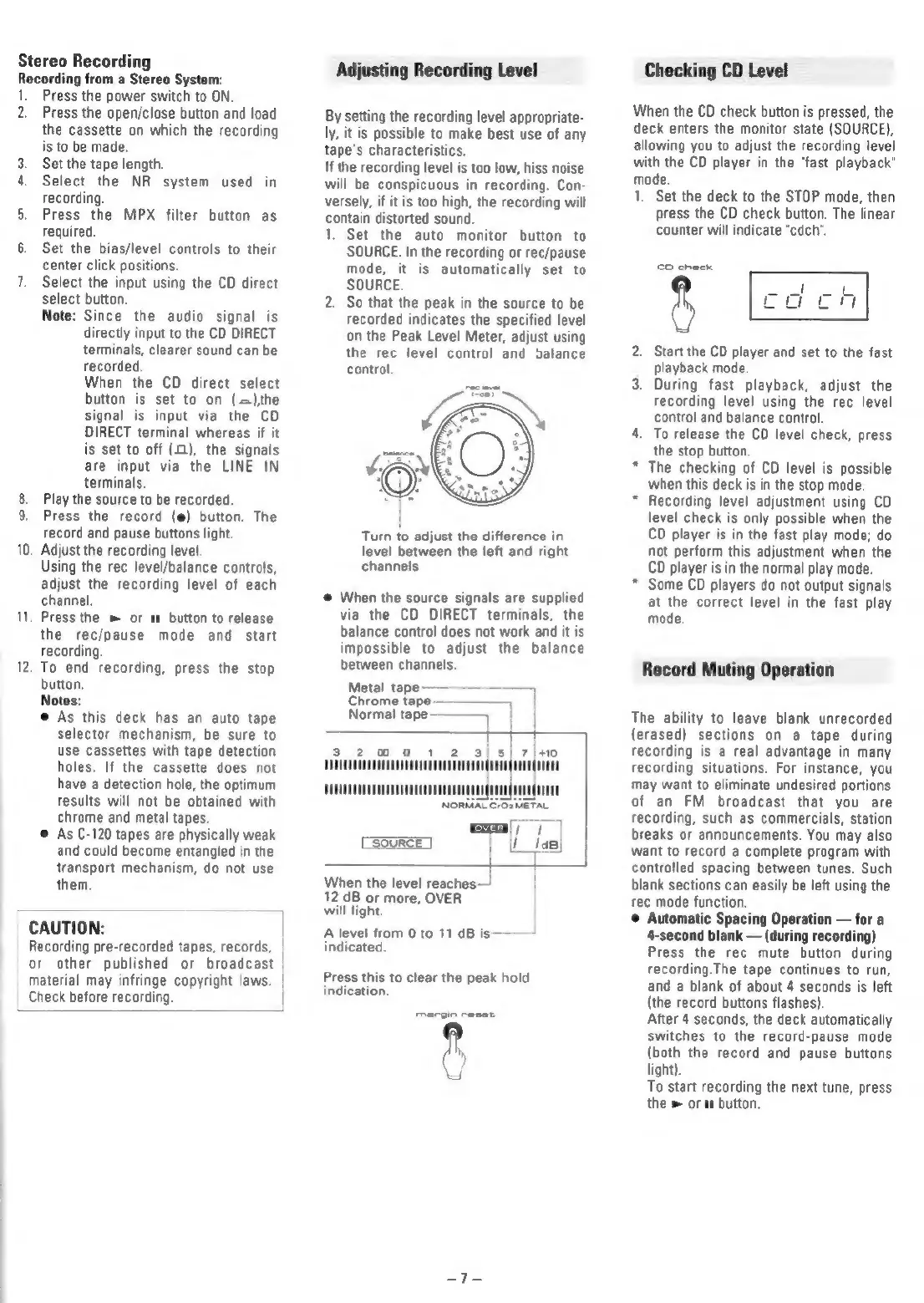
Adjusting
Recording
Level
By
setting
the
recording
level
appropriate-
ly,
it
is
possible
to
make
best
use
of
any
tape's
characteristics.
If
the
recording
level
is
too
low,
hiss
noise
will
be
conspicuous
in
recording.
Con-
versely,
if
it
is
too
high,
the
recording
will
contain
distorted
sound.
1.
Set
the
auto
monitor
button
to
SOURCE.
In
the
recording
or
rec/pause
mode,
it
is
automatically
set
to
SOURCE.
2.
So
that
the
peak
in
the
source
to
be
recorded
indicates
the
specified
level
on
the
Peak
Level
Meter,
adjust
using
the
rec
level
control
and
valance
control.
Turn
to
adjust
the
difference
in
level
between
the
left
and
right
channels
@
When
the
source
signals
are
supplied
via
the
CD
DIRECT
terminals,
the
balance
control
does
not
work
and
it
is
impossible
to
adjust
the
balance
between
channels.
Metal
tape
——
Chrome
tage
————_
Normal
tape
|
3
2
0
0
2
3)
5/
7/
+10
SOT
Co
Ce
SOURCE
When
the
level
reaches—
12
dB
or
more,
OVER
will
light.
A
level
from
0
to
11
dB
is
indicated.
Press
this
to
clear
the
peak
hold
indication.
Checking
CD
Level
When
the
CD
check
button
is
pressed,
the
deck
enters
the
monitor
state
(SOURCE),
allowing
you
to
adjust
the
recording
level
with
the
CD
player
in
the
“fast
playback"
mode.
1.
eon
>
*
Set
the
deck
to
the
STOP
mode,
then
press
the
CD
check
button.
The
linear
counter
will
indicate
“cdch’.
CO
check
Start
the
CD
player
and
set
to
the
fast
playback
mode
During
fast
playback,
adjust
the
recording
level
using
the
rec
level
control
and
balance
control
To
release
the
CD
level
check,
press
the
stop
button.
The
checking
of
CD
level
is
possible
when
this
deck
is
in
the
stop
mode.
Recording
level
adjustment
using
CD
level
check
is
only
possible
when
the
CD
player
is
in
the
fast
play
mode;
do
not
perform
this
adjustment
when
the
CD
player
is
in
the
normal
play
mode.
Some
CD
players
do
not
output
signals
at
the
correct
level
in
the
fast
play
mode.
Record
Muting
Operation
The
ability
to
leave blank
unrecorded
(erased)
sections
on
a
tape
during
recording
is
a
real
advantage
in
many
recording
situations.
For
instance,
you
may
want
to
eliminate
undesired
portions
of
an
FM
broadcast
that
you
are
recording,
such
as
commercials,
station
breaks
or
announcements.
You
may
also
want
to
record
a
complete
program
with
controlled
spacing
between
tunes.
Such
blank
sections
can
easily
be
left
using
the
rec
mode
function.
Automatic
Spacing
Operation
for
a
4-second
blank
(during
recording)
Press
the
rec
mute
button
during
recording.The
tape
continues
to
run,
and
a
blank
of
about
4
seconds
is
left
(the
record
buttons
flashes).
After
4
seconds,
the
deck
automatically
switches
to
the
record-pause
mode
(both
the
record
and
pause
buttons
light).
To
start
recording
the
next
tune,
press
the
»
or
a
button.

Related product manuals