Chapter 5 Pressure/Air Handler Flow Mode
Chapter 5 Pressure/Air Handler Flow Mode
5.1 Mode Summary
(PR/ AH)
measuring air handler
flow rates using a
TrueFlow Air
Handler Flow Meter
pressure (NSOP) and test flow
system operating pressure
(TFSOP) in Pascals.
Total air handler flow in units chosen
(CFM, m
3
/h, l/s). Air flow from the
selected Energy Conservatory test
device is continuously adjusted using
the measured NSOP and TFSOP
Note: Appendix A contains a Quick Guide for using the DG-700 with the Pressure/Air Handler Flow feature.
5.2 Overview of Pressure/Air Handler Flow Mode
The Pressure/Air Handler Flow mode is a specialized mode used to measure air handler flow with a TrueFlow Air
Handler Flow Meter or a Duct Blaster fan. The PR/ AH mode consists of the following 2-step procedure:
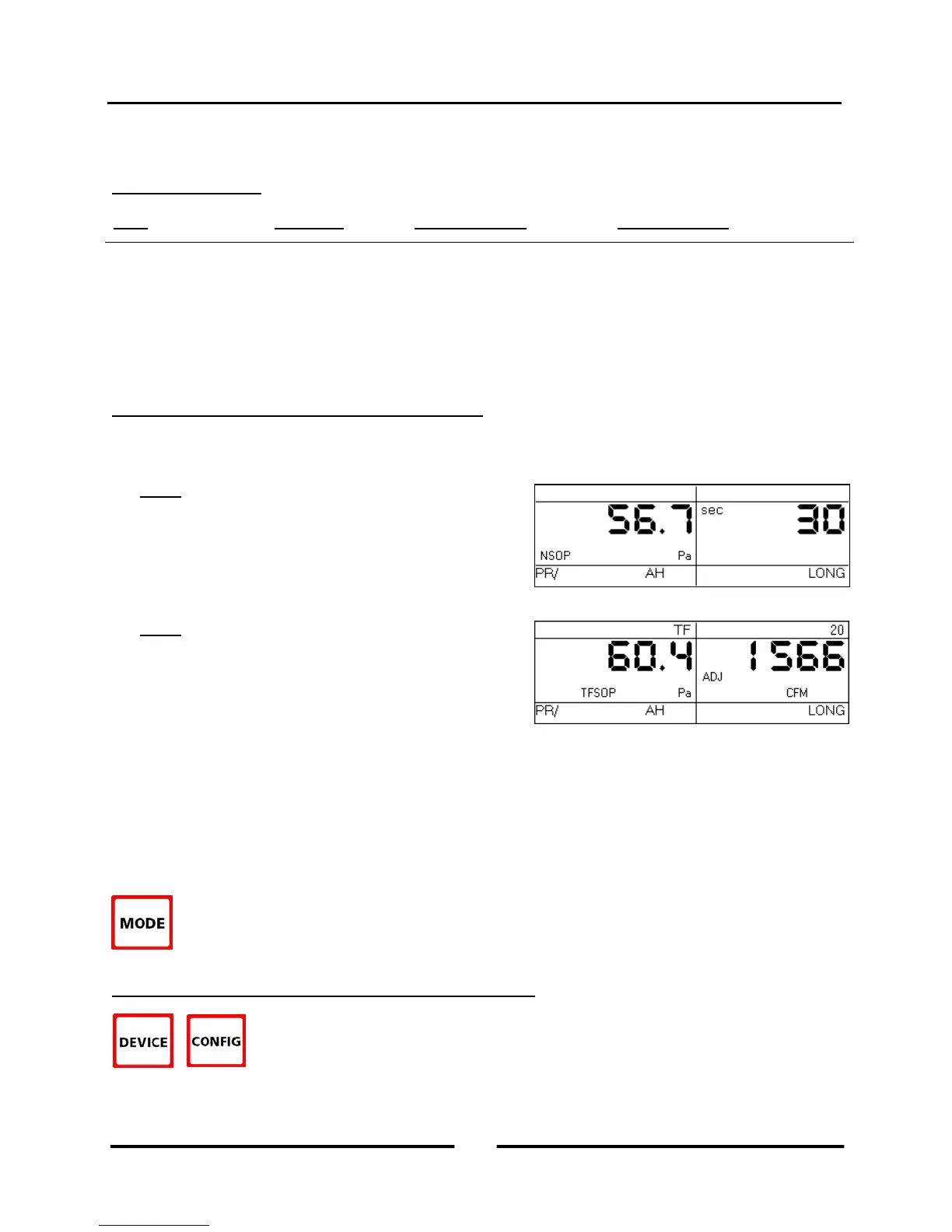
Step 1: When first entering the PR/ AH mode, Channel A
is set up to measure a Normal System Operating Pressure
(NSOP) in the duct system, under normal operating
conditions (e.g. existing filter in place, no test device
installed). Pressing the START button initiates a long-term
average NSOP pressure measurement, and pressing ENTER
records and enters the NSOP reading into the gauge.
Step 2: Once the NSOP measurement is made and entered
into the gauge (Step 1), the gauge is set up to simultaneously
measure the Test Flow System Operating Pressure (TFSOP)
on Channel A, and to display the estimated air handler flow
rate on Channel B. The flow rate estimate shown on
Channel B is determined by continuously adjusting the
measured air flow from the selected test device using a flow resistance correction factor calculated from the
NSOP and TFSOP pressure readings.
(Estimated Air Handler Flow = Test Device Flow x Flow Resistance Correction Factor)
Note: TFSOP is the operating pressure in the duct system, at the same location used for the NSOP reading, with
a TrueFlow Metering Plate or Duct Blaster fan installed. TFSOP is referred to in the TrueFlow Operation
Manual as the TrueFlow System Operating Pressure.
To select the Pressure/Air Handler Flow mode, press the MODE button until the selected operating
mode shown on the gauge display is PR/ AH.
5.3 Changing the Selected Test Device and Configuration
When in the Step 2 part of the PR/ AH procedure, press the DEVICE button to select the
test device being used to measure air handler flow. When using the PR/ AH mode, the
TrueFlow Metering Plates (TF) and the Duct Blaster fans (DB A or DB B) are the only
compatible test devices.
19
Operating Instructions
for the DG700



 To Next Page