Page 17 of 23
6.3 Frame Generator Mode
In this case, the device works as a Frame Generator, sending Ethernet frames on GB1 with
Gigabit Speed and on all 4 BroadR-Reach ports with 100Mbit/s.
In order to select this mode, the DIP switches 3 and 4 must be ON (“11” Value). In addition,
the user can select different functionalities according with the set of DIP switches 5,6,7 and
8:
• DIP Switch 5: When it is ON, it selects the Burst Mode. In this mode, the device
sends 4 packets with the minimum IFG (Interframe Gap). These sequence of packets
consists on a burst of mixed packets -a large frame and three small frames.
• DIP Switch 6: This switch selects the Packets Size. When it is OFF, the size of the
frame will be 64 bytes, and when it is ON, the size will be 1500 bytes. The sizes don’t
include the preamble and CRC.
• DIP Switches 7 and 8: This switches allows to select the FrameRate:
o DIP Switch 7 OFF, DIP Switch 8 OFF (“00”): 5 Mbits/s
o DIP Switch 7 OFF, DIP Switch 8 ON (“01”): 50 Mbits/s
o DIP Switch 7 ON, DIP Switch 8 OFF (“10”): 90 Mbits/s
o DIP Switch 7 ON, DIP Switch 8 ON (“11”): 98 Mbits/s
These rates are used in all BroadR-Reach ports, and in GB2. In Frame Generator mode, this
port will work as Fast Ethernet port, sending status frames -see section 6.3.2.
In GB1, these values are multiplied by 10.
6.3.1 Frame Format
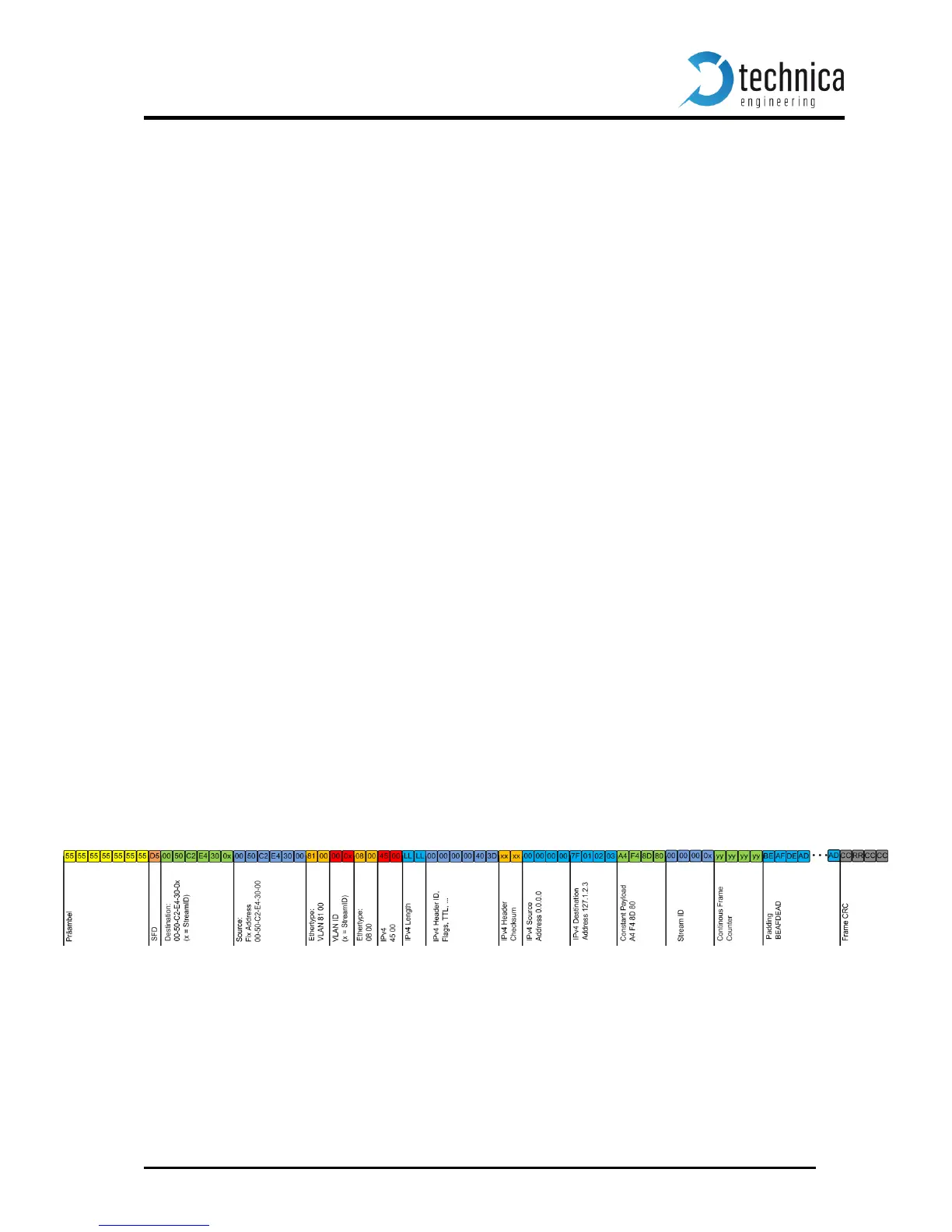
The following image shows the Frame Format transmitted on all BroadR-Reach ports and
GB port in Frame Generator Mode.


 To Next Page