EasyManua.ls Logo

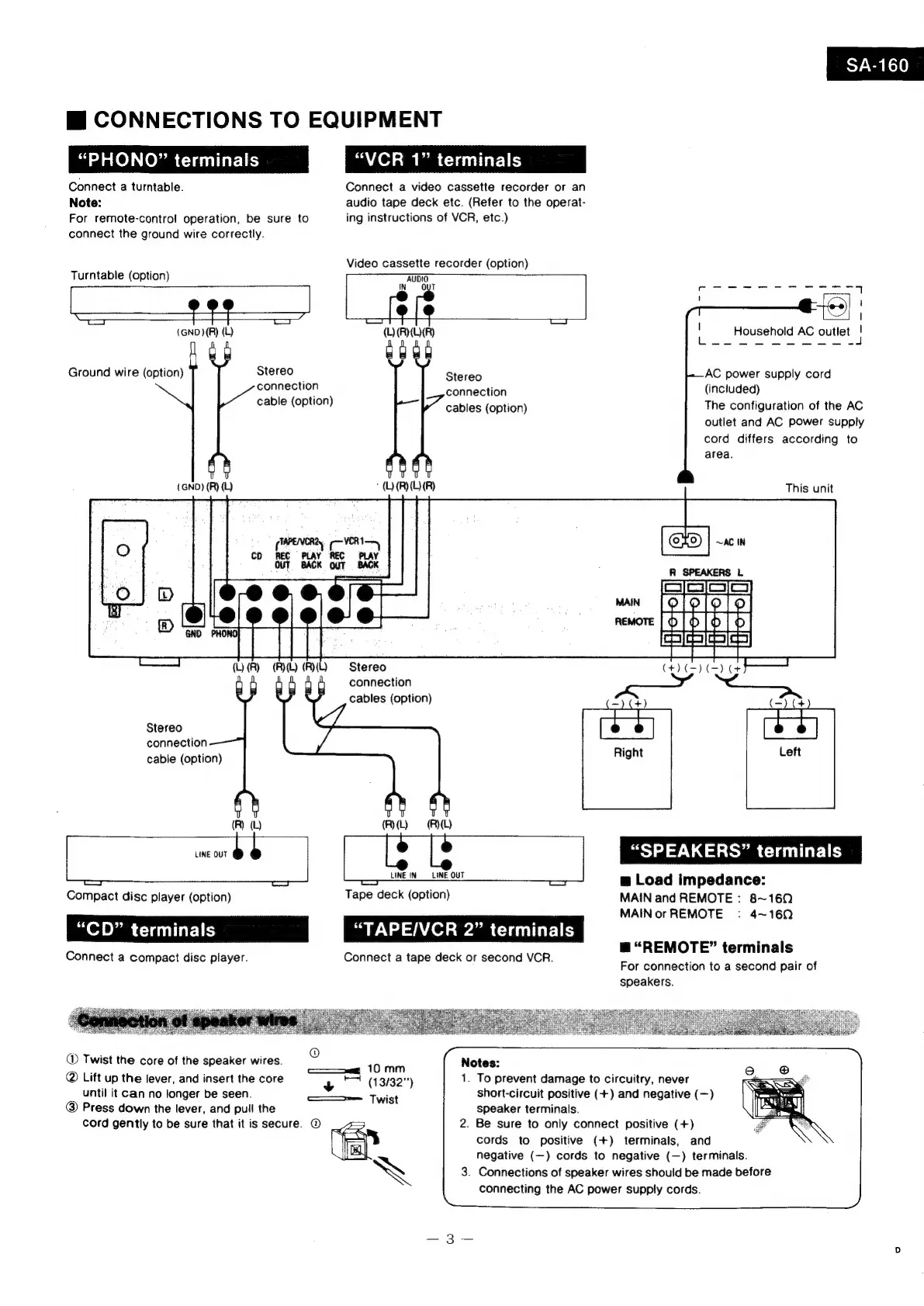
Technics QUARTZ SA-160 - Equipment Connections Guide; Phono Terminal Connection; VCR and Tape Deck Connections; Speaker and Remote Terminal Setup

Technics QUARTZ SA-160
22 pages
Print Icon
To Next Page IconTo Next Page
To Previous Page IconTo Previous Page
Loading...
Mi
CONNECTIONS
TO
EQUIPMENT
“PHONO”
terminals
Connect
a
turntable.
Note:
For
remote-contro!
operation,
be
sure
to
“VCR
1”
terminals
Connect
a
video
cassette
recorder
or
an
audio
tape
deck
etc.
(Refer
to
the
operat-
ing
instructions
of
VCR,
etc.)
Video
cassette
recorder
(option)
connect
the
ground
wire
correctly.
Turntable
(option)
ae
ers
EES
2
(GND)
(R)
(L)
Ground
wire
(option)
Stereo
connection
cable
(option)
(GND)
(R)
(L)
iN
CD
REC
PLAY
REC
PLAY
OUT
BACK
OUT
Stereo
connection
Stereo
connection
cable
(option)
(R)
(UY
(A)
AUDIO
OUT
(O(ROR)
TT
“ORO
A)
cables
(option)
AC
power
supply
cord
(included)
The
configuration
of
the
AC
outlet
and
AC
power
supply
cord
differs
according
to
area.
Stereo
connection
cables
(option)
This
unit
Lolo
[ol
o|
P11]
2]
eIeS|eS|cs
a
(RL)
LINE
OUT
b
ie
Compact
disc
player
(option)
“CD”
terminals
Connect
a
compact
disc
player.
LINE
IN
Tape
deck
(option)
“TAPE/VCR
2”
terminals
Connect
a
tape
deck
or
second
VCR.
“SPEAKERS”
terminals
mw
Load
impedance:
MAIN
and
REMOTE
:
8~169
MAIN
or
REMOTE
:
4~160
LINE
OUT
m@
“REMOTE”
terminals
For
connection
to
a
second
pair
of
speakers.
®
Twist
the
core
of
the
speaker
wires.
2
@
Lift
up
the
lever,
and
insert
the
core
until
it
Can
no
longer
be
seen.
@
Press
down
the
lever,
and
pull
the
cord
gently
to
be
sure
that
it
is
secure.
@
10
mm
+
*T
(13/32")
=
Twist
ack
Notes:
1.
To
prevent
damage
to
circuitry,
never
short-circuit
positive
(+)
and
negative
(—)
speaker
terminals.
2.
Be
sure
to
only
connect
positive
(+)
cords
to
positive
(+)
terminals,
and
negative
(—)
cords
to
negative
(—)
terminals.
3.
Connections
of
speaker
wires
should
be
made
before
connecting
the
AC
power
supply
cords.

Related product manuals