EasyManua.ls Logo

Technics QUARTZ SA-R330 - Page 3

Technics QUARTZ SA-R330
28 pages
Print Icon
To Next Page IconTo Next Page
To Previous Page IconTo Previous Page
Loading...
Mi
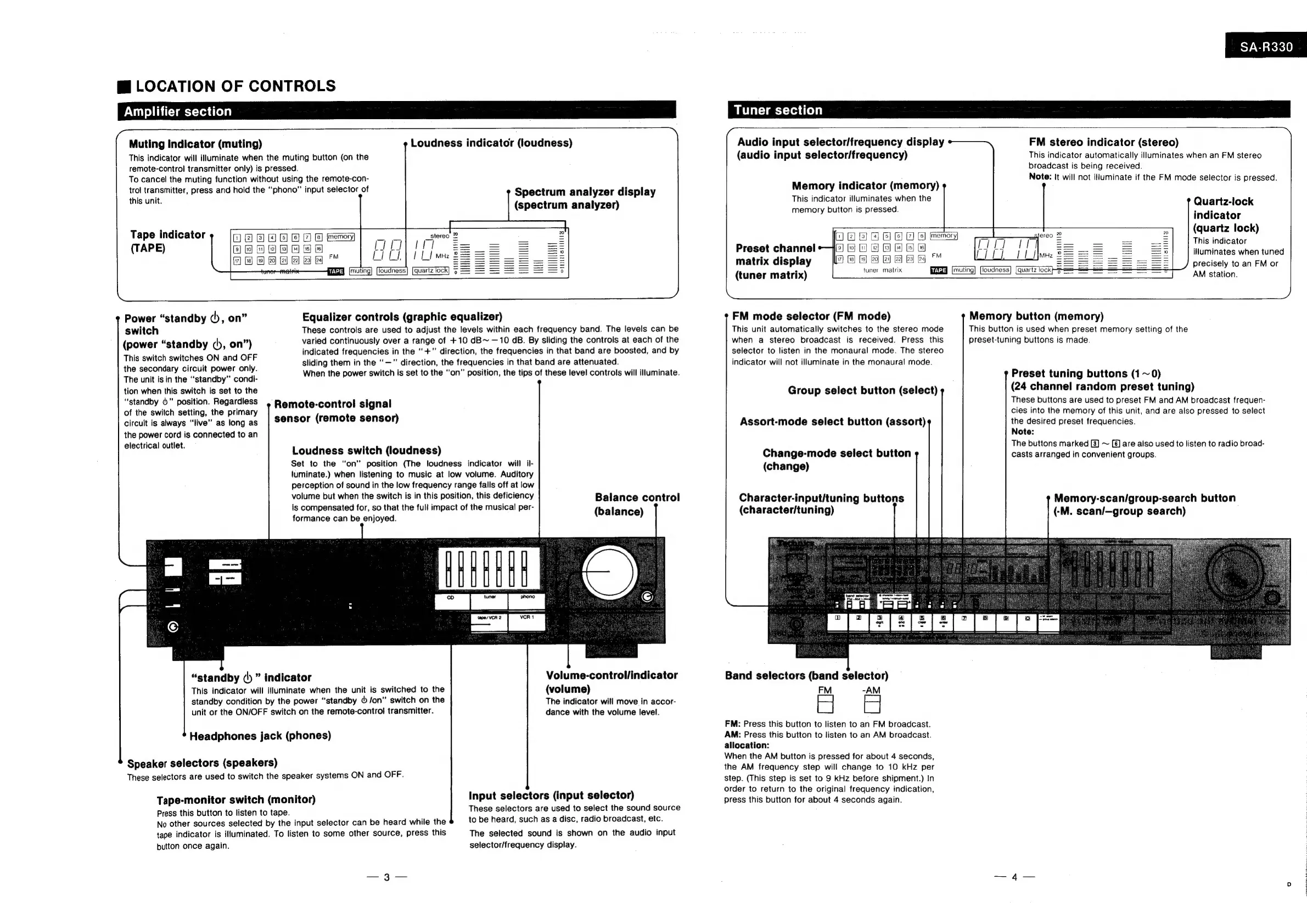
LOCATION
OF
CONTROLS
Amplifier
section
Muting
Indicator
(muting)
Loudness
indicator
(loudness)
This
indicator
will
illuminate
when
the
muting
button
(on
the
remote-control
transmitter
only)
is
pressed.
To
cancel
the
muting
function
without
using
the
remote-con-
trol
transmitter,
press
and
hold
the
‘‘phono”
input
selector
of
this
unit.
Spectrum
analyzer
display
(spectrum
analyzer)
Tape
indicator
memory
(TAPE)
HNSHNES
°
Power
“standby
¢),
on”
Equalizer
controls
(graphic
equalizer)
switch
These
controls
are
used
to
adjust
the
levels
within
each
frequency
band.
The
levels
can
be
(power
“standby
,
on”)
varied
continuously
over
a
range
of
+10
dB~
—10
aB.
By
sliding
the
controls
at
each
of
the
This
switch
switches
ON
and
OFF
indicated
frequencies
in
the
“+”
direction,
the
frequencies
in
that
band
are
boosted,
and
by
the
secondary
circuit
power
only.
sliding
them
in
the
“—"
direction,
the
frequencies
in
that
band
are
attenuated.
2.
:
The
unit
is in
the
“standby”
condi-
When
the
power
switch
is
set
to
the
“on”
position,
the
tips
of
these
level
controls
will
illuminate.
tion
when
this
switch
is
set
to
the
“standby
6"
position.
Regardless
of
the
switch
setting,
the
primary
circuit
is
always
“live”
as
long
as
the
power
cord
is
connected
to
an
electrical
outlet.
Remote-control
signal
sensor
(remote
sensor)
Loudness
switch
(loudness)
Set
to
the
“on”
position
(The
loudness
indicator
will
il-
ltuminate.)
when
listening
to
music
at
low
volume.
Auditory
perception
of
sound
in
the
low
frequency
range
falls
off
at
low
volume
but
when
the
switch
is
in
this
position,
this
deficiency
is
compensated
for,
so
that
the
full
impact
of
the
musical
per-
formance
can
be enjoyed.
Balance
control
(balance)
,
Volume-control/indicator
(volume)
The
indicator
will
move
in
accor-
dance
with
the
volume
level.
“standby
(|)
indicator
This
indicator
will
illuminate
when
the
unit
is
switched
to
the
standby
condition
by
the
power
“standby
&
Jon”
switch
on
the
unit
or
the
ON/OFF
switch
on
the
remote-control
transmitter.
Headphones
jack
(phones)
Speaker
selectors
(speakers)
These
selectors
are
used
to
switch
the
speaker
systems
ON
and
OFF.
Input
selectors
(input
selector)
These
selectors
are
used
to
select
the
sound
source
to
be
heard,
such
as
a
disc,
radio
broadcast,
etc.
The
selected
sound
is
shown
on
the
audio
input
selector/frequency
display.
Tape-monitor
switch
(monitor)
Press
this
button
to
listen
to
tape.
No
other
sources
selected
by
the
input
selector
can
be
heard
while
the
tape
indicator
is
illuminated.
To
listen
to
some
other
source,
press
this
button
once
again.
SA-R330
Tuner
section
Audio
input
selector/frequency
display
(audio
input
selector/frequency)
FM
stereo
indicator
(stereo)
This
indicator
automatically
illuminates
when
an
FM
stereo
broadcast
is
being
received.
Note:
It
will
not
illuminate
if
the
FM
mode
selector
is
pressed.
Memory
indicator
(memory)
This
indicator
illuminates
when
the
memory
button
is
pressed.
Quartz-lock
indicator
(quartz
lock)
This
indicator
iNuminates
when
tuned
1
2
3
4
5
6
7
8]
jmemory|
Preset
channel
9]
fo}
bo)
2}
(5)
[4)
(5)
6
|
Hesiliis
OMNIS
S
. .
FM
MHz
7}
118}
$19}
j20)
}21)
[22] |23)
j24
;
matrix
display
fs
precisely
to
an
FM
or
tuner
matrix
beta
[muting]
|loudness]
|
quartz
tock
(tuner
matrix)
AM
station.
FM
mode
selector
(FM
mode)
This
unit
automatically
switches
to
the
stereo
mode
when
a
stereo
broadcast
is
received.
Press
this
selector
to
listen
in
the
monaural
mode.
The
stereo
indicator
will
not
illuminate
in
the
monaural
mode.
Memory
button
(memory)
This
button
is
used
when
preset
memory
setting
of
the
preset-tuning
buttons
is
made.
Preset
tuning
buttons
(1
~
0)
(24
channel
random
preset
tuning)
These
buttons
are
used
to
preset
FM
and
AM
broadcast
frequen-
cies
into
the
memory
of
this
unit,
and
are
also
pressed
to
select
the
desired
preset
frequencies.
Note:
The
buttons
marked
[3]
~
[6]
are
also
used
to
listen
to
radio
broad-
casts
arranged
in
convenient
groups.
Group
select
button
(select)
Assort-mode
select
button
(assort)
Change-mode
select
button
(change)
Character-input/tuning
buttons
(character/tuning)
Memory-scan/group-search
button
(-M.
scan/—group
search)
Band
selectors
(band
selector)
FM
-AM
FM:
Press
this
button
to
listen
to
an
FM
broadcast.
AM:
Press
this
button
to
listen
to
an
AM
broadcast.
allocation:
When
the
AM
button
is
pressed
for
about
4
seconds,
the
AM
frequency
step
will
change
to
10
kHz
per
step.
(This
step
is
set
to
9
kHz
before
shipment.)
In
order
to
return
to
the
original
frequency
indication,
press
this
button
for
about
4
seconds
again.

Related product manuals