EasyManua.ls Logo

Technics QUARTZ SA-R330 - Page 9

Technics QUARTZ SA-R330
28 pages
Print Icon
To Next Page IconTo Next Page
To Previous Page IconTo Previous Page
Loading...
.
SA-R330
Mi
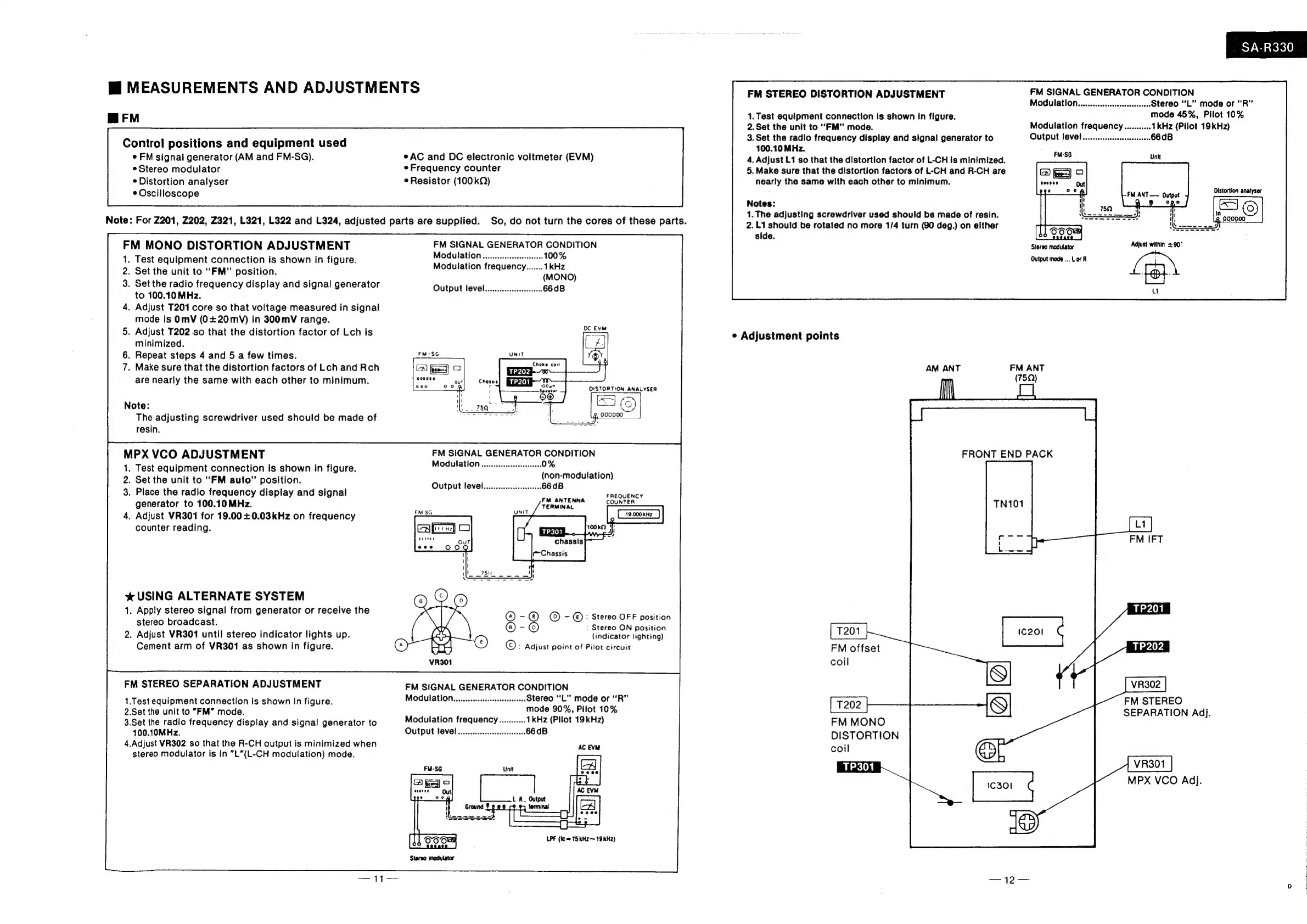
MEASUREMENTS
AND
ADJUSTMENTS
FM
STEREO
DISTORTION
ADJUSTMENT
FM
SIGNAL
GENERATOR
CONDITION
Modulation
Stereo
“L”
mode
or
"'R”
m@FM
1.
Test
equipment
connection
Is
shown
in
figure.
mode
45%,
Pilot
10%
2.
Set the
unit
to
“FM”
mode.
Modulation
frequency
eae
2
3.
Set
the
radio
f
cy
displ
d
signal
generator
to
Output
level
Control
positions
and
equipment
used
SaadGMiias
Co
¢
FM
signal
generator
(AM
and
FM-SG).
*AC
and
DC
electronic
voltmeter
(EVM)
4.
Adjust
L1
so
that
the
distortion
factor
of
L-CH
is
minimized.
¢
Stereo
modulator
«Frequency
counter
5.
Make
sure
that
the
distortion
factors
of
L-CH
and
R-CH
are
©
Distortion
analyser
¢
Resistor
(100kQ)
nearly
the
same
with
each
other
to
minimum.
*
Oscilloscope
Notes:
;
:
1.The
adjusting
screwdriver
used
should
be
made
of
resin.
Note:
For
2201, Z202,
Z321,
L321,
L322
and
L324,
adjusted
parts
are
supplied.
So,
do
not
turn
the
cores
of
these
parts.
2.L1
should
be
rotated
no
more
1/4
turn
(90
deg.)
on
elther
side.
Stereo
modulator
Output
mode...
Lor
R
FM
MONO
DISTORTION
ADJUSTMENT
FM
SIGNAL
GENERATOR
CONDITION
1.
Test
equipment
connection
is
shown
in
figure.
Modulation
2.
Set
the
unit
to
“FM”
position.
Modulation
tequeney
MONG)
3.
Set
the
radio
frequency
display
and
signal
generator
Output
level
to
100.10
MHz.
4.
Adjust
T201
core
so
that
voltage
measured
in
signal
mode
is
OmV
(0+20mV)
in
300mV
range.
.
Adjust
T202.so
that
the
distortion
factor
of
Lch
is
=
¢
Adjustment
points
minimized.
.
Repeat
steps
4
and
5
a
few
times.
a
.
Make
sure
that
the
distortion
factors
of
Lch
and
Rch
aga
5
AM
ANT
FM
ANT
8
(75Q)
are
nearly
the
same
with
each
other
to
minimum.
Note:
The
adjusting
screwdriver
used
should
be
made
of
resin.
MPX
VCO
ADJUSTMENT
FRONT
END
PACK
.
Test
equipment
connection
is
shown
in
figure.
.
Set
the
unit
to
“FM
auto”
position.
.
Place
the
radio
frequency
display
and
signal
FAROUENCY.
generator
to
100.10
MHz.
TERMINAL
=
COUNTER
.
Adjust
VR301
for
19.00+0.03kHz
on
frequency
counter
reading.
iar)
O
%*
USING
ALTERNATE
SYSTEM
1.
Apply
stereo
signal
from
generator
or
receive
the
_
stereo
broadcast.
5
©
2.
Adjust
VR301
until
stereo
indicator
lights
up.
cS
(indicator
lighting)
Cement
arm
of
VR301
as
shown
in
figure.
oO
5:
Adjust
point
of
Pilot
circuit
-—
©:
Stereo
OFF
position
:
Stereo
ON
position
FM
offset
coil
Modulation
Stereo
“L”
mode
or
“R”
2.Set
the
unit
to
“FM”
mode.
mode
90%,
Pilot
10%
3.Set
the
radio
frequency
display
and
signal
generator
to
Modulation
frequency
1kHz
(Pilot
19kHz)
FM
MONO
100.10MHz.
Output
level
DISTORTION
4.Adjust
VR302
so
that
the
R-CH
output
is
minimized
when
coil
stereo
modulator
is
in
“L”(L-CH
modulation)
mode.
FM
STEREO
1.Test
equipment
connection
is
shown
in
figure.
SEPARATION
Adj.
MPX
VCO
Adj.
LPF
(fc
=
15
kHz
~
19
kHz)

Related product manuals