EasyManua.ls Logo

Technics RS-273US - Page 11

Technics RS-273US
35 pages
Print Icon
To Next Page IconTo Next Page
To Previous Page IconTo Previous Page
Loading...
MEASUREMENT
&
ADJUSTMENT
REMARKS
.
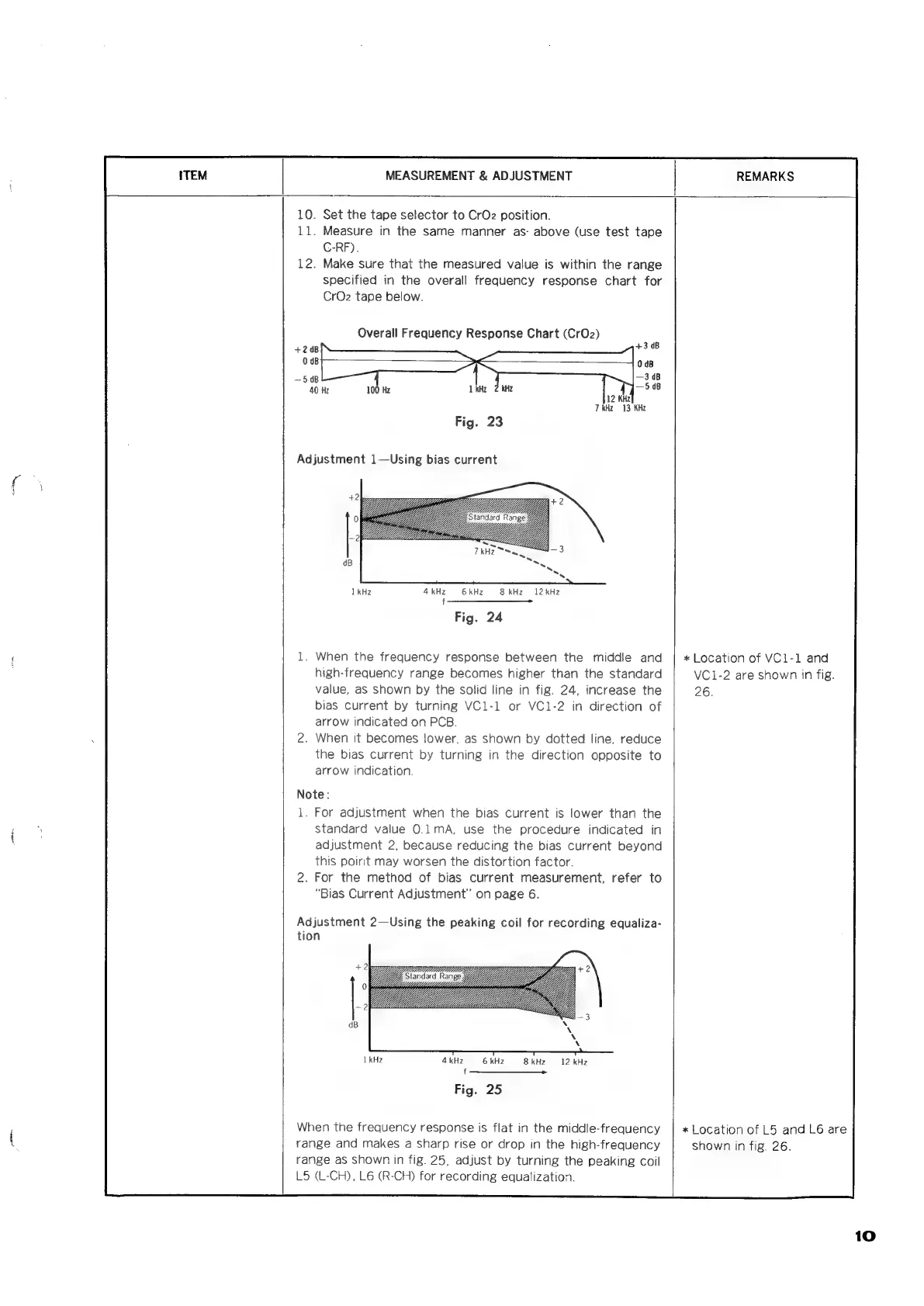
Set
the
tape
selector
to
CrO2
position.
.
Measure
in
the
same
manner
as-
above
(use
test
tape
C-RF).
.
Make
sure
that
the
measured
value
is
within
the
range
specified
in
the
overall
frequency
response
chart
for
CrOz
tape
below.
Overall
Frequency
Response
Chart
(Cr0z2)
7
kHz
13
KHz
VM
Ls
4kHz
6
kHz
8
kHz
12
kHz
f
Fig.
24
1.
When
the
frequency
response
between
the
middle
and
high-frequency
range
becomes
higher
than
the
standard
value,
aS
shown
by
the
solid
line
in
fig.
24,
increase
the
bias
current
by
turning
VC1-1
or
VC1-2
in
direction
of
arrow
indicated
on
PCB.
.
When
it
becomes
lower,
as
shown
by
dotted
line,
reduce
the
bias
current
by
turning
in
the
direction
opposite
to
arrow
indication
Note:
1.
For
adjustment
when
the
bias
current
is
lower
than
the
standard
value
0.1mA,
use
the
procedure
indicated
in
adjustment
2,
because
reducing
the
bias
current
beyond
this
poirit
may
worsen
the
distortion
factor.
.
For
the
method
of
bias
current
measurement,
refer
to
“Bias
Current
Adjustment”
on
page
6.
Adjustment
2—Using
the
peaking
coil
for
recording
equaliza-
tion
4
kHz
6
kHz
8kHz
=
12
kHz
_
——$———
ne
Fig.
25
When
the
frequency
response
is
flat
in
the
middle-frequency
range
and
makes
a
sharp
rise
or
drop
in
the
high-frequency
range
as
shown
in
fig.
25,
adjust
by
turning
the
peaking
coil
L5
(L-CH),
L6
(R-CH)
for
recording
equalization.
*
Location
of
VCi-1
and
VC1-2
are
shown
in
fig.
26.
*
Location
of
L5
and
L6
are
shown
in
fig.
26.
10

Related product manuals