EasyManua.ls Logo

Technics RS-615US-D - Page 10

Technics RS-615US-D
30 pages
Print Icon
To Next Page IconTo Next Page
To Previous Page IconTo Previous Page
Loading...
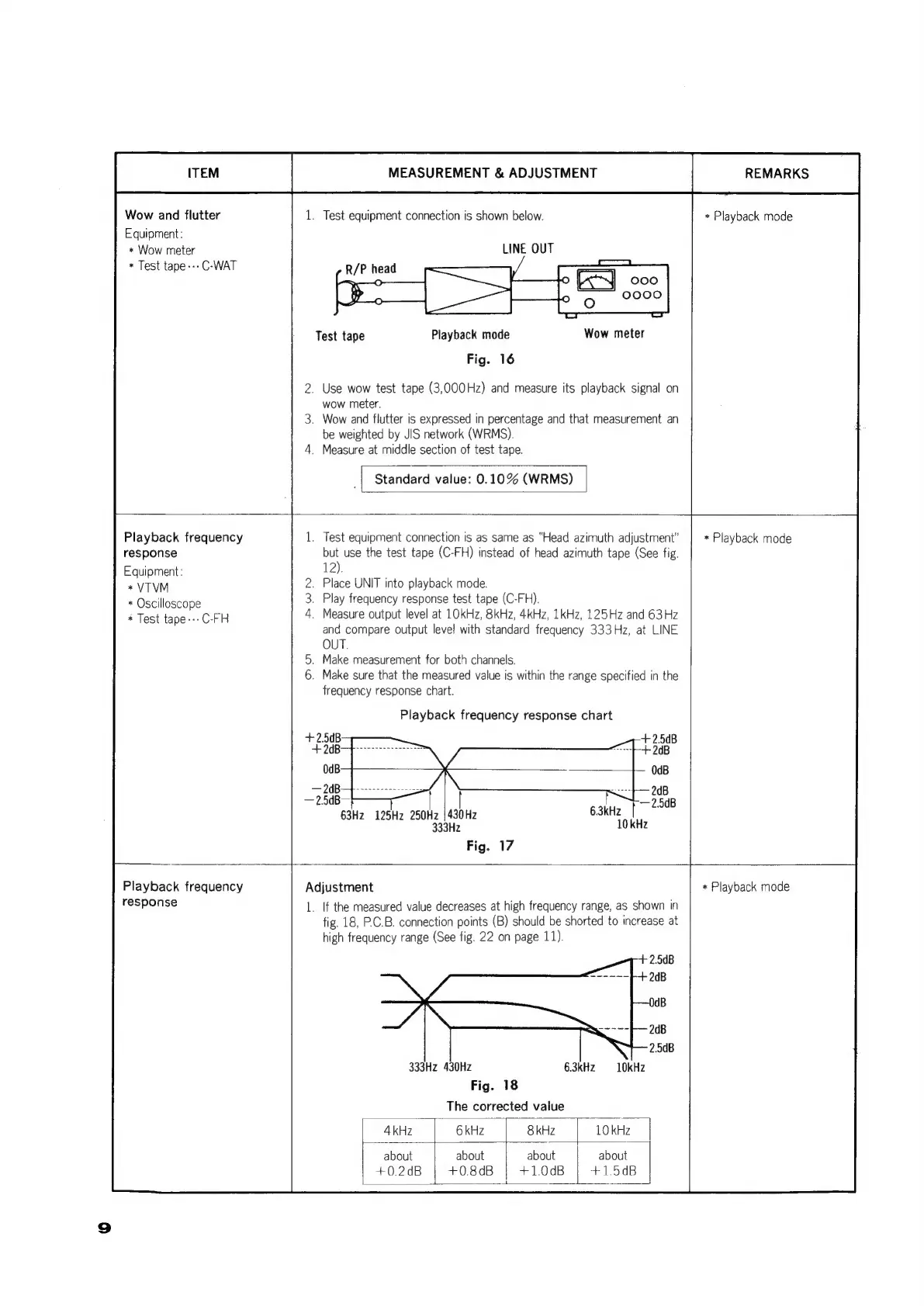
Wow
and
flutter
Equipment:
*
Wow
meter
*
Test
tape
---
C-WAT
MEASUREMENT
&
ADJUSTMENT
1.
Test
equipment
connection
is
shown
below.
LINE
OUT
Playback
mode
Wow
meter
Fig.
16
Test
tape
.
Use
wow
test
tape
(3,000Hz)
and
measure
its
playback
signal
on
wow
meter.
.
Wow
and
flutter
is
expressed
in
percentage
and
that
measurement
an
be
weighted
by
JIS
network
(WRMS).
.
Measure
at
middle
section
of
test
tape.
|
Standard
value:
0.10%
(WRMS)
REMARKS
*
Playback
mode
Playback
frequency
response
Equipment:
*VTVM
*
Oscilloscope
*
Test
tape---C-FH
.
Test
equipment
connection
is
as
same
as
“Head
azimuth
adjustment”
but
use
the
test
tape
(C-FH)
instead
of
head
azimuth
tape
(See
fig.
12).
.
Place
UNIT
into
playback
mode.
.
Play
frequency
response
test
tape
(C-FH).
.
Measure
output
level
at
1OkHz,
8kHz,
4kHz,
1kHz,
125Hz
and
63Hz
and
compare
output
leve!
with
standard
frequency
333Hz,
at
LINE
OUT.
.
Make
measurement
for
both
channels.
.
Make
sure
that
the
measured
value
is
within
the
range
specified
in
the
frequency
response
chart.
Playback
frequency
response
chart
63Hz
125Hz 250Hz
|
430Hz
333Hz
Fig.
17
Playback
frequency
response
*
Playback
mode
Adjustment
1.
If
the
measured
value
decreases
at
high
frequency
range,
as
shown
in
fig.
18,
P.C.B.
connection
points
(B)
should
be
shorted
to
increase
at
high
frequency
range
(See
fig.
22
on
page
11).
+
2.5dB
+
2dB
~
2B
2.5¢B
333Hz
430Hz
6.3kHz
10kHz
Fig.
18
The
corrected
value
4kHz
|
6kHz
kHz
|
about
about about
+0.2dB
+0.8dB
;
+1.0dB
L
a
*
Playback
mode

Related product manuals