EasyManua.ls Logo

Technics RS-615US-D - Parts Location

Technics RS-615US-D
30 pages
Print Icon
To Next Page IconTo Next Page
To Previous Page IconTo Previous Page
Loading...
Overall
S/N
ratio
Equipment:
*VTVM
*
AF
oscillator
*
ATT
*
Oscilloscope
*
Test
tape---C-RA
(reference
blank
tape)
MEASUREMENT
&
ADJUSTMENT
.
Test
equipment
connection
is
shown
in
fig.
27.
.
Supply
1kHz
signal
to
LINE
IN
and
adjust
ATT
so
that
output
level
at
LINE
OUT
indicates
0.42
V
(—74dB).
.
Make
recording.
_
Make
another
recording
without
supplying
signal
(disconnect
input
plug
to
LINE
IN).
.
Rewind
to
recorded
part
and
playback.
_
Measure
output
signal
level
and
no
signal
level
(noise),
and
determine
the
ratio
in
decibels
(dB).
_
The
value
is
difference
between
“Playback
S/N
and
overall
S/N’,
but
for
decibel
calculation
refer
to
“Playback
S/N
measurement”
on
page
12.
Standard
value:
Greater
than
42dB
(without
NAB
filter)
REMARKS
*
Record/playback
mode
*
LINE
IN
level
control
++
MAX
*
Erase
the
tape
with
a
bulk
tape
eraser.
Level
meter
Equipment:
*VTVM
*
Oscilloscope
*
AF
oscillator
.
Supply
1kHz
signal
(—24dB)
from
AF
oscillator,
through
ATT,
to
LINE
IN
jack.
.
Place
UNIT
into
record
mode.
.
Adjust
ATT
until
monitor
level
at
LINE
OUT
becomes
0.42
V.
_
Adjust
VR9
(L-CH),
VR10
(R-CH)
so
that
VU
meter
indicates
0
VU
(See
adjustment
parts
location
on
page
18).
ian
*
Record
mode
Dolby
NR
circuit
Equipment:
+
VTVM
*
AF
oscillator
*
ATT
*
Oscilloscope
.
Place
UNIT
into
record
mode,
set
the
Dolby
NR
switch
to
OUT
posi-
tion
and
supply
to
LINE
IN
to
obtain
—34.5dB
at
TP3
(L-CH),
TP4
(R-CH)
(frequency
5kHz).
_
Confirm
that
the
value
at IN
position
is
8dB
greater
than
the
value
at
OUT
position
of
Dolby
NR
switch.
_
When
it
is
not
in
condition
above,
adjust
as
follows.
.
Set
VR5
(L-CH),
VR6
(R-CH)
to
maximum.
.
Set
the
Dolby
NR
switch
to
IN
position.
_
At
this
time
adjust
VR7
(L-CH),
VR8
(R-CH)
so
that
the
reading
of
VTVM
become
10dB
greater
than
the
value
in
step
(1)
above.
.
Adjusting
VR5
(L-CH),
VR6
(R-CH),
make
the
reading
of
VTVM
be-
come
2dB
smaller
than
the
value
obtainted
through
the
adjustment
a
in
step
(6)
above.
*
Record
mode
*
LINE
IN
level
control
wes
MAX
*
Stop
the
bias
oscillation
by
unsoldering
point
(A)
shown
in
adjustment
parts
location
on
page
11.
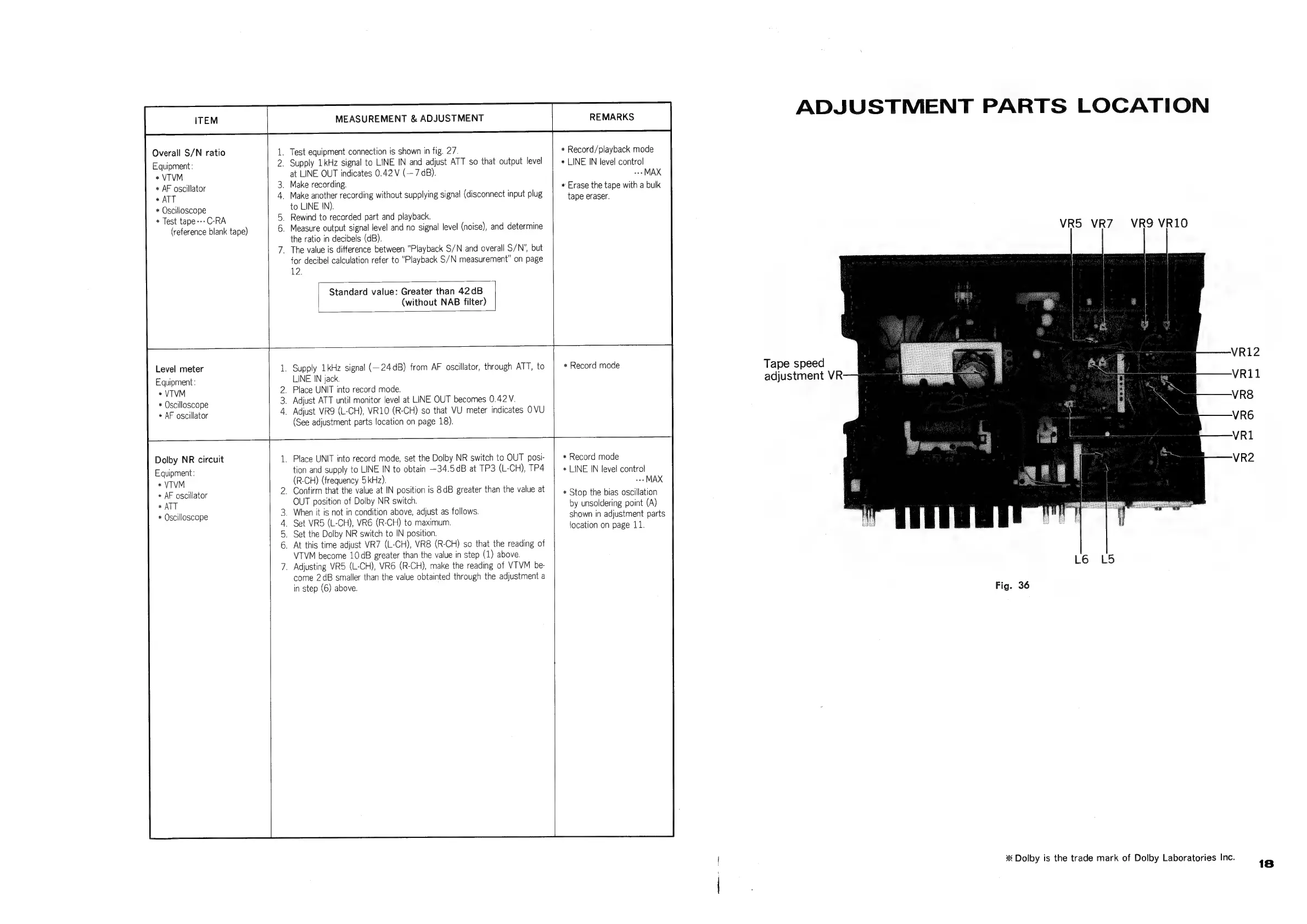
ADJUSTMENT
PARTS
LOCATION
Tape
speed
adjustment
VR
VR5
VR7Z
VR9
VR1O
L6
LS
Fig.
36
*
Dolby
is
the
trade
mark
of
Dolby
Laboratories
Inc.
VR2
18

Related product manuals