EasyManua.ls Logo

Technics RS-B465 - Panel and Drive PCB Disassembly

Technics RS-B465
27 pages
Print Icon
To Next Page IconTo Next Page
To Previous Page IconTo Previous Page
Loading...
RS-B465
Procedure
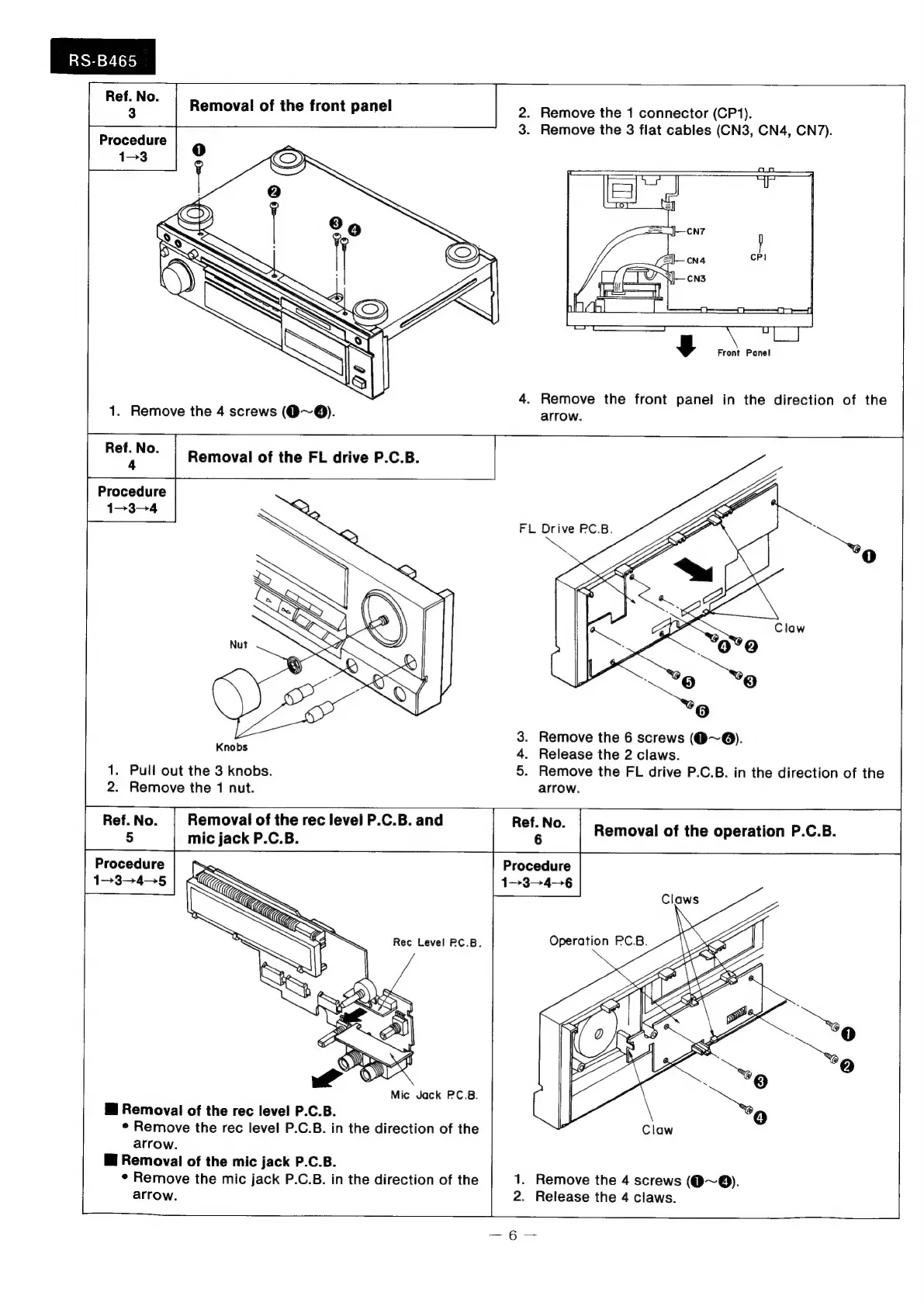
2.
Remove
the
1
connector
(CP1).
3.
Remove
the
3
flat
cables
(CN3,
CN4,
CN7).
y
Front
Panel
4.
Remove
the
front
panel
in
the
direction
of
the
arrow.
|
Procedure
1-3-4
Knobs
1.
Pull
out
the
3
knobs.
2.
Remove
the
1
nut.
.
Remove
the
6
screws
(@~@).
.
Release
the
2
claws.
Remove
the
FL
drive
P.C.B.
in
the
direction
of
the
arrow.
OR
w
Removal
of
the
rec
level
P.C.B.
and
mic
jack
P.C.B.
Ref.
No.
6
Removal
of
the
operation
P.C.B.
Procedure
1-345
Mic
Jack
PC.B.
i
Removal
of
the
rec
level
P.C.B.
*
Remove
the
rec
level
P.C.B.
in
the
direction
of
the
arrow.
i
Removal
of
the
mic
jack
P.C.B.
¢
Remove
the
mic
jack
P.C.B.
in
the
direction
of
the
arrow.
Procedure
1--3-—--4—6
1.
Remove
the
4
screws
(@~®).
2.
Release
the
4
claws.

Related product manuals