EasyManua.ls Logo

Technics RS-X302 - Location of Controls

Technics RS-X302
26 pages
Print Icon
To Next Page IconTo Next Page
To Previous Page IconTo Previous Page
Loading...
Mi
LOCATION
OF
CONTROLS
STEREO
DOUBLE
CASSETTE
DECK
RS-X30:
AUTO
REVERSE
recone
mavaacx
DECK
2
(
Controls
common
to
both
tape
decks
)
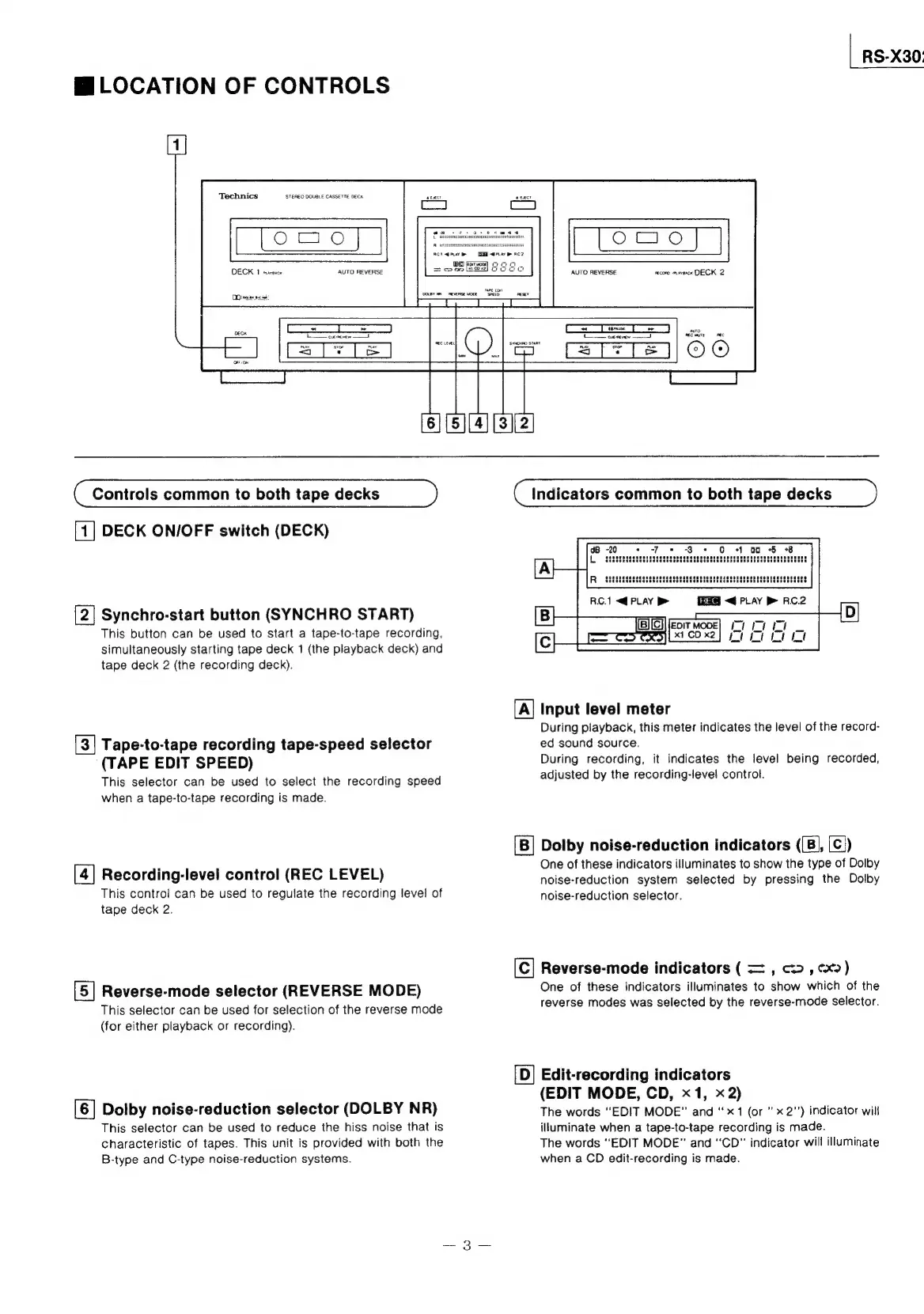
[1]
DECK
ON/OFF
switch
(DECK)
[2|
Synchro-start
button
(SYNCHRO
START)
This
button
can
be
used
to
start
a
tape-to-tape
recording,
simultaneously
starting
tape
deck
1
(the
playback
deck)
and
tape
deck
2
(the
recording
deck).
[3]
Tape-to-tape
recording
tape-speed
selector
(TAPE
EDIT
SPEED)
This
selector
can
be
used
to
select
the
recording
speed
when
a
tape-to-tape
recording
is
made.
[4]
Recording-level
control
(REC
LEVEL)
This
control
can
be
used
to
regulate
the
recording
level
of
tape
deck
2.
[5]
Reverse-mode
selector
(REVERSE
MODE)
This
selector
can
be
used
for
selection
of
the
reverse
mode
(for
either
playback
or
recording).
[6]
Dolby
noise-reduction
selector
(DOLBY
NR)
This
selector
can
be
used
to
reduce
the
hiss
noise
that
is
characteristic
of
tapes.
This
unit
is
provided
with
both
the
B-type
and
C-type
noise-reduction
systems.
CKO
Indicators
common
to
both
tape
decks
1
00
+
+8
[A]
Input
level
meter
During
playback,
this
meter
indicates
the
level
of
the
record-
ed
sound
source.
During
recording,
it
indicates
the
level
being
recorded,
adjusted
by
the
recording-level
control.
Dolby
noise-reduction
indicators
((B},
[C|)
One
of
these
indicators
illuminates
to
show
the
type
of
Dolby
noise-reduction
system
selected
by
pressing
the
Dolby
noise-reduction
selector.
Reverse-mode
indicators
(
=
,
c>
,
cx)
One
of
these
indicators
illuminates
to
show
which
of
the
reverse
modes
was
selected
by
the
reverse-mode
selector.
[D]
Edit-recording
indicators
(EDIT
MODE,
CD,
x1,
x2)
The
words
“EDIT
MODE”
and
“x1
(or
x
2")
indicator
will
illuminate
when
a
tape-to-tape
recording
is
made.
The
words
“EDIT
MODE”
and
“CD”
indicator
will
illuminate
when
a
CD
edit-recording
is
made.

Related product manuals