EasyManua.ls Logo

Technics RS-X302 - Page 5

Technics RS-X302
26 pages
Print Icon
To Next Page IconTo Next Page
To Previous Page IconTo Previous Page
Loading...
Mi
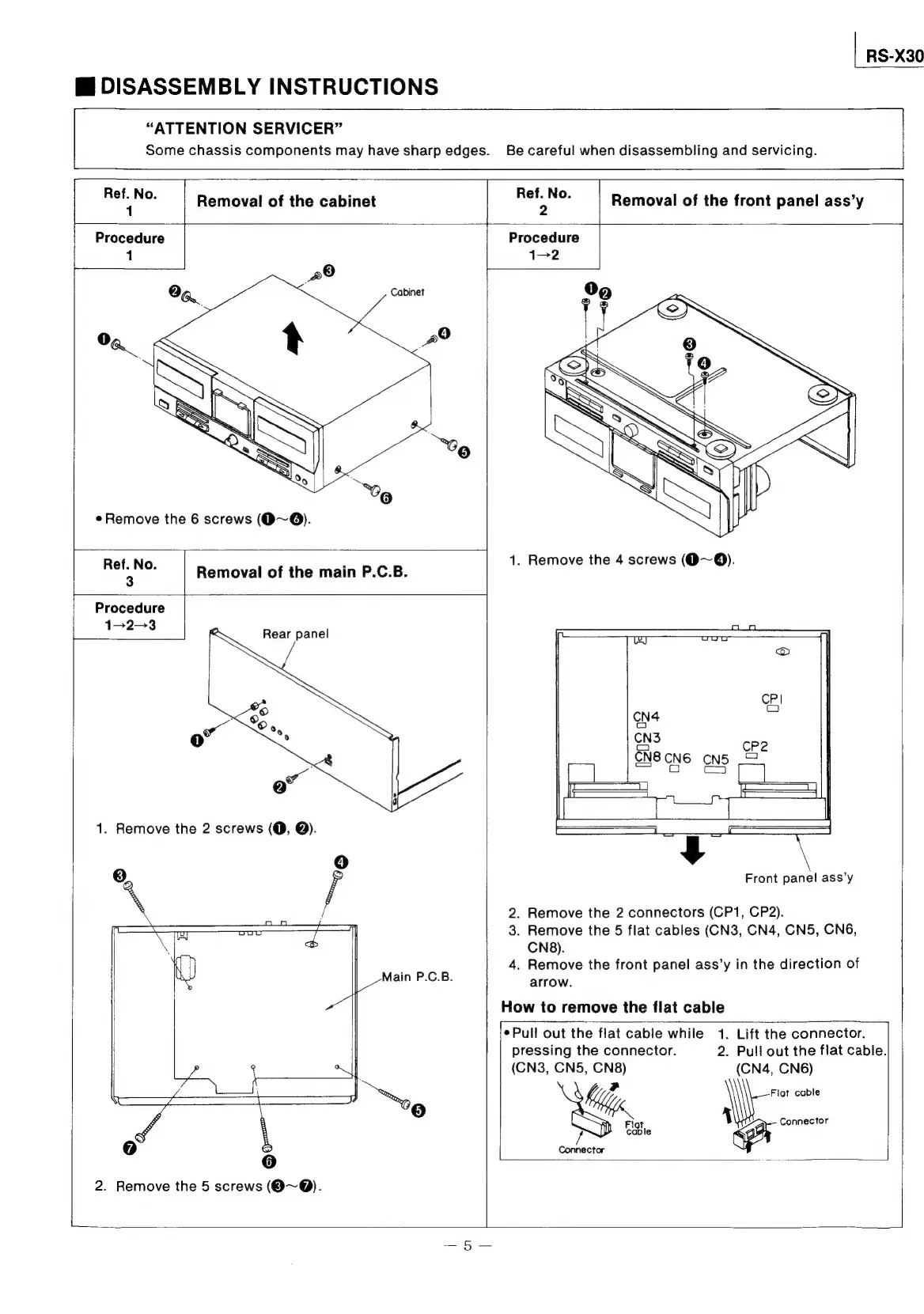
DISASSEMBLY
INSTRUCTIONS
RS-X30
“ATTENTION
SERVICER”
Some
chassis
components
may
have
sharp
edges.
Be
careful
when
disassembling
and
servicing.
Ref.
No.
1
Removal
of
the
cabinet
Ref.
No.
>
Removal
of
the
front
panel
ass’y
Procedure
1
Remove
the
6
screws
(O~@).
vo
|
Removal
of
the
main
P.C.B.
a
Procedure
1-2-3
Rear
panel
1.
Remove
the
2
screws
(O,
@).
;
at
“=
<=
a
a
ri
;
7)
Main
P.C.B.
6]
2.
Remove
the
5
screws
(@~@).
Procedure
CN3
Front
panel
ass’y
2.
Remove
the
2
connectors
(CP1, CP2).
3.
Remove
the
5
flat
cables
(CN3,
CN4,
CN5,
CN6,
CN8).
4.
Remove
the
front
panel
ass’y
in
the
direction
of
arrow.
How
to
remove
the
flat
cable
¢Pull
out
the
flat
cable
while
1.
Lift
the
connector.
pressing
the
connector.
2.
Pull
out
the
flat
cable.
(CN3,
CN5,
CN8)
(CN4,
CN6)
,
Flot
cable
Flor
Rey
Connector
cable
Connector

Related product manuals