23
RQT5744
Timer operations
Using the timers
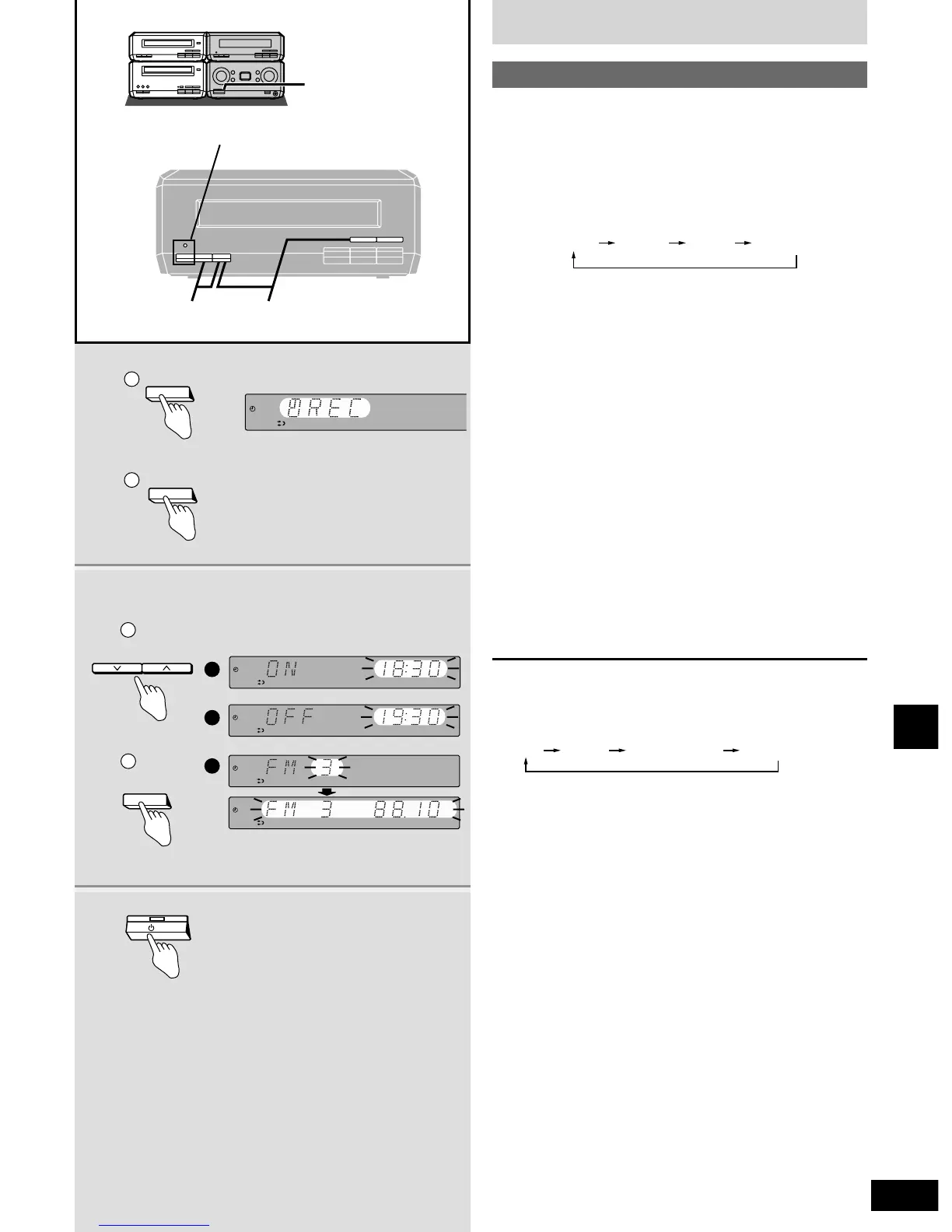
This timer records the radio at the set time.
The example shows settings for recording radio channel 3 from
18:30 to 19:30.
Preparation: Turn the unit on, set the time (
a
page 11), preset
radio stations (
a
page 13).
1
qq
Press [CLOCK/TIMER] to select
“z REC”.
ww
Press [SET] within 10 seconds.
2
qq
Press [TUNE/TIME ADJUST (2 or 1)]
to select the condition required and
ww
press [SET].
Repeat steps q and w to complete items q to e.
q Select the start time.
w Select the finish time.
e Select the preset channel.
The timer is now on standby. The display shows each
condition again for 3 seconds each then restores the original
display.
Confirm the [z PLAY/z REC] indicator lights and that
“z REC” lights on the display.
3 Press [8] to turn the unit off.
Recording starts 30 seconds before the set time with the
volume muted during the set time.
To cancel the timer
Turn the unit on.
Press [z PLAY/z REC] so “z REC” goes out.
Each time you press the button:
The timer function will be canceled, but the settings stay in the
memory.








 To Next Page