EasyManua.ls Logo

Technics SL-PS740A - Checking of the Main P.C; Measurements and Adjustments

Technics SL-PS740A
33 pages
Print Icon
To Next Page IconTo Next Page
To Previous Page IconTo Previous Page
Loading...
SL-PS740A
;
m@
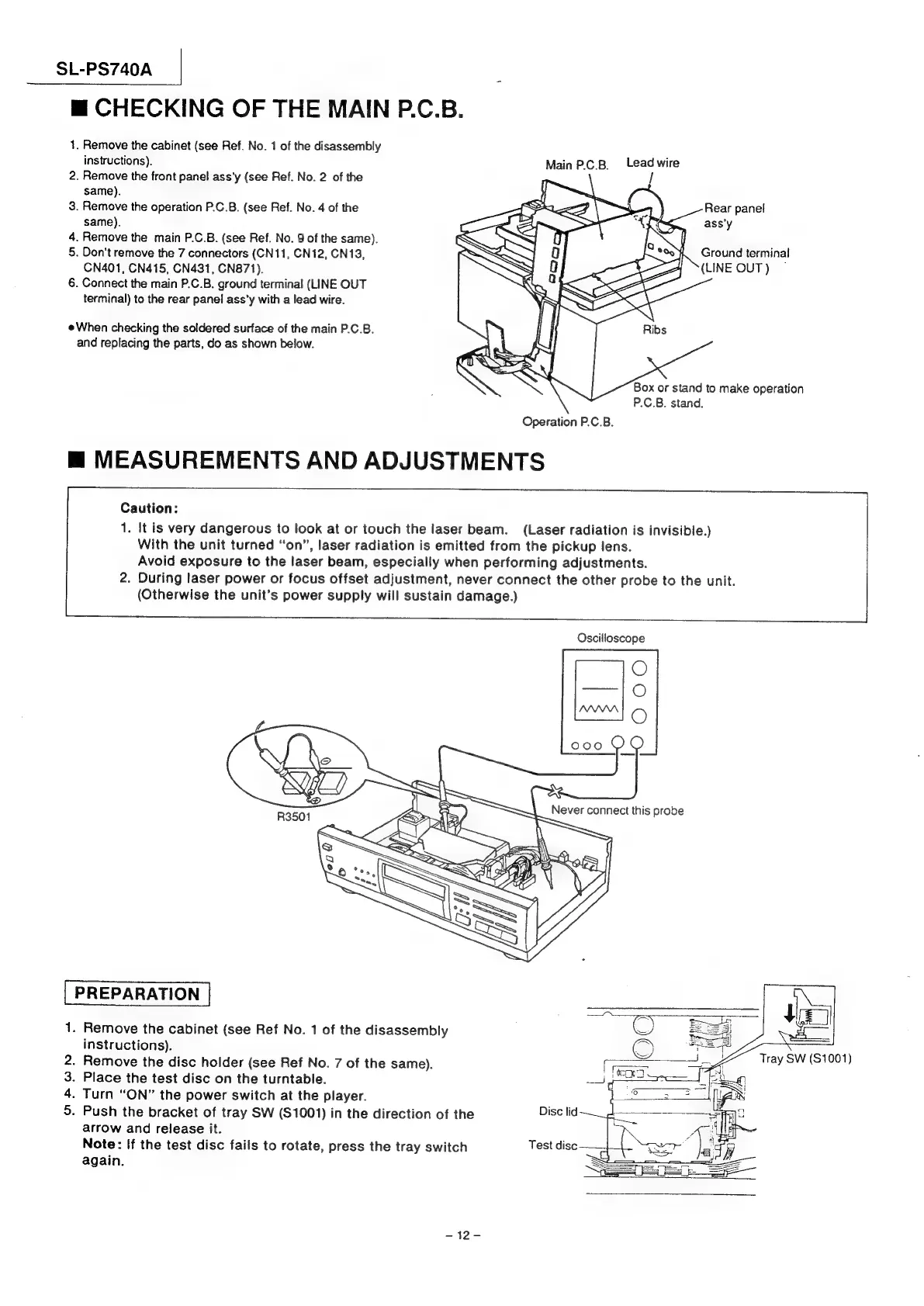
CHECKING
OF
THE
MAIN
P.C.B.
1.
Remove
the
cabinet
(see
Ref.
No.
1
of
the
disassembly
instructions).
Main
P.C.B.
Lead
wire
2.
Remove
the
front
panel
ass’y
(see
Ref.
No.
2
of
the
same).
3.
Remove
the
operation
P.C.B.
(see
Ref.
No.
4
of
the
Rear
panel
same).
ass'y
4.
Remove
the
main
P.C.B.
(see
Ref.
No.
9
of
the
same).
5.
Don't
remove
the
7
connectors
(CN11,
CN12,
CN13,
CN401,
CN415,
CN431,
CN871).
6.
Connect
the
main
P.C.B.
ground
terminal
(LINE
OUT
terminal)
to
the
rear
panel
ass’y
with
a
lead
wire.
Ground
terminal
(LINE
OUT)
When
checking
the
soldered
surface
of
the
main
P.C.B.
and
replacing
the
parts,
do
as
shown
below.
Box
or
stand
to
make
operation
P.C.B.
stand.
Operation
P.C.B.
m@
MEASUREMENTS
AND
ADJUSTMENTS
Caution:
1.
It
is
very
dangerous
to
look
at
or
touch
the
laser
beam.
(Laser
radiation
is
invisible.)
With
the
unit
turned
“on”,
laser
radiation
is
emitted
from
the
pickup
lens.
Avoid
exposure
to
the
laser
beam,
especially
when
performing
adjustments.
2.
During
laser
power
or
focus
offset
adjustment,
never
connect
the
other
probe
to
the
unit.
(Otherwise
the
unit’s
power
supply
will
sustain
damage.)
Oscilloscope
PREPARATION
1.
Remove
the
cabinet
(see
Ref
No.
1
of
the
disassembly
‘©
instructions).
.
Remove
the
disc
holder
(see
Ref
No.
7
of
the
same).
.
Place
the
test
disc
on
the
turntable.
.
Turn
“ON”
the
power
switch
at
the
player.
.
Push
the
bracket
of
tray
SW
($1001)
in
the
direction
of
the
Disc
lid
arrow
and
release
it.
Note:
If
the
test
disc
fails
to
rotate,
press
the
tray
switch
Test
disc
again.
3S
=.
Tray
SW
(S1001)
MO
&
Wh
-~12-

Related product manuals