EasyManua.ls Logo

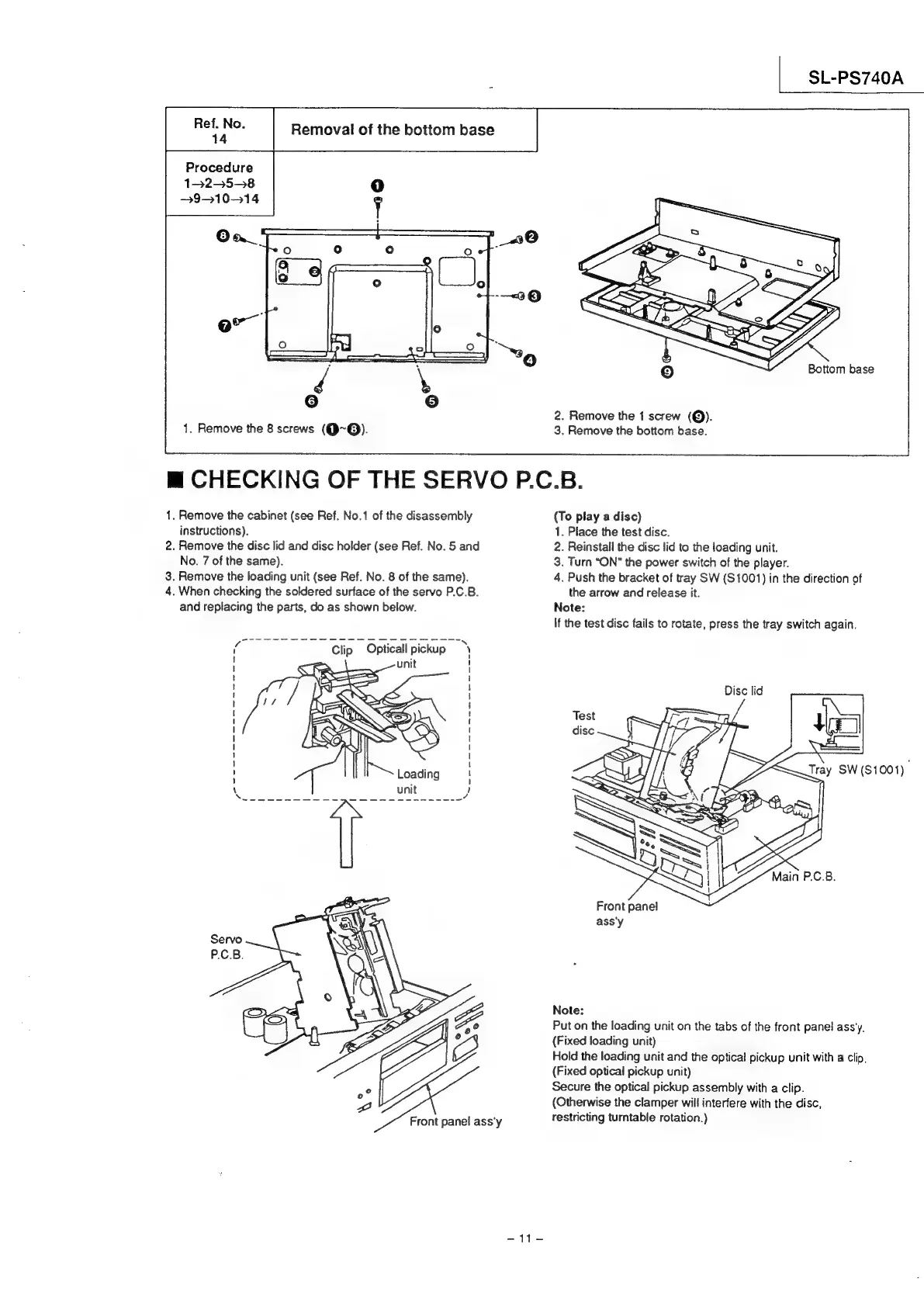
Technics SL-PS740A - Checking of the Servop.C

Technics SL-PS740A
33 pages
Print Icon
To Next Page IconTo Next Page
To Previous Page IconTo Previous Page
Loading...
SL-PS740A
Removal
of
the
bottom
base
Procedure
132558
3931014
Bottom
base
2.
Remove
the
1
screw
(@).
1.
Remove
the
8
screws
(Q~@).
3.
Remove
the
bottom
base.
m@
CHECKING
OF
THE
SERVO
P.C.B.
1.
Remove
the
cabinet
(see
Ref.
No.1
of
the
disassembly
(To
play
a
disc)
instructions).
1.
Place
the
test
disc.
2.
Remove
the
disc
lid
and
disc
holder
(see
Ref.
No.
5
and
2.
Reinstall
the
disc
lid
to
the
loading
unit.
No.
7
of
the
same).
3.
Turn
“ON”
the
power
switch
of
the
player.
3.
Remove
the
loading
unit
(see
Ref.
No.
8
of
the
same).
4.
Push
the
bracket
of
tray
SW
($1001)
in
the
direction
of
4.
When
checking
the
soldered
surface
of
the
servo
P.C.B.
the
arrow
and
release
it.
and
replacing
the
parts,
do
as
shown
below.
Note:
If
the
test
disc
fails
to
rotate,
press
the
tray
switch
again.
Clip
Opticall
pickup
unit
Disc
lid
Front
pane!
ass'y
Note:
Put
on
the
loading
unit
on
the
tabs
of
the
front
panel
ass’y.
(Fixed
loading
unit)
Hold
the
loading
unit
and
the
optical
pickup
unit
with
a
clip,
(Fixed
optical
pickup
unit)
Secure
the
optical
pickup
assembly
with
a
clip.
(Otherwise
the
clamper
will
interfere
with
the
disc,
Front
panel
ass'y
restricting
turntable
rotation.)
$i-S

Related product manuals