EasyManua.ls Logo

Technics SL-PS740A - Page 10

Technics SL-PS740A
33 pages
Print Icon
To Next Page IconTo Next Page
To Previous Page IconTo Previous Page
Loading...
SL-PS740A
:
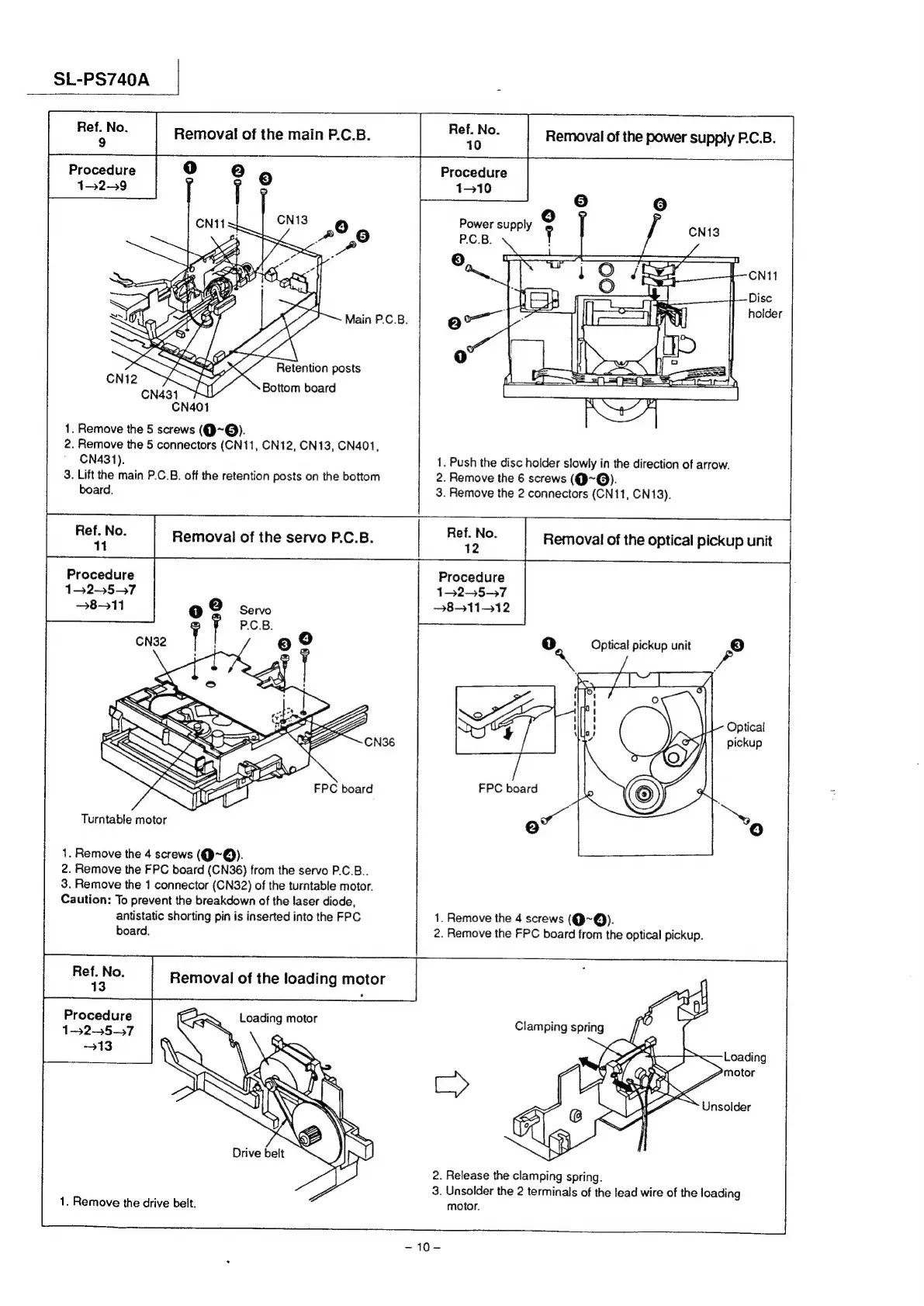
Removal
of
the
main
P.C.B.
Removal
of
the
power
supply
P.C.B.
Procedure
oe
(2)
rs)
Procedure
1329
Y
]
hs
1-10
°
Oo
Power
supply
rg
(=I
|
EY
holder
i
<7
CNtI
1.
Remove
the
5
screws
(Q@~Q@).
2.
Remove
the
5
connectors
(CN11,
CN12,
CN13,
CN401,
CN431).
1.
Push
the
disc
holder
slowly
in
the
direction
of
arrow.
3.
Lift
the
main
P.C.B.
off
the
retention
posts
on
the
bottom
2.
Remove
the
6
screws
(Q@~@).
board.
3.
Remove
the
2
connectors
(CN11,
CN13).
|
ee
|
Removal
of
the
servo
P.C.B.
|
Be
Mes
Removal
of
the
optical
pickup
unit
Procedure
152-57
811
Procedure
132-57
3831112
Turntable
motor
12)
1.
Remove
the
4
screws
(Q~Q).
2.
Remove
the
FPC
board
(CN36)
from
the
servo
P.C.B..
3.
Remove
the
1
connector
(CN32)
of
the
turntable
motor.
Caution:
To
prevent
the
breakdown
of
the
laser
diode,
antistatic
shorting
pin
is
inserted
into
the
FPC
1.
Remove
the
4
screws
(Q~Q).
board.
2.
Remove
the
FPC
board
from
the
optical
pickup.
Procedure
1-525-57
2.
Release
the
clamping
spring.
3.
Unsolder
the
2
terminals
of
the
lead
wire
of
the
loading
1.
Remove
the
drive
belt.
motor.
~10-

Related product manuals